Run a search
The settings of a Strategy Miner run, what each one does, and how to leave out the last 12 months for the QuantsDepot review.
This page covers the settings in the main row and under Advanced, and how to start and stop a run. The checks that follow the search are on How candidates are filtered.
The export target is chosen later, in the Builder
The Miner has no export-target field. A candidate is saved as a design made of Builder blocks, and you choose the target (MetaTrader 5, MetaTrader 4, TradingView Pine, cTrader or Python) later, in the Builder. There are 5 targets.
Decide the target before you start a long run, because not every part can be written for every target. When you export a design with a part the target cannot express, the Builder says so and gives a reason. It does not leave the part out. The six default entry parts (moving average, RSI, Bollinger Bands, MACD, Stochastic, Donchian) are the safest choice if you want to move between targets. The extra parts under Advanced search are off by default.
Exports are a Pro feature. For MetaTrader 5, the Builder saves a .mq5 source file. You open it in MetaEditor and press F7 to compile it.
Run a search
-
Open the Strategy Miner.
-
Set the main row (see the next section).
-
Click Advanced if you want to change the number of candidates, the minimum trades, the seed or the entry node families.
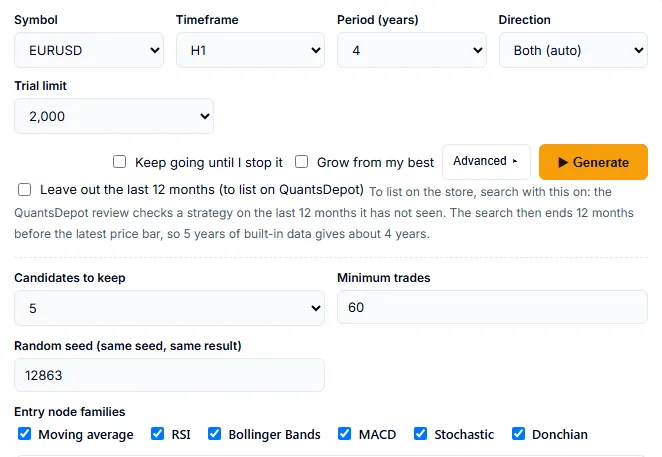
The main row and the Advanced area. -
Click Generate.
-
Watch the progress line. It shows the trials done and the candidates found so far, and then the robustness checks.
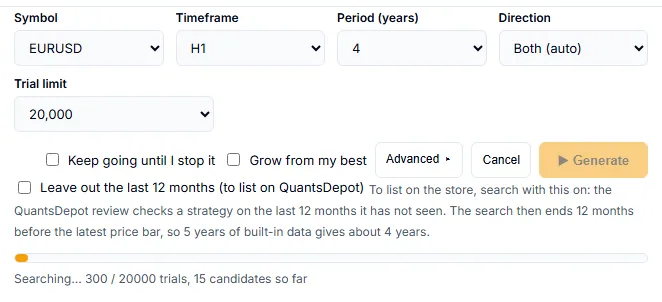
A run in progress. Cancel is active. -
Click Cancel to stop. The run ends, the screen says “Cancelled.” and nothing from that run is saved to your vault.
If you clear every entry node family and have not chosen any extra part under Advanced search (Pro), the Miner stops with “Select at least one entry node family.”
Symbol, timeframe, period, direction and trials
| Setting | What it does | Values |
|---|---|---|
| Symbol | The market to search on. With Pro, the add-on symbols are listed in the group Add-on currencies, each marked “download first”. | 8 built-in symbols, 35 in total |
| Timeframe | The bar length. | M15, M30, H1, H4, D1 |
| Period (years) | How much history to use. | 2, 3, 4, 5. Pro adds a Long period group: 8 and 10 |
| Direction | Which side the strategy may trade. | Both (auto), Buy only, Sell only |
| Trial limit | How many random combinations to try. More trials take longer. | 1,000, 2,000 (default), 5,000, 10,000, 20,000 |
- Add-on symbols need a download the first time. The Add currencies panel (Pro) manages them.
- A long period (8 or 10 years) works with the 8 built-in symbols and with 18 of the 27 add-on symbols. The first run downloads the data, and the search takes about twice as long.
- M15 and M30 cover up to 5 years. The first run downloads 15-minute data, and the search takes several times longer than on H1.
- In the demo, the trial limit and the period are fixed. See the overview for the demo limits.
Leave out the last 12 months (Pro, for QuantsDepot listing review)
Pro shows a checkbox, Leave out the last 12 months (to list on QuantsDepot). When it is on, the search ends 12 months before the latest price bar. The Miner never looks at those 12 months. With 5 years of built-in data, the search then uses about 4 years.
Use it when you plan to list a strategy on QuantsDepot. The QuantsDepot review checks the last 12 months that the search has not seen. A strategy searched on the full period is likely to be rejected in that review, because the search has already seen those months. The vault remembers which strategies were searched this way.
Turning it on does not change the other checks. It also does not make a strategy better. It only keeps the last 12 months unseen.
Grow from my best (Pro)
Pro shows a checkbox, Grow from my best. It is off by default. A normal run starts every search from random combinations. With the box ticked, the run starts from strategies you already have.
- Starting points. The Miner reads the top strategies in your vault for the same symbol and timeframe, ranked by profit factor and meeting your minimum trades. It takes up to 12 of them. If you also use Keep going until I stop it, the strategies that passed in the previous round are added.
- Fit. Only strategies that fit the current settings are used (direction, parts, advanced settings and volume data). The others are skipped.
- New candidates. Part of the first group of trials are variations of those strategies. After that the search goes on as usual.
- Parts. Parts that appear often in the strategies that passed are picked more often in new trials. Parts that never appeared still keep a lower chance.
- Same checks. Variations pass the same checks as every other candidate. Ones that repeat what your vault already holds are skipped.
The summary line says what happened, for example “Grew from 12 earlier strategies: 3 of the 5 kept come from them.” If no earlier strategy fits, it says “No earlier strategy fitted these settings, so this run started from scratch.”
The box has no effect on a search with your own CSV data. If the vault cannot be read within 10 seconds, that run starts from scratch.
See Grow from my best for the full explanation. Growing does not guarantee better candidates, and results come from past data. Judge each candidate by the later period and the other checks.
Candidates to keep, minimum trades and seed
These settings are under Advanced.
| Setting | What it does | Values |
|---|---|---|
| Candidates to keep | The most candidates one run keeps. | 3, 5 (default), 10 |
| Minimum trades | The fewest trades a candidate needs. The search period and the later checks each use a share of this number. | 20 to 1,000. Default 60, or 30 on D1 unless you changed it |
| Random seed | Sets the sequence of random trials. The same seed with the same settings gives the same result. | 1 to 99,999 |
The seed is picked at random when the page loads. It goes up by 1 after each Generate. To repeat a run, type the same seed again.
A higher minimum leaves fewer candidates, each based on more trades. If a run ends with no candidate, the Miner suggests more trials, another symbol, or a lower minimum.
Entry node families
Under Advanced, the families are the six default entry parts: Moving average, RSI, Bollinger Bands, MACD, Stochastic and Donchian. Tick the ones the search may use. At least one must stay on, unless you have chosen extra parts under Advanced search (Pro). Pro can add more parts under Advanced search.
Results of a run
A Pro run saves its candidates to your vault automatically and shows a line such as “Saved 5 to your vault”. The demo shows the summary, the Checks table and a tick or cross per check for each candidate. These are explained on Reading results.
Results are an approximation of past data. They do not guarantee the future.