Continuous search Pro
Keep the Strategy Miner searching round after round until you stop it, what the status line shows, and when it stops by itself.
This feature is part of Pro.
A normal run searches once and stops. With Keep going until I stop it (Pro), the Miner repeats the search round after round and saves what it finds to your vault, until you stop it or it has to stop.
Start and stop
-
Open the Strategy Miner with a Pro account.
-
Set the search as usual (see Run a search).
-
Tick Keep going until I stop it.
-
Click Generate. The Keep going until I stop it box is greyed out while the search runs.
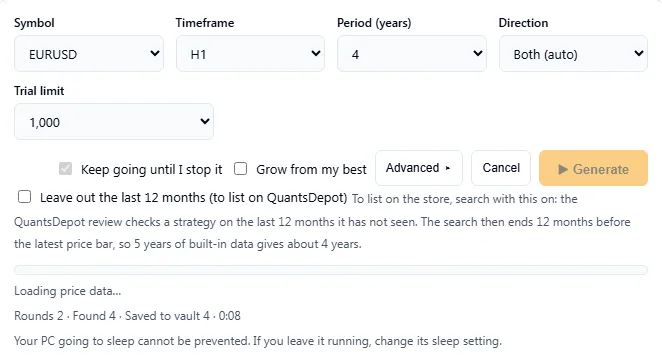
A continuous search after two rounds. -
To stop, click Cancel. The search stops and the status line ends with “Stopped.” Candidates saved in earlier rounds stay in your vault.
Each round uses the same settings. The only thing that changes is the random seed, which goes up by 1 each round, so every round tries new combinations. Repeats of results already in your vault are skipped.
If Grow from my best is also ticked, each round starts from the strategies that passed in the rounds before, as well as from your vault. See Grow from my best.
What the status line shows
While it runs, one line shows the progress.
| Item | Meaning |
|---|---|
| Rounds | How many rounds have finished. |
| Found | How many candidates passed every check, in all rounds. |
| Saved to vault | How many of them were saved. |
| Time | How long the search has been running. |
Keep the screen awake
The search runs in your browser, so it needs the page to stay open and the computer to stay on.
- The Miner asks the browser to keep the screen awake when it can. If your browser does not allow that, a note says “The screen may stop the search when it sleeps.”
- The Miner cannot stop your computer from going to sleep. If you leave it running, change the sleep setting of your computer.
When it stops by itself
The search stops when any of these happens. The status line or a message says why.
- You click Cancel.
- The vault is full (10,000 strategies). Delete some and start again.
- Saving to the vault fails three times in a row.
- Your Pro plan cannot be confirmed, or the session has ended (“The vault is part of Pro.”). Sign in again.
- You searched with your own CSV data. That search is not saved to your vault, so it runs once.
Results are an approximation of past data and do not guarantee the future. A long search tries many more combinations, and the best of many trials looks better than it will in a new period. Judge candidates by the later period and the other checks, not by how long the search ran.
Related reference: Limits lists the vault size and the other limits.