MetaTrader 5 Pro
Download the .mq5 source, compile it in MetaEditor, put it in MQL5/Experts, attach it to a chart and check it in the Strategy Tester.
This feature is part of Pro.
MetaTrader 5 is the reference target. The file is MQL5 source (.mq5). It can export all 119 parts, including strategies that use more than one symbol and decisions inside a bar. You compile it yourself in MetaEditor.
Download and compile
-
In the Builder toolbar, choose MT5 (MQL5).
-
Click Download .mq5. The file is saved as
EA_Builder.mq5, and the Builder shows the steps below.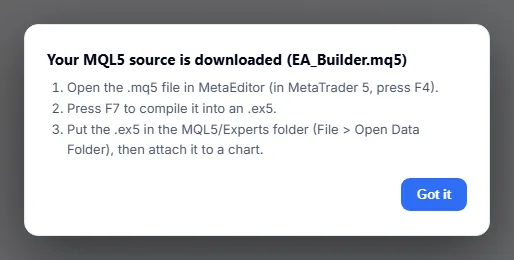
The Builder shows these steps after it saves the .mq5 file. -
In MetaTrader 5, press F4 to open MetaEditor, then open the
.mq5file. -
Press F7 to compile it into an
.ex5. -
Put the
.ex5in theMQL5/Expertsfolder. In MetaEditor or MetaTrader 5, choose File > Open Data Folder to find it. If you compiled a file that is already insideMQL5/Experts, the.ex5is already there.
Nothing is compiled on this site. The compiled file stays on your computer.
Attach it to a chart
- Open a chart of the symbol and timeframe named on the
Checked under:line at the top of the file. - In the Navigator panel (Ctrl+N), open Expert Advisors. Drag the EA onto the chart.
- Allow algorithmic trading in the dialog and in the toolbar.
- Try it on a demo account first. The file itself says to backtest and forward-test on a demo account before any live use.
Inputs
The EA has these inputs. The first three are the same in every file.
| Setting | What it does | Values |
|---|---|---|
MagicNumber | Marks the orders of this EA so it only manages its own positions. | Integer |
Slippage | Maximum slippage in pips. The EA converts it to points on 3- and 5-digit symbols. | Integer, default 3 |
OncePerBar | When true, the EA enters at most once per bar. | true or false, default true |
| One input per setting of a part | Each part adds its own inputs, such as MA_Period_3, LotSize, SL_Pips_5 or MaxSpread_6. The suffix is the part’s id in the flow. | Set in the Builder, editable here |
Check it in the Strategy Tester
- Open the Strategy Tester (View > Strategy Tester, or Ctrl+R).
- Select the compiled EA, the same symbol and timeframe as in
Checked under:, and a date range. - Run the test and compare it with the Miner result.
Expect the numbers to differ. The Miner works on its own price bars with an approximate backtest. The Strategy Tester uses your broker’s price history and conditions. The measured causes are:
- Spread. The tester uses the broker’s spread bar by bar. The Miner uses a fixed value.
- Two exits in one bar. When a single bar reaches both the stop loss and the take profit, the order in which they were hit is unknown. The Miner guesses it from the candle; the tester follows the real price path.
- Currency conversion. For symbols that are not quoted in your account currency, the tester converts profit at the rate on the closing date.
- Swap and commission. The code carries neither. The account charges them.
- Gaps. In the comparison runs, the tester filled a stop at its set level even when the bar opened beyond it.
The comparison runs behind Match check used the Open prices only and 1 minute OHLC models. The Every tick model was not measured.
Results are an approximation of past data. They do not predict future results.
Differences to know
- Hedging accounts. The parts Pyramiding and Averaging Down open several positions on one symbol. They need a hedging account. On a netting account the EA disables those add-on entries.
- Trailing and break-even. MetaTrader 5 manages them on every tick. The other targets do it when a bar closes.
If the compile fails
- Check that you opened the
.mq5file in the MetaEditor of MetaTrader 5. A.mq4file does not compile there. - Read the first message on the Errors tab. Later messages are often a result of the first.
- If you edited the file by hand, undo your edit and compile again to find out whether the edit caused the error.
- Download the file again from the Builder. The file is regenerated from the strategy each time.
Next steps
- See what the other targets do in Export overview.
- Read Match check for what has been compared with the MetaTrader 5 tester.
- Start from the first search with the Quickstart.
- Go back to the Docs home.