Data & privacy
Which data the Miner and the Builder keep on your account, which data stays only in your browser, and how to delete each.
This page lists what is stored on your account, what is stored only in your browser, and how long it stays. The legal text is in the Privacy Policy.
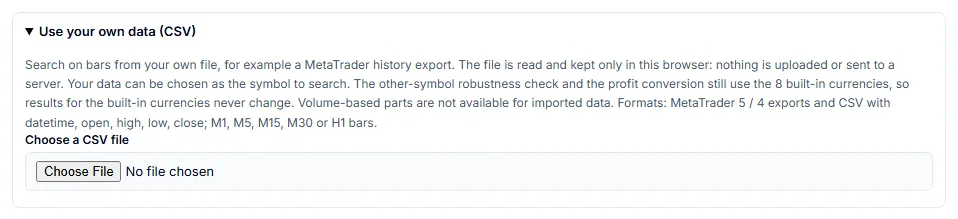
Your own CSV is not sent
When you import your own price data (CSV) into the Miner, the file is read and kept only in your browser. The Miner does not upload it and does not send it to a server.
Stored on your account
These items are on our server and are tied to your account. You need to be signed in to use them.
| Item | Keep and delete |
|---|---|
| Account details (email, display name, country, plan). Everyone with an account. | Until you delete the account. Use Settings > Delete account. |
| Vault: strategies the Miner saved for you, up to 10,000 per account. Pro. | No time limit. Select strategies in the Vault and delete them, or delete the account. |
| Builder projects you save. Signed-in users. | No time limit. Delete a project in the Builder’s project list, or delete the account. |
| Result summary for your AI (the Hand to AI button). Pro. | 30 days. Use Delete this id under the summary, or wait for it to expire. |
Builder link made by your AI (MCP tool create_builder_link). Anyone with the link can open it. | 90 days after the same flow was first saved. You cannot delete it before it expires. |
What each item holds:
- Vault and projects have no expiry. When you delete your account, they are deleted with it.
- The result summary for your AI holds your settings, how many candidates each check removed, and the metrics of each candidate. It holds no strategy design and no code. Your AI reads it with the id.
- A Builder link made by your AI holds the flow that the AI sent. It has no name, and it is not tied to your account. The same flow gets the same link.

When you measure a flow in the Builder, the flow is sent to our server for the calculation. This needs a signed-in account with a confirmed email.
For how long AI links and result IDs last, the rate limits and what the AI connection never returns, see Limits and safety.
Stored only in this browser
These items are saved in your browser. They are not copied to your account.
| Item | Where it comes from |
|---|---|
| The flow you are editing in the Builder (your draft) | Saved automatically while you work. |
| Realistic cost settings and advanced search settings (Pro) | The Miner |
| Vault column choices and saved views | The Miner |
| The export target you chose | The Builder |
| Extra symbols you downloaded | The Miner, under Add currencies |
| Your own CSV data sets | The Miner, under Use your own data (CSV) |
| Small preferences, such as whether the tour is done | The Builder |
When you are not signed in and press Ctrl+S, the Builder tells you that your flow is saved in this browser only.
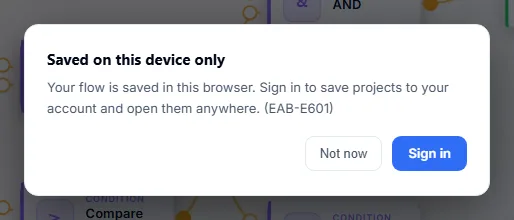
If you clear your browser data, use another browser or another device, or use a private window that discards its storage, these items are not there. Your settings, drafts and CSV data sets do not come back, because no copy exists on a server. Export a flow as JSON and keep your CSV files if you need them.
Extra symbol data is public price data, so you can download it again. The settings, drafts and CSV data sets cannot be rebuilt.
If the browser cannot read a saved draft, the Builder keeps a backup copy in the same browser storage and opens a fresh canvas. The Builder tells you when this happens. If the storage is full, the Builder cannot save your draft and tells you so.
Deleting your data
- Delete single items as shown in the tables above.
- To remove everything on your account, delete the account in Settings. See Account.
- To remove the browser-only items, remove them in the Miner (Remove next to a data set or an extra symbol) or clear the site data in your browser settings.
Results in the Miner and the Builder are approximations on past data. They do not guarantee future results.