Overview
What the Strategy Miner does, how one search runs from settings to candidates, and what the free demo can do compared with Pro.
The Strategy Miner searches for trading rules on past price bars. You choose a symbol, a timeframe and a period. The Miner tries many random combinations of Builder blocks, and keeps only the ones that pass a series of checks. The search runs in your browser. It works on a phone as well as on a desktop screen, though a long run is easier to watch on a larger one.
This page is a map of the section. For a first run, start with the Quickstart.
The screen at a glance
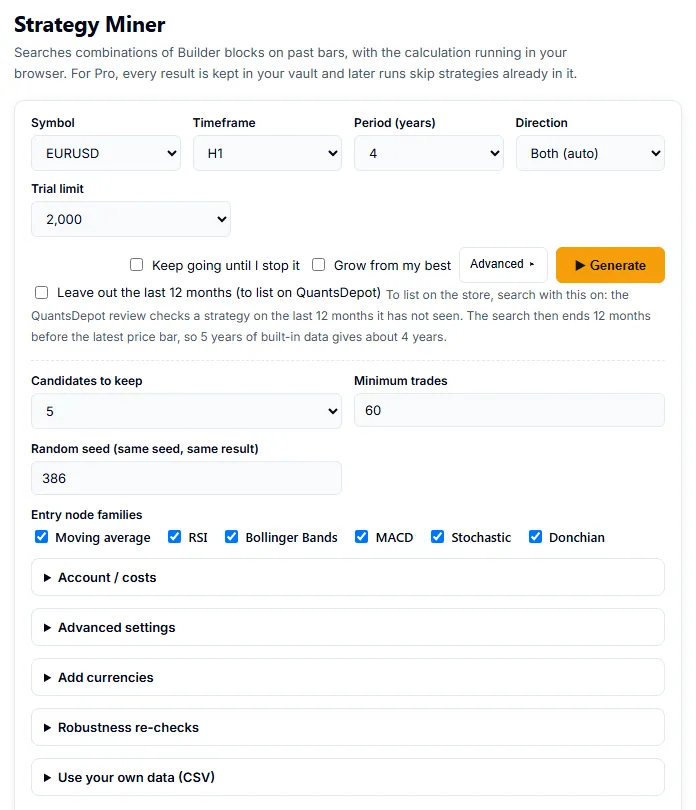
Open the Strategy Miner. The page has these parts, from top to bottom.
| Part | What it is |
|---|---|
| Settings row | Symbol, Timeframe, Period (years), Direction and Trial limit. See Run a search. |
| Advanced button | Opens more settings: Candidates to keep, Minimum trades, Random seed and the entry node families. With Pro, the five panels below are in the same place. |
| Generate and Cancel | Generate starts a run. Cancel appears while a run is going and stops it. |
| Pro panels | Under Advanced: Account / costs, Advanced settings, Add currencies, Robustness re-checks and Use your own data (CSV). They appear only with Pro. |
| Result | A summary line and a Checks table. |
| Vault | In Pro, a table of every candidate you have kept. Click a strategy number to open its card, which has the conditions and the numbers. |
How one search runs
- You set the search and click Generate.
- The Miner loads the price bars for your symbol and timeframe. The first time you use a symbol that is not built in, it downloads the data first.
- It runs your trial limit of random trials on the first part of the bars (the search period, called IS).
- Candidates that look good on that part go through the checks in order: duplicates, a later period the search did not use (OOS), other symbols, robustness tests, the stability sieve and the robustness re-check. How candidates are filtered lists the criteria.
- What is left is the result. In Pro, the candidates are saved to your vault. Reading results explains the numbers.
Every number a candidate shows comes from an approximate backtest on past data. It does not guarantee anything about the future.
Demo and Pro
The demo shows a sample result of the same search, prepared in advance with the fixed limits below for the Symbol and Timeframe you choose. Nothing is searched in your browser. It shows how many candidates survive each check, but not what the candidates are.
| Demo | Pro | |
|---|---|---|
| Trials per run | 1,000 | Your choice, up to 20,000 |
| Candidates kept | 3 | Your choice |
| Period | 4 years | Your choice, up to 10 years |
| Minimum trades | 60 | Your choice |
| Time limit per run | 40 seconds | 90 seconds by default |
| Symbols | The built-in symbols; add-on symbols and your own data fall back to EURUSD | All symbols, add-on currencies and your own CSV |
| Candidates | Tick and cross marks per check, no conditions | Conditions, results, vault, Builder, export |
| Panels | None | Realistic costs, advanced search, robustness re-check, continuous search, grow from my best |
Pro is a one-time purchase ($899); see Pricing.
Pages in this section
- Run a search: the settings and what each one does.
- Realistic costs (Pro): test with your own spread, swap and trading hours.
- Advanced search (Pro): choose parts, conditions, stop and take-profit ranges and filters.
- How candidates are filtered: each check in order.
- Robustness re-check (Pro): the last and strictest check.
- Reading results: what each number on a candidate means.
- Continuous search (Pro): keep searching until you stop it.
- Grow from my best (Pro): start a search from the strategies you already saved.
- Vault (Pro): keep, find and compare the strategies the Miner saved.
- Combine strategies (Pro): weigh several saved strategies as one portfolio.
- Optimize parameters (Pro): tune the numbers of one strategy.
- Prop-firm check (Pro): estimate how a strategy fares under a prop firm’s rules.
- Symbols, timeframes and data: what data each run can use.
- Use your own CSV data (Pro): search on a file you import.
- List on QuantsDepot (Pro): send a strategy to QuantsDepot as a draft.
- Hand results to AI (Pro): give your AI a summary of a run.
For the numbers and limits behind these pages, see the Reference.
Back to the Docs home.