Validation messages
Every check the Builder runs on a flow, the message you see, and how to fix it.
The Builder checks your flow while you edit it. Each message says what happened and what to do, and ends with a code such as EAB-E204. This page lists the messages, and the tables write the code without the EAB- prefix (E204). The tables are read from the Builder’s own files when this site is built, so they match the screen.
Where messages appear
- Validation bar. About 1.5 seconds after you change the flow, the Builder runs the structure checks. If any block has an error, the bar shows “Issues: n” and one line per error, in the form “Block name — message (EAB-E203)”. Click a line to scroll to that block. The bar closes by itself after 8 seconds, or when you click ×. Warnings do not appear in the bar.
- Preflight check panel. This panel stays on screen, and you can collapse it. Its title counts the items, for example “Preflight check — 1 error · 2 warn · 1 info”. Errors are listed with a CRITICAL badge. Warnings and info items are folded under a line such as “2 warn · 1 info”; click it to open them. They carry WARNING and INFO badges. Click an item to scroll to its block. The panel also has a short summary headed “What this EA does”.
- On the block. A block with an error is outlined. A block with a missing connection has its input marked.
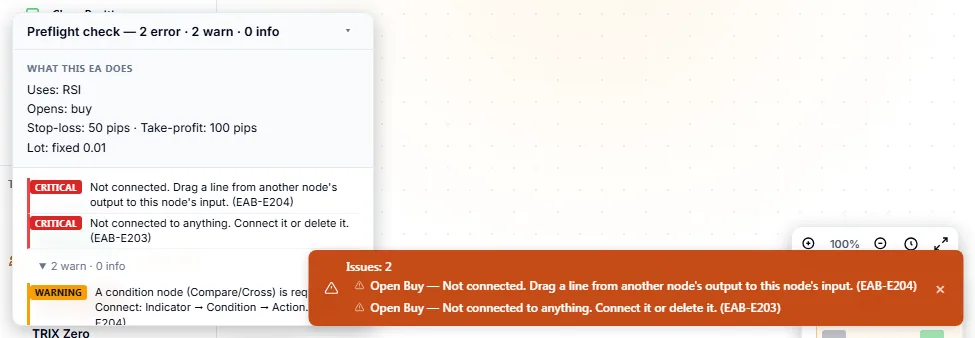
The levels mean:
| Level | Meaning |
|---|---|
| Error | The flow is broken. Fix it before you rely on the result. |
| Warning | The flow works, but it may not do what you expect. |
| Info | A fact worth knowing. Nothing is wrong. |
Structure checks
These are the checks on how blocks are connected and placed. Codes E201 to E208 and E103 come from the flow check.
| Code | Level | Message on screen |
|---|---|---|
E103 | Warning | A required value is empty. Fill in the highlighted field — leaving it blank silently falls back to a default and may not match your intent. |
E201 | Error | These nodes form a loop, so the run order cannot be determined. Remove one connection in the cycle. |
E202 | Error | No Start node found. Drag "Start" from the Utility section in the palette. |
E203 | Error | Not reachable from Start. Connect it into the Start chain, or delete it — it will not be included in the generated EA. |
E203 | Error | Not connected to anything. Connect it or delete it. |
E204 | Error | Not connected. Drag a line from another node's output to this node's input. |
E204 | Warning | A condition node (Compare/Cross) is required. Connect: Indicator → Condition → Action. |
E205 | Error | Cannot connect an indicator directly to an action. Add a condition node (Compare/Cross) in between. |
E206 | Error | This node can only be placed once, but there are several. Remove the extra copies. |
E207 | Warning | This flow has a very large number of nodes. Generation still works, but the editor may become slow. |
E208 | Warning | This latch has no reset wired, so it fires once and never re-arms. Wire a reset condition into input 2, or set it to re-arm when flat. |
E208 | Warning | This block keeps one state for the whole EA, but Target Symbols makes the flow trade several symbols — the state is shared across them instead of tracked per symbol. |
E208 | Warning | Nanpin stage table and per-side counting are ignored while Target Symbols is set: multi-symbol mode falls back to the single-interval basket ladder. |
E208 | Warning | An indicator is wired straight into an And / Or / Not gate. A gate only reads conditions, so that input is not evaluated as a signal. Insert a condition node (Compare/Cross) in between. The MT4, TradingView, cTrader and Python exports refuse this wiring. |
E208 | Warning | An indicator reaches this action only through a filter, so no condition is evaluated and the action would be always true. Insert a condition node (Compare/Cross) between the indicator and the action. The MT4, TradingView, cTrader and Python exports refuse this wiring. |
E208 | Warning | This Compare / Cross node has more than two inputs. Only the first two are read and the rest are ignored. Remove the extra connections. The MT4, TradingView, cTrader and Python exports refuse this wiring. |
E208 | Warning | There is more than one Stop Loss (or Take Profit) node, so they overwrite each other and only one value ends up applying. Keep one of each. The MT4, TradingView, cTrader and Python exports refuse this. |
E207 is a warning. It appears when a flow has 50 or more blocks. It does not stop you from placing blocks. See How a strategy flow works.
Several rules share a code. E203 has two messages: a block that has no connection at all, and a block that is connected but cannot be reached from Start. E208 covers wiring that is allowed but means something different from what it looks like.
Preflight items
The Preflight check panel also shows items about risk and about values. These come from the same flow. The first column is the item’s name in the Builder. The panel shows the message, with the code in brackets when the item has one.
| Item | Level | Message |
|---|---|---|
no_stop_loss | Error (CRITICAL) | No stop-loss (SL) is set, or it is effectively disabled. An EA without an SL can blow up your account on a single sudden move, however clean the backtest looks. Set a fixed SL. |
martingale_unbounded | Error (CRITICAL) | Martingale (doubling lot size after a loss) is configured with no cap on the number of positions, or with an extreme maximum level. A losing streak makes margin grow exponentially and blows up the account. Set a cap with a Position Filter, or lower the level. |
nanpin_unbounded | Error (CRITICAL) | Averaging-down (adding into a losing position) is configured with no cap on the number of positions, or with an extreme maximum number of adds. In live forward testing the edge disappears even with a clean backtest, leading to a 100-position blow-up. Set the number of adds and a position cap. |
no_drawdown_filter | Warning | No drawdown (DD) filter is set. Adding a safety valve that halts trading when the maximum DD is exceeded limits the damage during an unexpected losing streak. |
oversized_lot | Warning | The fixed lot size is large for a retail account. A single stop-out can be a big loss — consider a smaller lot or risk-percent sizing. |
no_take_profit | Info | No take-profit (TP) is set. This is fine for trend-riding strategies, but positions will then close only via stop-loss, an exit rule, or manually. |
sltp_dual_active | Info | Both an initial SL/TP (set at order entry) and a post-entry Exit manager (Stop Loss / Take Profit) are active. Not necessarily an error — they serve different purposes — but positions will be managed by both. |
hedging_required | Info | This flow uses pyramiding/nanpin, which require a HEDGING account (multiple positions per symbol). On a NETTING account those add-on entries are automatically disabled for safety. |
E101 | Warning | A value is outside its allowed range and will be clamped to the nearest limit. |
E102 | Error | A numeric field is not a number. Enter a numeric value. |
An item with the code E101 or E102 names the field and the values, for example the value you entered and the range allowed.
How risky setups are handled
Four setups are marked as risky: no stop loss, martingale with no cap, averaging down with no cap, and no drawdown filter. The first three are CRITICAL. The last is a WARNING. They show in the Preflight check panel for everyone.
When you download code (Pro), the Builder looks at the CRITICAL items first. If there are any, it lists them in a dialog headed “Dangerous configuration detected:” and asks “Generate anyway?” If you cancel, nothing is generated and the Builder says “Generation cancelled (dangerous configuration)”. If you continue, the file is generated and a toast says it was made with a dangerous configuration. The Builder warns you; it does not stop you.
If there are no CRITICAL items but there is a WARNING-level one, the Builder shows its message as a toast and does not ask you to confirm.
Checks when code is generated
When the Builder builds code (the Code tab, or a download, both Pro), it checks the flow first. If a check fails it refuses and returns no code, instead of giving you a partial file.
| Code | Message |
|---|---|
E301 | This flow contains a node type this builder does not recognize, so it cannot be generated safely. Remove the unknown node. |
E302 | The code generator is not available. Reload the page and try again. |
E302 | Code generation produced no output. |
E302 | The generated code failed an internal safety self-check and was withheld. Please report this configuration. |
E302 | An internal error occurred while generating the code. Please report this configuration. |
E303 | This flow has a connection to a node that does not exist, so parts of the strategy would silently disappear. Re-create the connection. |
E304 | This block is configured from the Settings panel, not as a canvas node. Remove it from the canvas and enable it in the Settings tab instead. |
E102 can also stop generation. E101 does not: an out-of-range value is moved to the nearest limit.
Fix the common problems
- E202, no Start block. Add Start from the Utility category and connect it.
- E203 or E204, a block that is not connected. Connect it, or delete it. A block that is not reachable from Start is not part of the generated code.
- E205, an indicator wired straight to an action. Put a Compare or Cross block between them.
- E206, a block placed twice. Delete the extra copy. You cannot place a second Start by hand: the Builder shows “Only one of this node can be placed” and adds nothing. E206 shows up when a flow comes from elsewhere, for example an imported file in which two Start blocks feed the same group of blocks. Separate chains that each have their own Start are allowed.
- Risk items. Set a stop loss, set a cap on positions for martingale or averaging down, or add a drawdown filter.
If a message is not clear, find its code in the tables above. For the full list of blocks, see the block categories on How a strategy flow works.