How a strategy flow works
The block categories, the order in which blocks connect, and what happens when a flow gets large.
A strategy flow is a set of connected blocks. It starts at a Start block and ends at an order. This page explains the categories of blocks and how to connect them.
Block categories
The palette groups the 119 blocks into the categories below. The names and counts come from the Builder itself.
| Category in the palette | Blocks |
|---|---|
| Utility | 2 |
| Indicators | 52 |
| Price / Info | 5 |
| Conditions | 10 |
| Filters | 21 |
| Actions | 15 |
| Money Mgmt | 7 |
| Exit Strategy | 7 |
The order of a flow
A flow reads from left to right.
- Start is the entry point. It runs on every tick. Connect its output to an indicator or a condition.
- Indicators and Price / Info blocks produce values, such as a moving average or the current price. Connect them to a condition. An indicator cannot connect straight to an order.
- Conditions compare values and give a yes or no. Compare tests two values with an operator such as
>or<=. Cross detects a crossover or crossunder. The AND Gate, OR Gate and NOT Gate combine other conditions. Connect a condition to an action. - Filters go between a condition and an action. A filter blocks trades you do not want, for example outside a time window or when the spread is wide.
- Actions are the last step of a flow. They include Open Buy, Open Sell, the pending orders (Buy Limit, Sell Limit, Buy Stop, Sell Stop), Close Position and Alert. Connect a condition to the input of an action.
- Money Mgmt blocks set how the lot size is chosen, for example Fixed Lot or Risk-Based Lot.
- Exit Strategy blocks set how a position closes, for example Stop Loss, Take Profit, Trailing Stop and Break Even.
In short, a typical entry is Start, then an indicator, then a condition, then an optional filter, then an action. Lot size and exits come from the money management and exit blocks, or from the same options in the Settings tab.
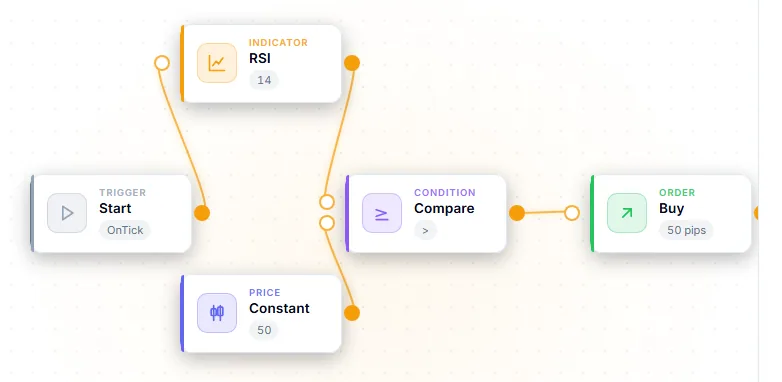
The Builder checks the order for you. Connecting an indicator straight to an action is error E205, and a condition-less action raises warning E204. See Validation messages.
Settings that apply to the whole strategy
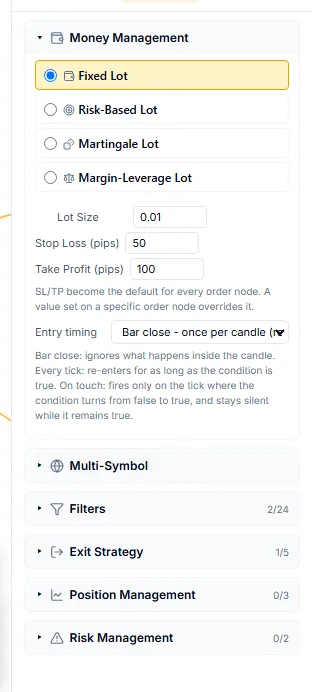
The Settings tab holds options that are not tied to one block: lot size, the default stop loss and take profit, when the flow is evaluated, filters, exits, position management, risk limits and target symbols. The filter, money management and exit categories exist both as blocks and as Settings entries. A block that is only available in the Settings tab, such as Pyramiding or Account Guard, cannot be placed on the canvas.
Large flows
The count of blocks is shown in the small column on the canvas as ”= n”. When the count reaches 50, the validation bar says “Node limit reached (50). Performance may degrade.” for a moment, until the structure checks replace it. While a flow has 50 or more blocks, the Preflight check also shows warning E207.
50 is a warning level, not a ceiling. The Builder still lets you place more blocks, and code generation still works. A large flow only makes the editor slower.
Next steps
- Start from a ready-made flow: Templates and recipes.
- Test a flow: Backtest in the Builder.