Realistic costs Pro
Test Strategy Miner candidates with your own spread, commission, swap, trading hours and stop conditions instead of the simple default.
This feature is part of Pro.
By default, the Miner tests with one simple cost model. The Account / costs panel (Pro) lets you test with your own account conditions instead. Nothing is filled in for you from any company: you enter your own numbers.
Turn it on
- Open the Strategy Miner with a Pro account.
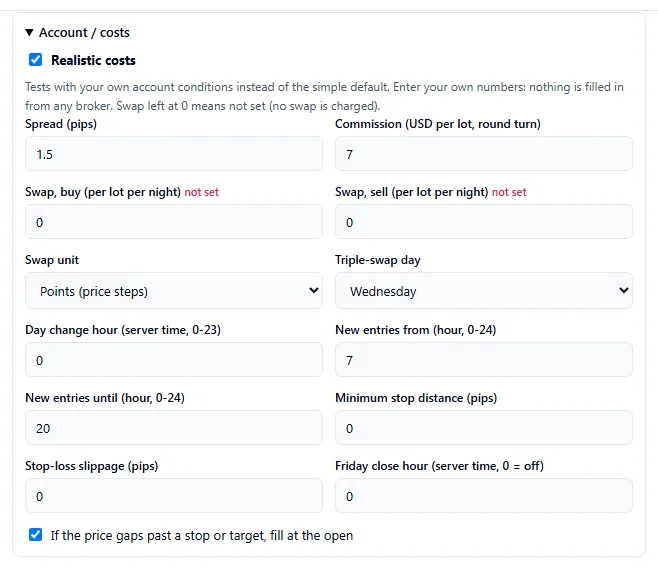
- Click Advanced, then open the Account / costs panel.
- Tick Realistic costs. While it is off, the fields are greyed out and the run uses the simple default.
- Fill in the fields below. Click Generate.
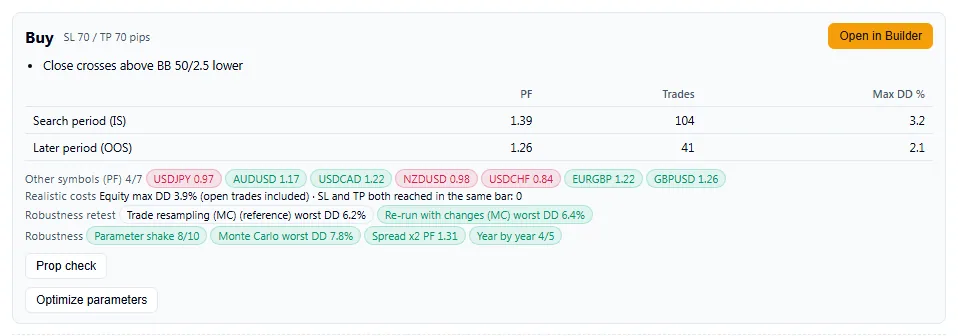
With it on, the result shows a line that starts “Realistic costs on”.

Each candidate then also shows its equity drawdown and the count of bars where the stop and the target were both reached. In Pro, click a strategy number in the Vault to open its card.
Spread, commission and swap
| Setting | What it does | Values |
|---|---|---|
| Spread (pips) | The cost of opening a trade. | 0 or more. Default 1. The starting value changes with the symbol (gold starts higher) |
| Commission (USD per lot, round turn) | A fixed fee per lot, charged once for open and close together. | 0 or more. Default 0 |
| Swap, buy and Swap, sell (per lot per night) | The overnight charge or credit on each side. | Any number. 0 means not set, and no swap is charged |
| Swap unit | How the two swap numbers are read. | Points (price steps) or USD |
| Triple-swap day | The weekday that charges three nights of swap. | Monday to Friday. Default Wednesday |
| Day change hour (server time, 0-23) | When a new trading day starts, which decides when swap is charged. | 0 to 23. Default 0 |
The fields on the screen take any number at or above the minimum shown. A link from an AI tool is stricter: it accepts a spread of 0 to 50 pips (0 to 500 for gold), a commission of 0 to 100, a swap of -1000 to 1000, a minimum stop distance of 0 to 500 pips and a stop-loss slippage of 0 to 100 pips, and drops anything outside those ranges.
If you change the symbol, the spread resets to that symbol’s starting value, unless you have edited the spread yourself.
Trading hours, stops and gaps
| Setting | What it does | Values |
|---|---|---|
| New entries from and until (hour) | Only open trades inside this window, in server time. | 0 to 24. Default 0 to 24 (all day) |
| Minimum stop distance (pips) | If a stop-loss or take-profit is closer to the entry price than this, it is pushed out to this distance. | 0 or more. Default 0 |
| Stop-loss slippage (pips) | How much worse than the stop price a stop-loss is filled. | 0 or more. Default 0 |
| Friday close hour (server time, 0 = off) | Close open trades at this hour on Fridays. The test data ends on Fridays at hour 21, so the highest value is 20. | 0 to 20. Default 0 (off) |
| If the price gaps past a stop or target, fill at the open | When a bar opens beyond a stop or target, fill at that open price instead of the stop or target price. | Checkbox. Default on |
Because the Miner works on bars, it cannot see inside a bar. When a single bar reaches both the stop and the target, the Miner uses a fixed rule to decide which came first, and counts these bars for you.
How it is saved
Your values are stored in this browser only. They are not saved to your account, and another browser or device starts with the defaults. The panel saves as you change a field.
A spread that the Miner filled in for you (for example the higher starting value for gold) is not saved as your own value, so it does not carry over to other symbols.
A link from an AI tool can fill the panel for one visit. Values that come from a link apply to that run only. They are not saved unless you click Save these as my settings. Out-of-range values in a link are dropped and listed.
Costs in the robustness re-check
The Robustness re-check re-runs each candidate with a random spread. When Realistic costs is on, it also adds stop-loss slippage and a minimum stop distance. With it off, those two are not applied.
Results are an approximation of past data. Your real costs change with the market and your account, and results do not guarantee the future.