Overview
What your own AI assistant can do with AIStrategyMiner through the MCP server, what it cannot do, and what it costs.
AIStrategyMiner runs a public MCP server. MCP (Model Context Protocol) is a standard that lets an AI assistant call tools on another service. When you connect your own AI assistant to this server, it can design a strategy as a block flow, check the flow, and give you a link that opens the result in the Strategy Builder. It can also give you a link that opens the Strategy Miner with the conditions already filled in.
The server is at https://aistrategyminer.com/mcp. It has 7 tools. See Connect your AI to set it up and Tools reference for each tool.
What your AI can do
- Read the list of block types and their settings, and the list of ready-made templates.
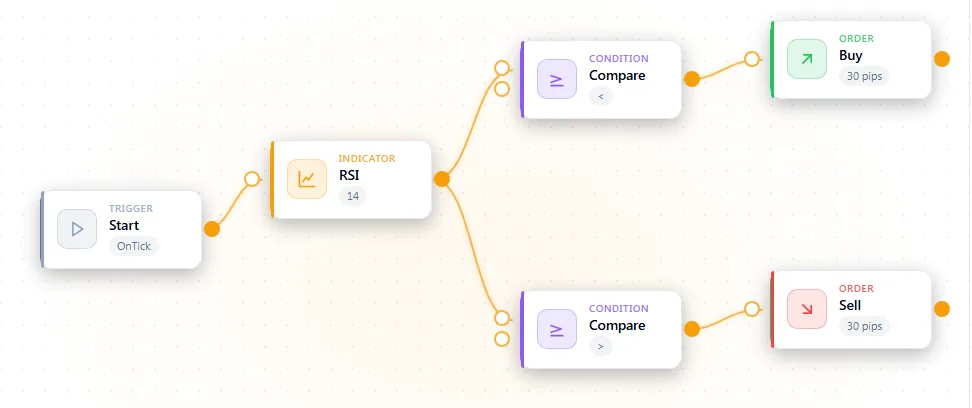
- Compose a strategy as a flow of blocks, using a template as a model.
- Validate the flow with the same checks the Strategy Builder uses, and fix the errors it reports.
- Create a Builder link. The link opens the flow on the Strategy Builder canvas. You review it there.
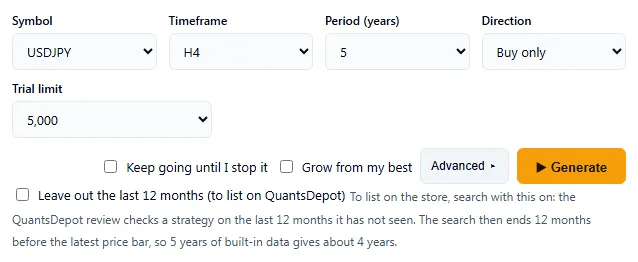
- Create a Miner link. The link opens the Strategy Miner with the symbol, timeframe, period and other settings filled in.
- Read a result summary that you handed over with the Hand to AI button (Pro). The summary holds the settings, how many candidates each check removed, and the metrics of each candidate. It does not hold the strategy design.
What your AI cannot do
- It cannot run the Strategy Miner. A Miner link only fills in the settings. You open the link and click Generate yourself.
- It cannot export anything. Backtests and the source download are done in the Strategy Builder, in your browser.
- It cannot return code. The server never returns MQL5 source, other source code, or compiled files, and a result summary has no code in it.
- It cannot give investment advice. A flow is a strategy design. Past results do not guarantee future results.
Typical flows
Design a strategy from a description. You describe the idea. The AI looks at the templates, builds a flow, validates it, and creates a Builder link. You open the link, check the flow, and run a backtest in the Strategy Builder.
Tune a search. You hand a result to your AI with Hand to AI. The AI reads the summary and proposes new settings as a Miner link. You open the link and decide whether to run it.
Cost and access
- The MCP server is free for everyone. You do not need an account, and no sign-in is used.
- The AI assistant itself is yours. Any subscription or usage fee of that assistant is paid by you, not by AIStrategyMiner.
- Some of the actions after a link opens need Pro. The full Strategy Miner and the source download are part of Pro ($899, one-time). Without Pro, a Miner link opens the demo. See Quickstart.
See Limits and safety for rate limits and for how long links and result IDs last, and Data & privacy for what is stored. For prompts you can copy, see Examples.