Troubleshooting
Common problems with the Strategy Miner, the Strategy Builder and exports, each with the reason and the fix. Screen messages are quoted as they appear.
Each entry gives the symptom, the reason and the fix. Messages are quoted exactly as the software shows them. Results come from an approximate backtest on past data and do not guarantee future results.
If the fix does not work, use the contact page and include the exact message and what you clicked before it appeared.
MetaTrader 5 results differ from the Miner
Symptom. The Strategy Tester in MetaTrader 5 shows different trades or a different profit than the Miner showed for the same strategy.
Reason. The Miner and MetaTrader 5 use different price bars, costs and fill rules. The exported file carries only the trading logic, so the settings below are not copied into it.
| What differs | Detail |
|---|---|
| Price history | The Miner works on its own price bars. MetaTrader 5 uses your broker’s history. |
| Spread | The exported EA trades at the live spread unless the flow has a Spread Filter block. |
| Commission and swap | The broker charges them. The code does not carry them. |
| Gaps | The broker applies its own fill after a gap. |
| Currency conversion at close | The broker or platform converts at its own rate. |
| Bar that reaches both stop loss and take profit | The Miner picks the order from the bar’s colour: an up bar reaches the low first, a down bar reaches the high first, and a bar with equal open and close counts as a stop loss. MetaTrader 5 follows the real price path. Tight stop loss and take profit distances are affected most. |
| Hedging and netting accounts | Pyramiding and nanpin entries run only on a hedging account. On a netting account the EA prints WARNING: pyramiding/nanpin require a HEDGING account; on this NETTING account those add-on entries are disabled for safety. in the Experts tab and skips those entries. |
Fix.
- Open the
.mq5file and read the comment block headedVALIDATION SETTINGS(Pro). The line startingChecked under:gives the symbol, the timeframe and the period. Each row below it is markedEXPORTED,VALIDATION-ONLYorNOT-EXPRESSIBLE.VALIDATION-ONLYmeans the Miner used the value for the check but the code does not carry it. - Run the Strategy Tester on the same symbol and timeframe, over a date range inside that period.
- Set the tester’s spread to the value in the
spreadrow, if the row shows one. - If the line starting
Checked under:readsedited after validation, the strategy was changed after it was checked, so no recorded settings are shown.
The line Match with the platform tester: not verified is in every exported file. The software does not claim that the tester will reproduce the Miner’s numbers.
Related. MetaTrader 5 export and Match check show what has been compared with the tester.
MetaEditor does not compile the file
Symptom. MetaEditor shows errors after F7, or the EA compiles but does not start.
Reason and fix.
- Wrong file type or editor. An
.mq5file compiles in MetaEditor for MetaTrader 5. An.mq4file (MT4 export) compiles in MetaEditor for MetaTrader 4. Open the file in the editor that matches its extension. - The file was edited. Compile the file as downloaded first. If it compiles, the error comes from your edit.
- The export has a gap. If a block cannot be exported to the chosen target, the Builder does not write a file. It shows a list instead. See An export stops.
- The EA compiles but is removed from the chart. Open the Experts tab in MetaTrader 5.
Handle error: <number>means an indicator could not be created. If the flow uses a custom indicator block (iCustomin the code), the indicator named in the block must be compiled and placed inMQL5/Indicatorsfirst.Target symbol not available: <name>means a multi-symbol flow names a symbol your broker does not offer. Use the symbol names exactly as your broker lists them.
The download dialog repeats the steps: open the file in MetaEditor (in MetaTrader 5, press F4), press F7, then put the .ex5 in the MQL5/Experts folder.
Related. Quickstart covers the MT5 steps, and MetaTrader 5 export the compile steps.
The vault is full (409 limit_reached)
Symptom. After a search, the note under the result reads The vault is full ({count}/{limit}). Delete the ones you do not need, then run again.

Reason. The vault keeps up to 10,000 strategies per account. The server saves a run’s results as a whole. If they would not fit, it refuses with 409 limit_reached and saves none of them. The results stay on screen as cards.
Fix.
- In the Vault table, tick the strategies you do not need. The bar above the table shows how many are selected.
- Click Delete and confirm:
Delete {n} strategies from your vault? Later runs may then produce them again. - Run the search again.

A continuous search stops with the same message. Related messages:
| Message | Meaning |
|---|---|
The vault is part of Pro. | Your plan is not Pro, or it could not be confirmed. See Pro does not show up after purchase. |
Could not save to your vault. The results above are still usable. | The save failed for another reason. Run again. |
Could not read your vault, so repeats of earlier results were not removed this time. | The search ran, but strategies you already have may appear again. |
Saving to your vault failed 3 times in a row. | A continuous search stopped after three failed saves. |
Related. Vault explains how to delete strategies, and Limits gives the vault size.
A request is refused for being too frequent (429)
Symptom. A message says to wait and try again.
Reason. Some server requests have a limit per minute. The search itself runs in your browser and does not use these.
| Where | Message | Limit |
|---|---|---|
| Code preview in the Builder | Too many preview requests. Please wait a few seconds and press refresh. | 10 per minute |
| Download or export | Too many generations. Please wait a moment and try again. | 10 per minute |
| Backtest in the Builder | You hit the measurement rate limit. Please wait a moment and try again. | 20 per minute |
| Hand results to an AI | Too many requests right now. Try again later. | A per-minute limit and a daily allowance for saved summaries |
Fix. Wait about a minute, then try again. Code preview and export share one limit, so a quick run of previews can block the next download. The same message appears when the daily allowance for saved summaries is used up; try again the next day (UTC).
Related. Limits lists every request limit. For AI requests, see Connect your AI and Limits and safety.
A CSV file is refused
Symptom. Importing your own bar data (Pro) ends with a message and no data is saved.
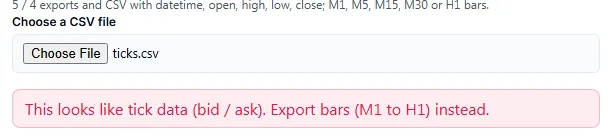
Reason and fix. The software refuses data it cannot use correctly. Pick the row that matches your message.
| Message | What to do |
|---|---|
The file is empty. | Export the file again. |
This looks like tick data (bid / ask). Export bars (M1 to H1) instead. | Export bars, not ticks. |
No open / high / low / close columns were found. Bars with all four prices are needed. | Include open, high, low and close. |
The file has dates but no time of day (daily bars?). Hourly or finer bars are needed. | Export M1, M5, M15, M30 or H1. |
The date and time could not be read. Supported: 2024.01.02 00:00, 2024-01-02 00:00:00, 02/01/2024 00:00, epoch seconds. | Change the date format to one of these. |
Too many rows could not be read ({n}). The file does not look like a bar export. | Check that the file is a bar export. |
The file has too many rows (over 4,000,000). Export a shorter range or a coarser timeframe such as M5. | Shorten the range or use a coarser timeframe. |
The bars are finer than one minute, which is not supported. Export M1 or coarser. | Export M1 or coarser. |
These bars are coarser than one hour (for example H4 or daily). Hourly bars are needed, because the generator builds H1 and H4 itself. Export M1, M5, M15, M30 or H1. | Export a finer timeframe. |
The bar length does not divide one hour evenly, so the file cannot be assembled into hourly bars. | Use a timeframe that divides one hour. |
The columns could not be recognised. Use MetaTrader 5 / MetaTrader 4 history exports or a CSV with datetime, open, high, low, close. | Use one of these layouts. |
After the file is read, the screen lists quality checks. A check marked as an error ends with Import refused. The main ones:
| Message | What to do |
|---|---|
"{sym}" is not a pair of the 8 supported currencies (USD, EUR, GBP, JPY, CHF, CAD, AUD, NZD), so the pip size and the profit conversion are unknown. Import refused. | Enter a six-letter symbol made of two of those currencies, such as GBPJPY. |
Price decimals ({digits}) do not fit {sym} (2 or 3 for JPY pairs, 4 or 5 for others), so the pip size would be wrong. Import refused. | Check the symbol you typed against the file. |
Too short: {bars} hourly bars. At least {min} (about 1.3 years) are needed to split into a search period and a later period. Import refused. | Use a file with at least 8,000 hourly bars. |
Too many duplicate times with different prices ({c}). Import refused. | Export a clean range from one source. |
Rows are mostly out of order ({n}). Import refused. | Export again in time order. |
Too many rows with contradicting prices ({n}), for example a high below the low. Import refused. | Export again from the platform. |
Too many missing hours: {missing} ({pct}%), the longest gap {h} h from {at}; long breaks: {long}. Import refused. | Use a range without long gaps. |
Too many suspicious price jumps ({n}), for example at {at}. Import refused. | Check the data at the dates shown. |
The price range inside one bar is too large to store ({n} bars). Import refused. | Check the prices in the file. |
Problems after saving, or when you run a search on imported data:
| Message | What to do |
|---|---|
You can keep up to 20 data sets. Remove one first. | Click Remove next to a saved set. |
The data could not be saved in this browser (storage full or blocked). | Free browser storage, or leave private mode. Imported data is kept in this browser only. |
The imported data you selected is not in this browser any more. Import the file again under "Use your own data (CSV)". | Import the file again. Clearing site data removes saved sets. |
Volume-based parts are not available for imported data. Turn them off in Advanced, or choose one of the built-in currencies. | Turn off the volume-based parts, or search a built-in symbol. |
Long periods are not available for your own data. Choose a period of 5 years or less, or one of the 8 built-in currencies. | Choose 5 years or less. |
M15 / M30 are not available for your own data. Choose H1 / H4, or one of the built-in currencies. | Choose H1 or H4. |
Related. Use your own CSV data explains the import, and Limits the file limits.
An added symbol cannot be read
Symptom. You pick a symbol in the Symbol list that is marked download first and press Generate. The result area shows {pair} has not been downloaded yet. Download it under "Add currencies", then press Generate.
Reason. The 8 built-in symbols are ready to use. The other symbols need a one-time download. The browser keeps the downloaded data, so later runs do not download it again. The list of symbols you chose is kept in the browser’s local storage. If you clear site data, both are gone.
Fix.
- Open Add currencies.
- Click Download next to the symbol. The button reads
Downloading…while it works. - Press Generate again.
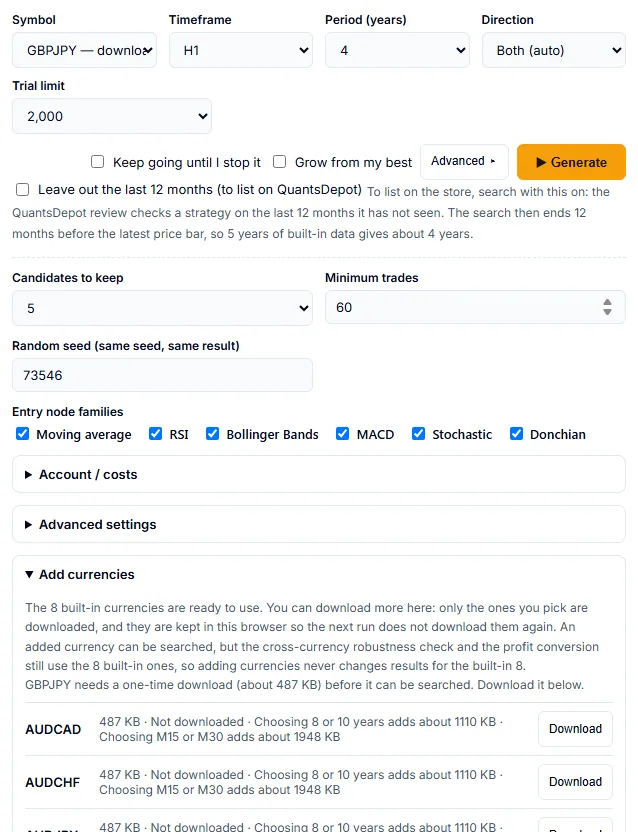
Other messages:
| Message | What to do |
|---|---|
The download failed. Check your connection and try again. | Check the connection, then click Download again. |
The downloaded file failed its integrity check and was discarded. Try again. | Click Download again. |
The extra currencies cannot be loaded right now. The built-in 8 currencies still work. | Search a built-in symbol, or reload the page later. |
This browser cannot keep downloaded data (private mode or storage blocked), so a selected currency is fetched again on each run. | Leave private mode or allow site storage. Without it, each run downloads the data again. |
Long periods are not available for {pair} (it has no long-period data). Choose another currency, or a period of 5 years or less. | Choose 5 years or less, or a symbol that has long-period data. |
Volume-based parts are not available for long periods (no volume data for {pairs}). Turn them off in Advanced, or choose 5 years or less. | Turn off the volume-based parts, or choose 5 years or less. |
M15 / M30 only cover the 8 built-in currencies and the extra currencies with 15-minute data ({pair} has none). Choose another currency, or H1 / H4. | Choose H1 or H4, or another symbol. |
M15 / M30 cover up to 5 years. Choose a period of 5 years or less, or H1 / H4. | Shorten the period, or choose H1 or H4. |
Volume-based parts are not available for M15 / M30 (no volume data for {pairs}). Turn them off in Advanced, or choose H1 / H4. | Turn off the volume-based parts, or choose H1 or H4. |
In Add currencies, a symbol shows Choosing 8 or 10 years adds about {kb} KB or Choosing M15 or M30 adds about {kb} KB only if it has that data.
Related. Symbols, timeframes and data lists which symbols have long periods and 15 and 30 minute bars, and Run a search explains the settings.
Pro does not show up after purchase
Symptom. You paid, but the Miner still shows the demo, the Builder shows no PRO badge, or a Pro action opens a purchase dialog.
Reason. Pro is linked to the account you were signed in to when you paid. The page also has to read the new plan.
Fix.
- Check that you are signed in with the account you used at the purchase.
- Reload the Strategy Builder or the Strategy Miner. The PRO badge appears in the header when the plan is confirmed.
- If the Builder says
Your account is not eligible yet. Please verify your email address and try again., confirm the email address of the account. - If a dialog says
Sign in to unlock the source, sign in. If it saysEditable .mq5 source is a Pro feature(the file type follows the chosen target), the signed-in account does not have Pro.
Messages on the pricing page:
| Message | Meaning |
|---|---|
Your payment was approved but we couldn't confirm it automatically. Don't pay again — contact support with your PayPal receipt and we'll unlock Pro. | PayPal approved the payment, but the automatic confirmation failed. Do not pay again. Contact support with the receipt. |
You already have lifetime Pro access — no second purchase is needed. Open the Strategy Builder to download the .mq5 source. | The account is already Pro. |
Your session expired. Please sign in again and retry. | Sign in, then retry. |
Please tick the box confirming immediate access before continuing. | Tick the box on the pricing page. |
The payment form could not be loaded. Please disable content blockers and reload, or contact support. | Turn off the content blocker for the site and reload. |
We couldn't start the checkout. Please try again in a moment, or contact support. | Try again. |
Checkout is being upgraded and will be back shortly. Please check again soon or contact support. | Try again later. |
If the plan check fails, a search or a continuous search ends with Your Pro plan could not be confirmed. Reload the page and start it again. See Pricing for what Pro includes.
An export stops (target_blocked)
Symptom. You click a download or open the code tab, and the Builder shows These parts cannot be exported to the selected target: with a list. The affected blocks are outlined on the canvas.
Reason. The chosen target cannot express one or more blocks or settings. The server refuses with 422 target_blocked and gives a reason for each one. It does not leave a block out of the file. Examples of reasons:
Multi-symbol flows (a symbol on a part, or a target_symbols pair loop) are MT5 only; the MT4 export handles the single chart symbolParts that decide in the middle of a bar (every tick) are MT5/MT4 only; every other target decides at bar close and fills at the next bar openCalling an external MetaTrader indicator (.ex5/.ex4) by name is MetaTrader onlyA part that reads the forming bar (shift 0) cannot be expressed in Pine (it decides at bar close). Use shift 1 or moreA part that reads another timeframe is not exported to this target: how the higher-timeframe bar index maps is not confirmed in the official docsThe Python exporter does not cover this part yet (only parts whose trades were checked against the in-house validator are exported)An indicator (…) is wired straight into an action (…); the signal would be always true. Insert a condition node (compare / cross) in between
Fix. Read the reason on each row, then do one of these:
- Change or remove the listed block, for example set the bar shift to 1 or more, or put a condition block between an indicator and an action.
- Choose another export target in the toolbar. MT5 accepts the widest set of blocks.
Export is a Pro feature. See Quickstart for the MT5 steps.
Related. Why a block is not exported explains each reason, Export limits lists what each target cannot express, Validation lists the checks the Builder makes before an export, and Free and Pro and Upgrade to Pro explain how the plan is confirmed.