Advanced search Pro
Choose which parts, conditions, stop and take-profit ranges, entry hours and filters the Strategy Miner search may use.
This feature is part of Pro.
The Advanced settings panel (Pro) narrows or widens what the search may build. Without it, the search uses the 6 default parts and its built-in ranges. There are 52 parts in total.
Do not confuse it with the Advanced button in the main row. That button shows Candidates to keep, Minimum trades, Random seed and the entry node families; see Run a search. Advanced settings is a separate panel for Pro.
Open the panel
- Open the Strategy Miner with a Pro account.
- Click Advanced, then open the Advanced settings panel. The settings apply only while the panel is open. A closed panel searches as before.
- Change the settings below, then click Generate.
- Click Save these as my settings to keep them in this browser. Reset to defaults puts the panel back to the defaults, and leaves your saved settings unchanged until you save.
Values outside the allowed range are not rounded. The Miner ignores them and says so.
Parts to search
A part is one indicator the search can use in an entry condition. There are 52 parts.
- Parts to search lists the 6 default parts: moving average, RSI, Bollinger Bands, MACD, Stochastic and Donchian. They are on by default.
- More indicators (off by default, slower) lists the other 46 parts. Tick the ones you want the search to try.
- Each part has a How often it is picked list: Rarely, Normal or Often. It changes how often the search chooses that part. It does not guarantee the part appears in a result.
- 8 of the parts use volume. They read tick counts, and a note appears when you tick one. Your trading platform’s tick volume differs from the data in the Miner, so volume parts can behave differently there.
The extra parts make a run slower. With all of them on, 2,000 trials take about 2.4 times as long.

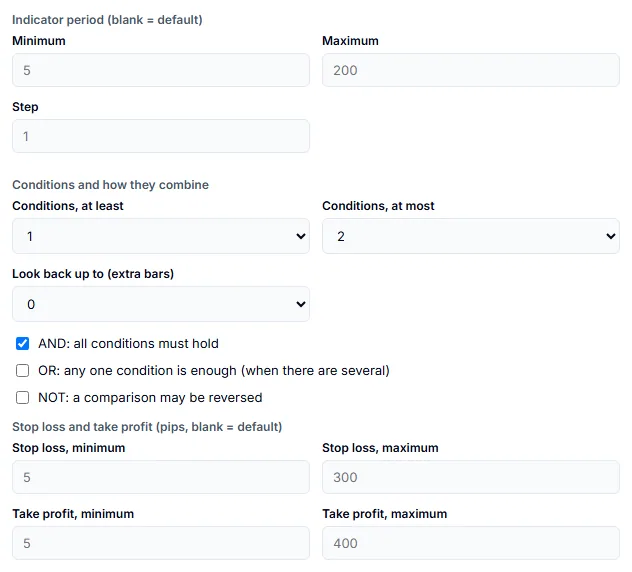
Indicator period
| Setting | What it does | Values |
|---|---|---|
| Minimum and Maximum | The smallest and largest indicator period the search may try. | 2 to 400 |
| Step | The gap between the periods tried. | 1 to 400 |
Leave the boxes empty to use the defaults. Some parts have their own narrower limits.
Conditions and how they combine
An entry is made of one or more conditions. The search builds them from the parts above.
| Setting | What it does | Values |
|---|---|---|
| Conditions, at least and at most | How many conditions an entry has. | 1 to 4 |
| Look back up to (extra bars) | How many bars back a condition may look. | 0 to 5 |
| AND | All conditions must hold. | Checkbox |
| OR | Any one condition is enough, when there are several. | Checkbox |
| NOT | A comparison may be reversed. | Checkbox |
The search builds 7 kinds of condition: a crossing, a comparison, AND, OR, NOT, a run of consecutive bars, and a perfect order of moving averages. The last two come from parts that you turn on.
Stop loss and take profit
| Setting | Values (pips) |
|---|---|
| Stop loss, minimum and maximum | 5 to 300 |
| Take profit, minimum and maximum | 5 to 400 |
For gold, indices and oil, the allowed range is scaled up, and the box shows the range for the symbol you picked.
Entry hours
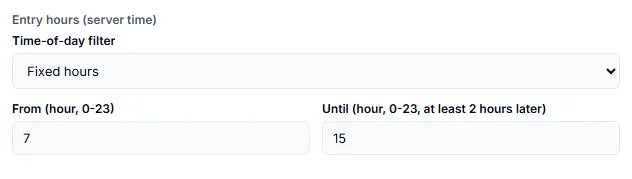
The Time-of-day filter limits the hours when a trade may open, in server time.
- Off: no limit.
- Fixed hours: set From (hour, 0-23) and Until (hour, 0-23, at least 2 hours later). The two boxes appear only for this choice.
- Let the search pick the hours: each candidate gets its own window.
Extra filters
Tick a filter to let the search use it. The search decides for each candidate whether to use it. There are six: the session filter, the weekday filter, the Gotobi filter, the high-low range filter, the candle pattern and the distance from a moving average.
Together with the entry hours, that is 7 filters.

Speed
More parts, more conditions and wider ranges make the search space larger. A bigger space needs more trials to cover it, and each trial may take longer. If a run ends with no candidate, raise the trial limit, narrow the ranges, or lower Minimum trades.
Results are an approximation of past data. A wider search finds more combinations that fit the past by chance, so the later checks in How candidates are filtered matter more, not less.
Related reference: Block reference lists every part the Miner can use.