Core concepts
The ideas behind every Miner and Builder result - one strategy design for many targets, when orders are filled, search and later periods, and what a pass means.
These ideas apply to every page of this documentation. Read this page once before you rely on a number from the Miner or the Builder.
One strategy design, several export targets
A strategy is a flow of blocks. The flow is the design. It does not belong to a trading platform. The Miner produces flows, the Builder edits them, and an export turns a flow into code for one target.
- The same flow can be exported to 5 targets: MetaTrader 5, MetaTrader 4, TradingView Pine, cTrader and Python.
- Not every target can express every block. If a block cannot be exported to the target you chose, the export says so and gives the reason. It does not leave the block out.
- Export is part of Pro.
The bar closes, then the strategy decides
The Miner and the Builder work on price bars. A strategy looks at a bar only after the bar has closed. If the conditions are true, the order is filled at the open of the next bar.
These are the rules of the simple backtest the Miner uses.
| Situation | What the backtest does |
|---|---|
| Entry | Fills at the open of the next bar. A buy fills on the ask side, which is the open plus the spread. |
| Stop loss and take profit | Checked against the high and the low of the entry bar itself and of every bar after it. |
| One bar reaches both the stop and the target | The bar’s direction decides. On a rising bar the low is assumed to come first. On a falling bar the high is assumed to come first. If the bar closes at its open, the stop is assumed to be hit first. With Realistic costs on, the candidate card also counts the trades where this happened. |
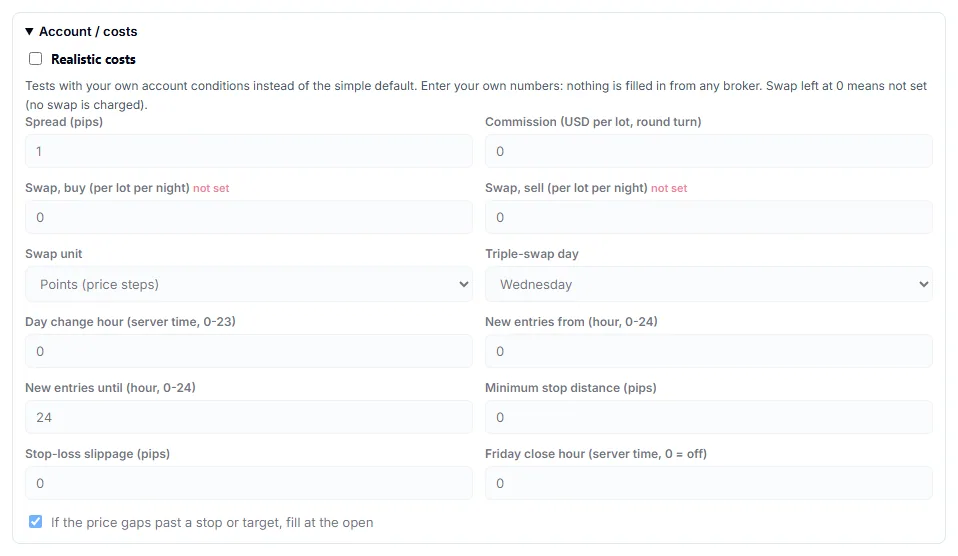
| A bar opens beyond the stop or the target | Fills at the open price. This is on by default. |
The exact fill rules of your own platform’s tester can differ. Expect the numbers in the MetaTrader 5 Strategy Tester to differ from the numbers in the Miner.
Search period and later period
The Miner splits the history of a symbol in time. By default the first 70% of the bars are the search period, and the last 30% are the later period. The result tables call them Search period (IS) and Later period (OOS).
- The Miner scores candidates on the search period.
- It removes candidates that look too similar to a better one.
- It keeps the candidates that also hold up on the later period.
- It keeps the candidates that also hold up on other symbols. This check uses the 8 built-in symbols. Extra symbols you download are not used for it.
The later period is not untouched data. The Miner uses it to select candidates, so a candidate that passes has already been chosen with it. In Pro, the option Leave out the last 12 months keeps the most recent 12 months out of the search entirely. The option is meant for strategies you plan to list on QuantsDepot. A candidate’s later-period result is a filter, not a forecast.
A pass is not a promise
A pass means that a candidate met the Miner’s checks on past data. It does not mean the strategy will make money.
- A search tries thousands of combinations. Some combinations fit past data by chance. More trials make chance fits more likely.
- The backtest is an approximation on the Miner’s own price bars. Results in your platform use your broker’s price history and trading conditions.
- Nothing in the Miner, the Builder or this documentation is investment advice.
Costs: simple and realistic
By default the Miner charges a fixed spread and nothing else. For most currency pairs the default spread is 1 pip. Gold, silver, indices and oil each have their own default. The backtest charges no commission and no swap.
With Realistic costs (Pro) you enter your own account conditions: spread, commission, swap, the hour when the day changes, trading hours, a minimum stop distance, stop-loss slippage, gap fills and a Friday close hour. Nothing is filled in from any broker. A swap left at 0 means no swap is charged. The settings are saved in your browser only.
Realistic costs change the result of a search. They do not make the result a forecast.
Next: Reading results, How candidates are filtered and Export. Figures are defined in Metrics.