Import your own CSV Pro
Search on price bars exported from your own platform. The file stays in your browser, and a few features are not available for imported data.
This feature is part of Pro.
Use this when you want the Strategy Miner to search on price bars from your own platform instead of the bundled data. The import is part of Pro. Your own CSV is not sent. It is read and kept in your browser.
What a file needs
| Item | Requirement |
|---|---|
| Bar size | M1, M5, M15, M30 or H1. Bars coarser than one hour and bars finer than one minute are refused. The Miner builds H1 bars from finer ones. |
| Format | An MT5 export, an MT4 export, or a generic CSV with date and time, open, high, low and close. |
| Symbol | Six letters made of two of USD, EUR, GBP, JPY, CHF, CAD, AUD and NZD, such as EURUSD. |
| Digits | 2 or 3 decimals for JPY pairs, 4 or 5 for the others. |
| Size | At most 150 MB and 4,000,000 rows. |
| Length | At least 8,000 H1 bars (about 1.3 years). Under about 3.2 years you get a warning that the search may find less. |
Other symbols, such as gold or indices, are not accepted as your own data.
Import a file
- Open the Strategy Miner while signed in with Pro and open Use your own data (CSV).
- Click Choose a CSV file and pick the file.
- Fill in the form.
| Setting | What it does | Values |
|---|---|---|
| Name | A label for this data set. It starts as the file name. | Up to 40 characters |
| Symbol (6 letters, for example GBPJPY) | The pair the bars belong to. | Guessed from the file name when possible |
| Time basis of the file | The time zone of the timestamps. You must choose it. The Miner never guesses. | UTC (GMT); UTC+2 with UTC+3 in summer, using US summer time (the usual MetaTrader server); the same with EU summer time; or a fixed UTC offset |
| Column separator in the file | How columns are split. | Asked only when the Miner is not sure |
| Date order in the file | Day-month-year or month-day-year. | Asked only when the Miner is not sure |
The Miner also suggests a time basis, with its reason, for example “Suggestion: UTC (GMT) (reason: the trading week starts Sun 21:00 …)”. The list stays on — choose —, and Save this data stays disabled until you pick one.
- Read the quality report. It reads the symbol and the price decimals, then checks duplicates, order, price consistency, gaps, spikes, flat bars, length and range. Each line starts with OK, i, ! or NG. Lines marked NG refuse the import.
- Click Save this data. Cancel drops the file.
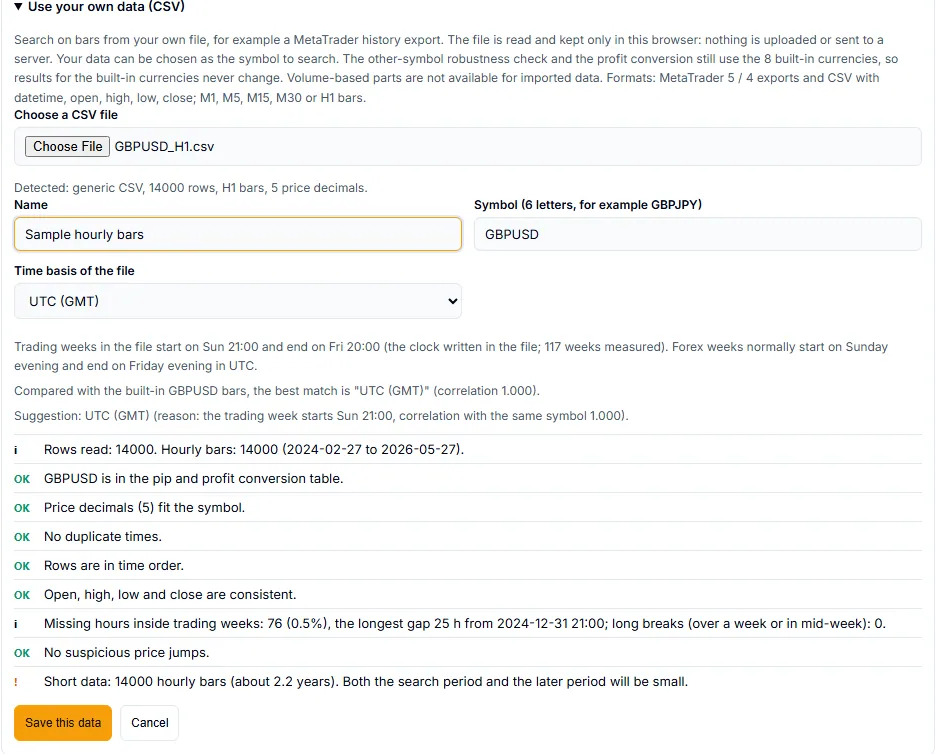
Up to 20 data sets can be saved in a browser. Remove deletes one. If the browser cannot keep data, for example in private mode, the Miner says importing is unavailable.
Search on your data
Saved data appears in the Symbol list under My data (this browser). Pick it and run a search as usual. A line under the settings reads “Searching your imported data” followed by the name and symbol, for example “Sample hourly bars” (GBPUSD). The result cards carry a Your data chip.


- The other-symbol robustness check and the profit conversion still use the 8 built-in currencies.
- Timeframes H1, H4 and D1 are available.
What does not work with a CSV
These are fixed limits of imported data:
- Volume parts cannot be used. The Miner says “Volume-based parts are not available for imported data.” Turn them off under Advanced, or choose one of the built-in symbols.
- 8 and 10 years cannot be used, because an imported file has no long-period data. If you choose them with your data selected, the Miner resets the symbol to EURUSD and says “Your own data has no long-period data, so the symbol was reset to EURUSD.”
- M15 and M30 cannot be used, and the Miner resets the symbol the same way.
- A strategy found on your own data cannot be listed on QuantsDepot.
What leaves your browser
Generation runs in your browser, and your own CSV is not sent. When you save a result to the Vault, the strategy design and its metrics go to your account, as for any run. The price bars do not. If you use Hand results to AI, the summary only records that the data came from a user-imported file.
Results from imported data are an approximate backtest of the file you supplied. The Miner does not check that the file is correct, and past results do not guarantee future results.
Related reference: Limits gives the file limits, and Symbols the pip sizes. If a file is refused, see Troubleshooting.