Templates and recipes
Start a flow from the template gallery, which anyone can open, or from a recipe, which needs Pro. Open either one from a link.
A template is a finished flow you can load onto the canvas and then change. The Builder has two kinds. Templates in the gallery are open to everyone. Recipes need Pro.
Open a gallery template
The gallery has 12 templates.
-
Open the Strategy Builder. On an empty canvas, the start screen shows a Template gallery. The same templates are listed under Templates at the bottom of the palette. The palette is closed at first; open it with the grid button at the top left.
-
Use the filter buttons to narrow the list: All, Trend, Breakout, Mean reversion, Session & scalping, Risk management and Multi-strategy.
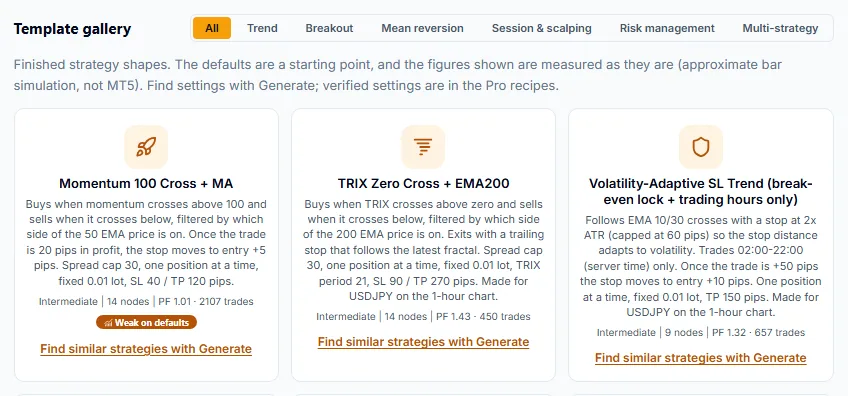
The start screen gallery. The filter buttons are above the cards. -
Click a template card.
-
If the canvas already has blocks, the Builder asks “Loading a template will replace the current flow. Continue?” Confirm to load it.
After loading, the flow is an ordinary flow. Change it like any other. If your project still has an automatic name, the template name replaces it.
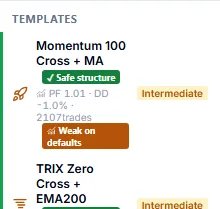
Each card shows a short description and the size of the flow. A card on the start screen also shows PF and the number of trades, and a link to find similar strategies with Generate. The list in the palette adds DD (the drawdown, shown with a minus sign). The start screen says these are an approximate bar simulation, not MetaTrader 5, and hovering over the numbers in the palette shows the same note with the symbol and timeframe, measured with the template’s default settings. A card can also carry a short chip such as “Weak on defaults”. The defaults are a starting point, and a PF below 1.0 can appear. The gallery shows the numbers as measured. A tester run in MetaTrader 5 gives different numbers, and past results do not guarantee future results.
Two badges can appear on a card in the palette list:
- Safe structure means a single entry with a fixed stop loss and take profit, and no martingale or averaging down. It describes the structure only. It is not a statement about results.
- Portfolio means several strategies bundled in one flow. The card shows how many, for example “Portfolio · 3 strategies”.
When you load a gallery template, the Measure window starts with the symbol and timeframe the card’s numbers were measured on. See Backtest in the Builder.
Gallery templates
| Template | Group | Blocks | Link ID |
|---|---|---|---|
| Williams Scalper | Session & scalping | 11 | williams_scalper |
| 3-Strategy Portfolio (Risk-Managed Trend) | Multi-strategy | Portfolio of 3 | portfolio_risk_managed_trend |
| Momentum 100 Cross + MA | Trend | 14 | momentum_ma_trend |
| OBV Confirmation + Bollinger Breakout | Breakout | 15 | obv_bb_breakout |
| DeMarker Reversal + ATR Squeeze | Mean reversion | 12 | demarker_atr_squeeze |
| TRIX Zero Cross + EMA200 | Trend | 14 | trix_zero_ma_trend |
| Ultimate Oscillator pullback with a trend filter | Mean reversion | 17 | uo_pullback_trend |
| Opening range breakout (with trailing stop) | Breakout | 7 | session_orb_trail |
| RSI Scale-Out + Trailing (trading hours only) | Risk management | 16 | partial_scale_out_hours |
| Pending Order Breakout (SL50/TP120) | Breakout | 9 | pending_breakout_tuned |
| Force Index Pullback + Profit-% Trail (trading hours only) | Mean reversion | 13 | force_index_hours |
| Volatility-Adaptive SL Trend (break-even lock + trading hours only) | Trend | 9 | dynamic_sl_trail |
Recipes (Pro)
A recipe is a ready-made flow for one symbol and timeframe. There are 9. They are not in the gallery. The list, with each recipe’s symbol and timeframe, is on the Recipes page.
Opening a recipe needs a Pro account. If you are not signed in with Pro, the Builder shows “This recipe is included with AIStrategyMiner Builder Pro. Sign in with a Pro account to open it.” and loads nothing. Pro is a one-time purchase ($899); see Pricing.
The numbers on the Recipes page are results on past data. They do not guarantee future results.
Open a template from a link
Add ?template= and a template ID to the Builder address:
/strategy-builder?template=<ID>
For a gallery template, use the Link ID in the table above. For example, /strategy-builder?template=session_orb_trail opens the opening range breakout template. Recipes work the same way, and the Open buttons on the Recipes page use these links.
A link loads the template without the replace prompt. The new flow takes the place of any flow open on the canvas. An ID that does not exist loads nothing.
Next steps
- Change and connect blocks: Canvas basics.
- Test the flow: Backtest in the Builder.