No-code EA Builder
Design a MetaTrader 5 trading robot — without writing MQL5 by hand.
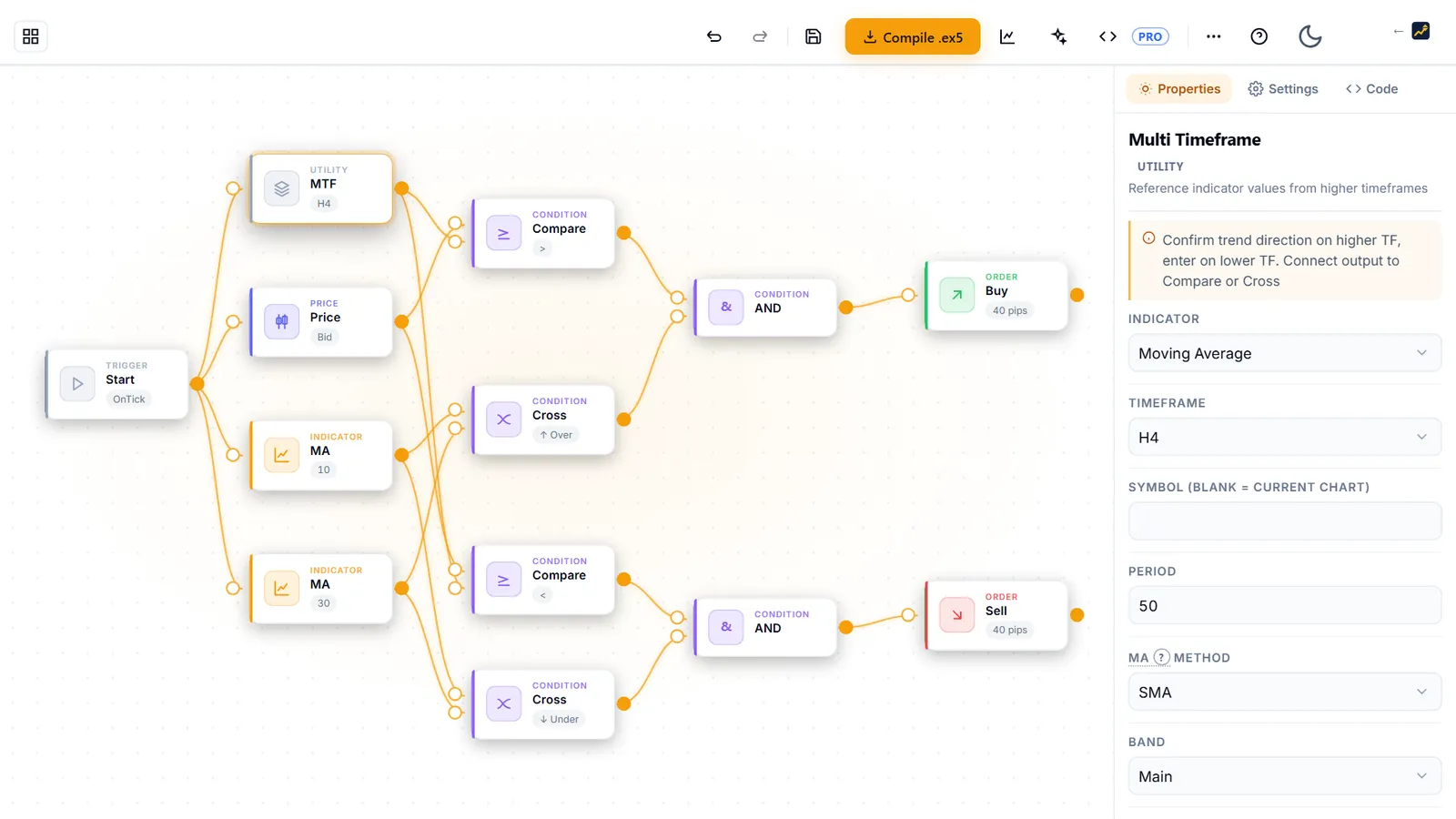
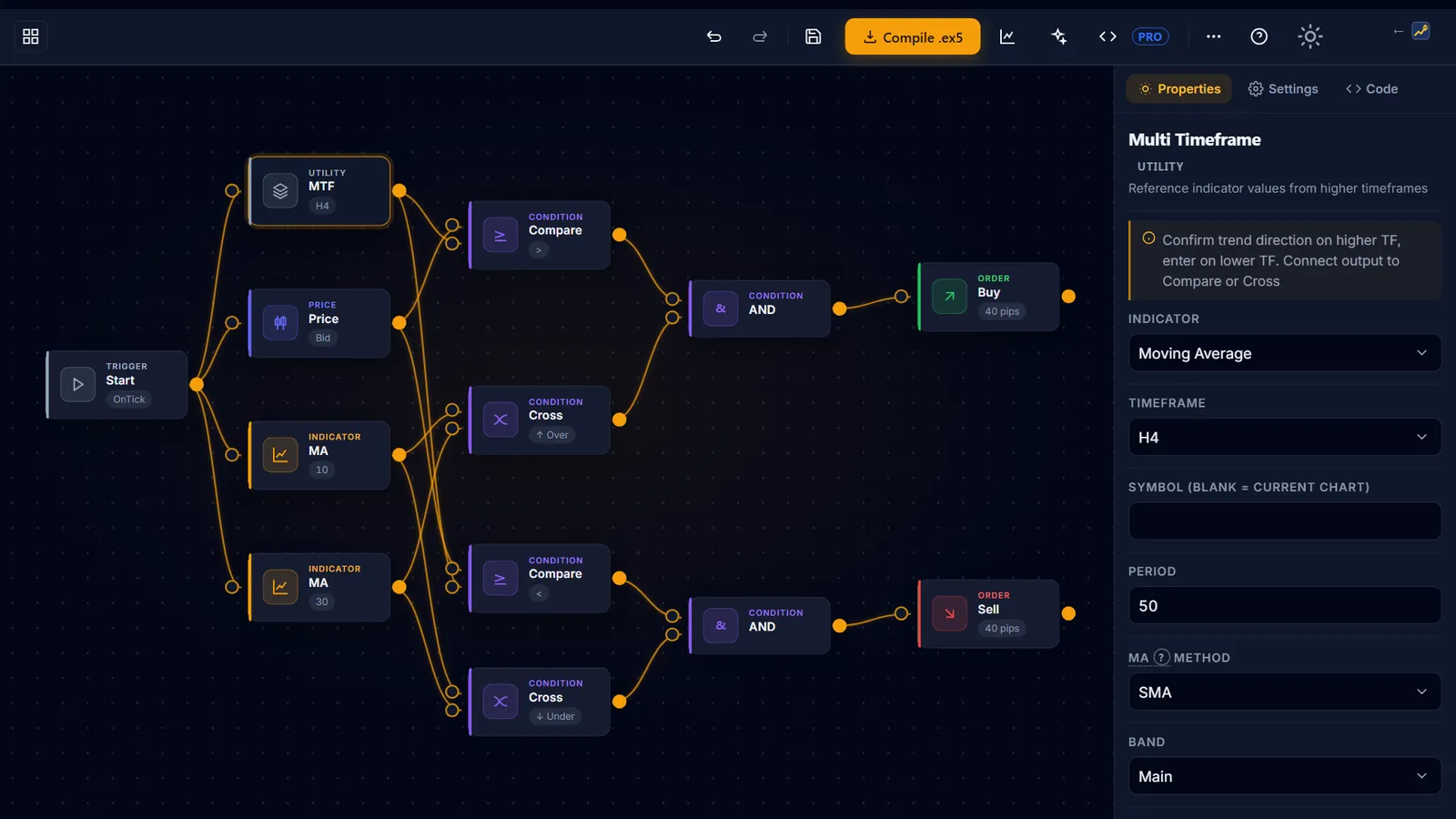
AIStrategyMiner Builder is a no-code development tool. You design trading logic in a visual editor on a free canvas, test it with the built-in strength test, and try the Generate tool's free demo. With Pro you run the full generator and download a working MetaTrader 5 EA — a compiled file, or the editable MQL5 (.mq5) source code.
- 12
- strategy templates
- 119
- logic blocks in 8 categories
- .ex5
- compile & MQL5 export on Pro
- 0
- installs — runs in your browser
What the Builder is — and is not
AIStrategyMiner Builder is a software development tool that outputs source code. It is not a trading robot, a brokerage, a signal service, or financial advice.
- It does generate MQL5 source code from a visual design.
- It does not execute trades, place orders, or connect to a broker.
- It does not provide trading signals, strategies to follow, or investment advice. Candidates from Generate fit past data and may be chance fits; they are starting points to test, not recommendations.
- You compile and decide what to do with the source code you create.
How it works
From idea to a tested EA in three steps
-
 1
1Design your logic visually
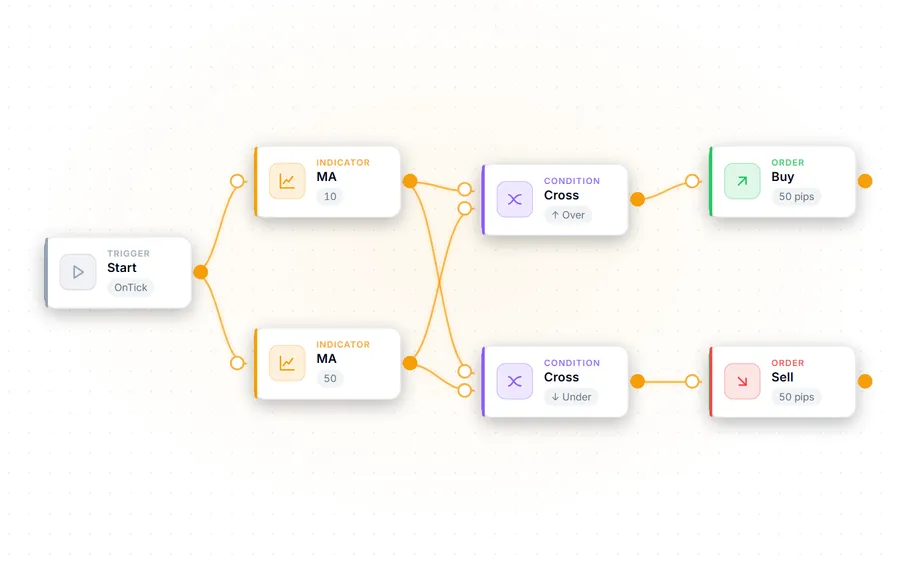
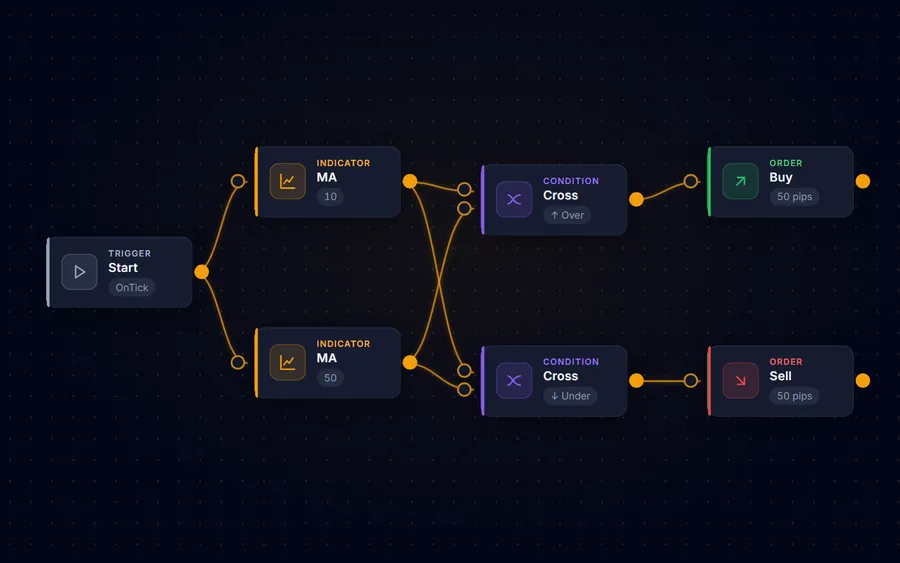
Drag and drop blocks — indicators, entry and exit conditions, risk rules — onto a canvas, or start from one of 12 strategy templates. Not sure where to start? Generate searches block combinations and parameters in your browser (nothing is sent to a server); open any candidate in the editor and change it. No MQL5 syntax to memorise.
-
 2
2Test it before you trust it
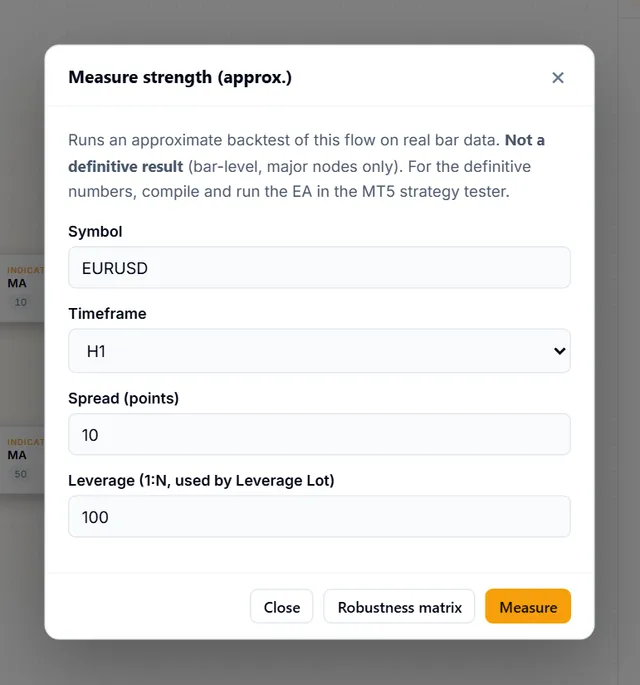
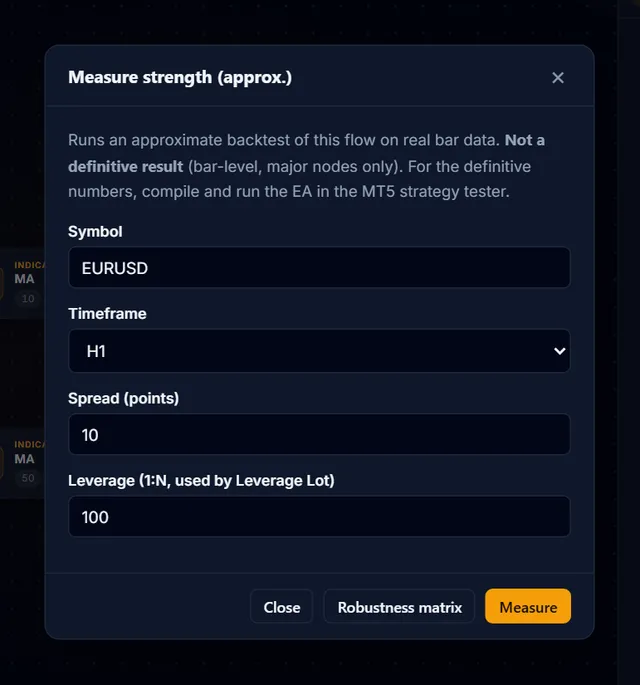
Run the built-in strength test on historical data and the robustness matrix across major pairs — directly in the browser, before anything touches your terminal.
-
 3
3Compile and take it with you
Compile to a ready-to-run .ex5 for MetaTrader 5, or download the editable MQL5 (.mq5) source — both with Pro. You decide what to do with what you build — the Builder never runs it for you.
Features
A development environment, not a black box
Visual block editor
Build entry/exit rules, indicator conditions, and money-management logic without writing code. 119 blocks across 8 categories.
12 strategy templates
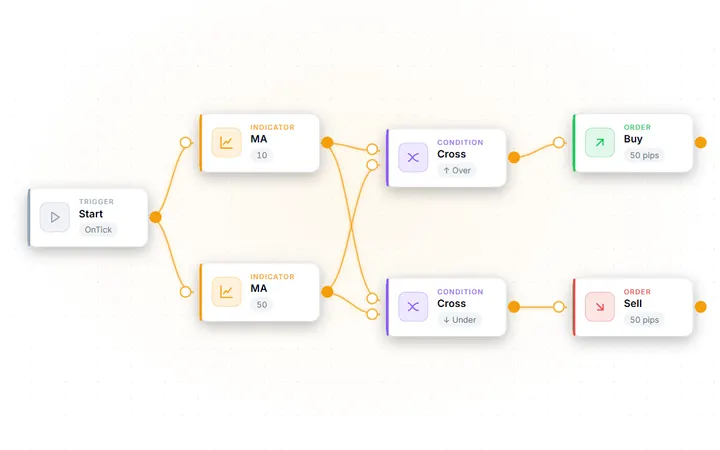
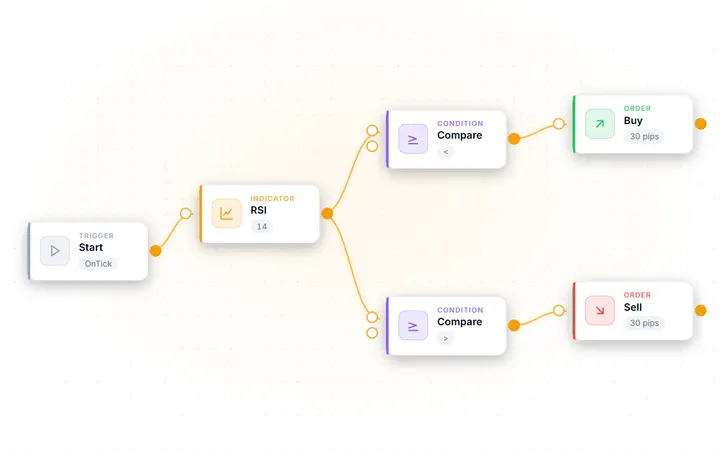
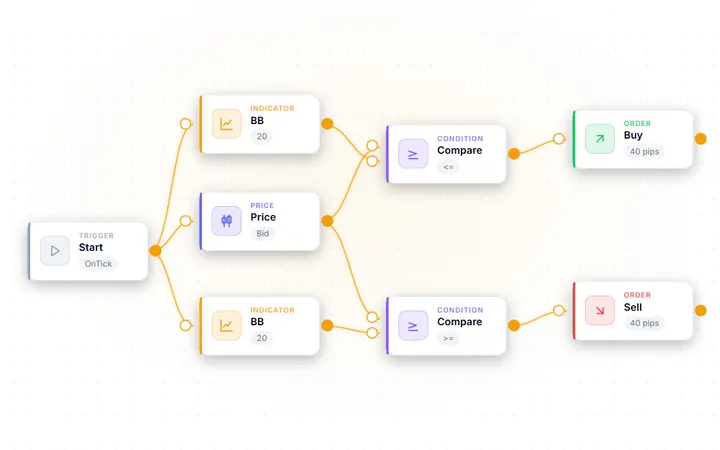
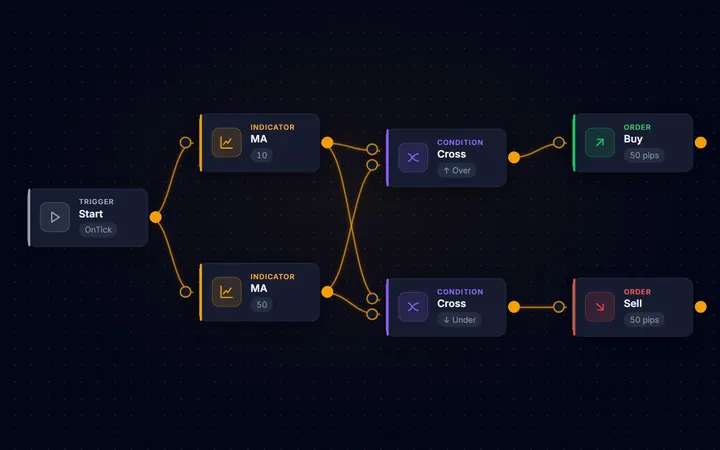
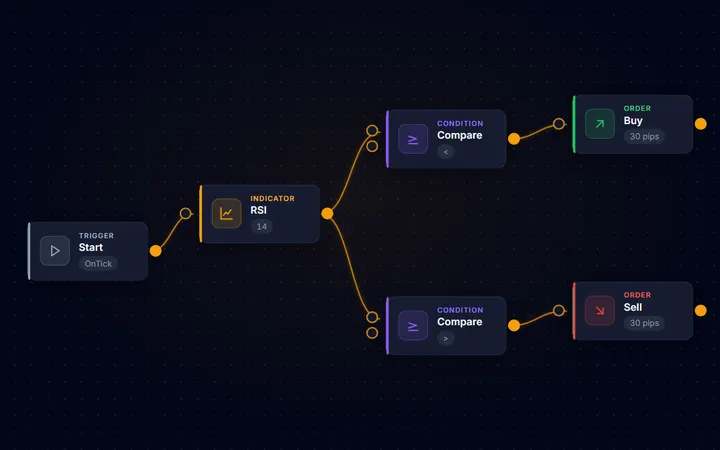
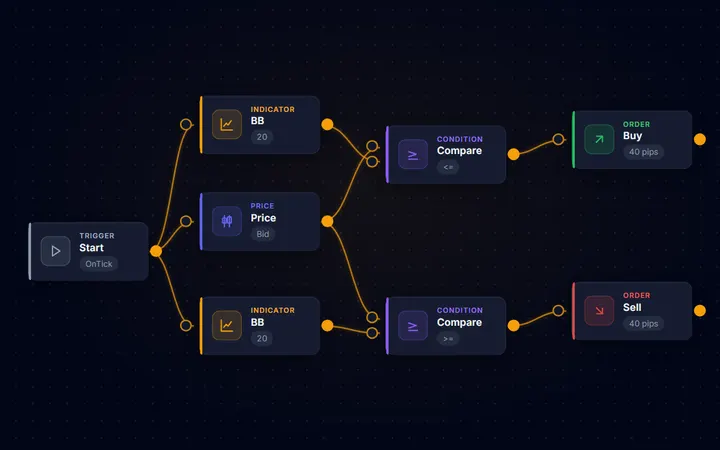
Start from moving-average crossovers, RSI reversion, Bollinger breakouts and more, then adapt the blocks to your own idea.
Built-in strength test
Backtest your design on historical data and evaluate robustness across major pairs — in the browser, before you export anything.
Risk-management blocks
Stop-loss, take-profit, break-even and trailing logic expressed as reusable components, with dangerous-configuration warnings before export.
Projects saved to your account
Sign in to keep your designs as projects, reopen them on any device, and pick up where you left off. Anonymous designs stay in your browser.
Readable source output
Pro generates structured, commented MQL5 you can inspect, modify, and version-control. Your designs and your output are yours to keep.
What you can build with
Every block in the Builder, in one list.
- Moving AverageMoving Average (SMA/EMA/SMMA/LWMA)Trend
- RSIRelative Strength IndexOscillator
- Bollinger BandsBollinger Bands (Upper/Main/Lower)Volatility
- MACDMACD (Main/Signal)Oscillator
- ATRAverage True RangeVolatility
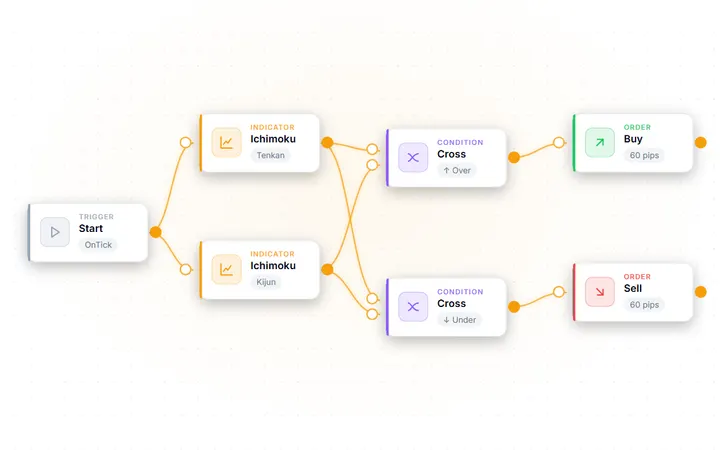
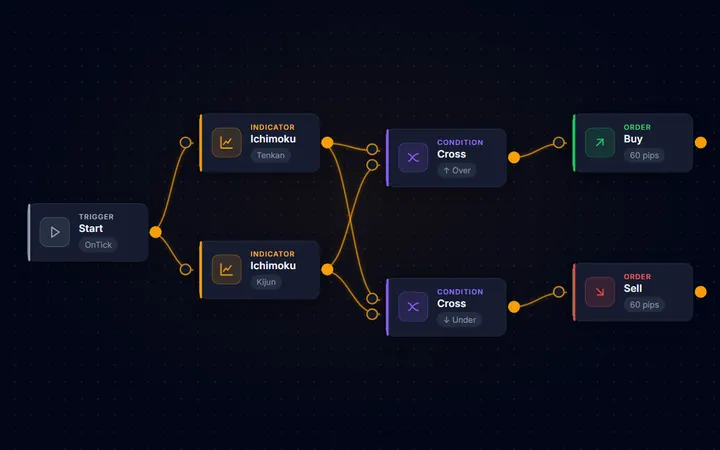
- IchimokuIchimoku Kinko Hyo (Tenkan/Kijun/Senkou A/B/Chikou)Trend
- Donchian ChannelHighest high / lowest low of the last N bars - for breakout and swing-level conditionsVolatility
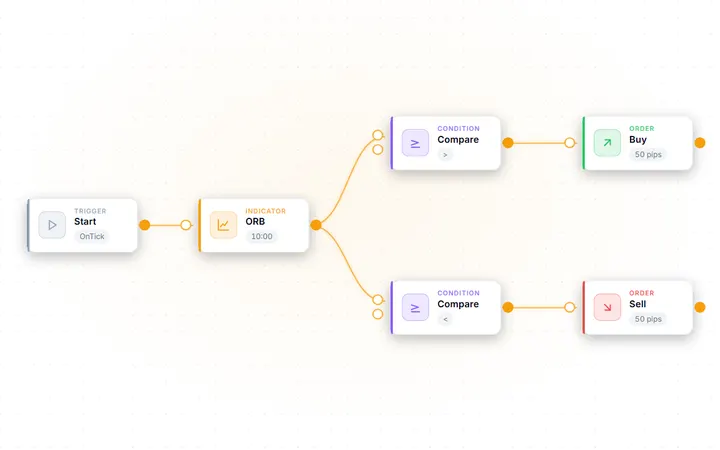
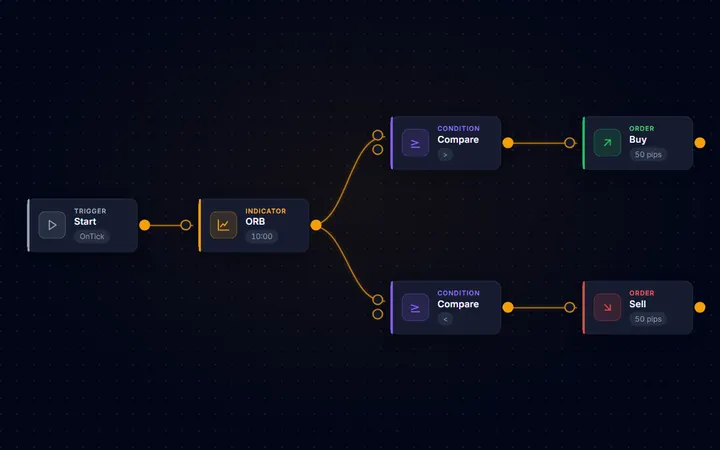
- Opening Range BreakoutFreezes the high/low of the first N bars from a given time as a range, then reports a break of it as +1 (up) / -1 (down) / 0 (none)Price levels
- Heiken AshiHeiken Ashi candle close/open - detect trend by candle color flipTrend
- ADXADX — Trend Strength (Main/+DI/-DI)Trend
- CCICommodity Channel IndexOscillator
- Parabolic SARParabolic SAR — Trend-following stopTrend
- StochasticStochastic Oscillator (%K/%D)Oscillator
- Williams %RWilliams %R — Overbought/oversold oscillator (-100~0)Oscillator
- MomentumMomentum — Rate of price changeOscillator
- OBVOn Balance Volume — Cumulative volume indicatorVolume
- DeMarkerDeMarker — Trend exhaustion detection (0~1)Oscillator
- AlligatorBill Williams Alligator — Jaw/Teeth/Lips 3 linesTrend
- Bears PowerBears Power — Selling pressure strengthOscillator
- Bulls PowerBulls Power — Buying pressure strengthOscillator
- Force IndexForce Index — Price change x VolumeVolume
- EnvelopeMA Envelope — Upper/Lower bands around moving averageVolatility
- RVIRelative Vigor Index — Trend strength (Main/Signal)Oscillator
- DEMADouble Exponential MA — a moving average with reduced lagTrend
- TEMATriple Exponential MA — even less lag than DEMATrend
- Adaptive MAKaufman Adaptive MA — smoothing adapts to volatilityTrend
- FrAMAFractal Adaptive MA — smoothing driven by fractal dimensionTrend
- VIDyAVariable Index Dynamic Average — a CMO-driven adaptive MATrend
- Std DeviationStandard Deviation — how far price spreads from its averageVolatility
- Awesome OscAwesome Oscillator — momentum from the 5/34 SMA differenceOscillator
- Accelerator OscAccelerator Oscillator — the acceleration of AOOscillator
- SupertrendSupertrend — trend direction from an ATR-width trailing bandTrend
- VLDMIVariable-period RSI — stretches the RSI period by the ATR ratio and fades sharp drops or spikesOscillator
- Persistence RatioDirection-agreement ratio — how often the last N bars moved the same way as the bar before themTrend
- Hull MAHull MA — recombines two LWMAs so the line keeps up with price instead of trailing itTrend
- QQEQQE — trails a one-way band around a smoothed RSI and reports which side it brokeOscillator
- VWAPVWAP — volume-weighted average price accumulated from an anchor (the day boundary by default). The bands are multiples of the weighted standard deviation.Volume
- ADX WilderADX Wilder — trend strength using Wilder’s original smoothing (Main / +DI / −DI)Trend
- Keltner ChannelKeltner Channel — a moving average with bands at a multiple of ATR (Upper / Main / Lower)Volatility
- ROCRate of Change — the percentage change from N bars agoOscillator
- Ultimate OscillatorUltimate Oscillator — buying pressure over three periods, blended 4:2:1Oscillator
- DPODetrended Price Oscillator — strips the trend out and leaves the cycleOscillator
- OsMADifference between the MACD line and its signal (histogram)Oscillator
- TRIXRate of change of a triple-smoothed EMA — momentum without the noiseOscillator
- Chaikin OscChaikin Oscillator — money flow that includes volumeVolume
- Money Flow IndexMoney Flow Index — an RSI that includes volume (0-100)Volume
- VolumesTick volume — how active the bar wasVolume
- Accum/DistribA/D line — cumulative buying and selling pressureVolume
- BW Market FacilBill Williams Market Facilitation Index — range per unit of volumeVolume
- Gator OscGator Oscillator — the spread between the three Alligator linesOscillator
- FractalsBill Williams Fractals — the most recent confirmed swing high/lowPrice levels
- iCustomGet custom indicator valuesCustom
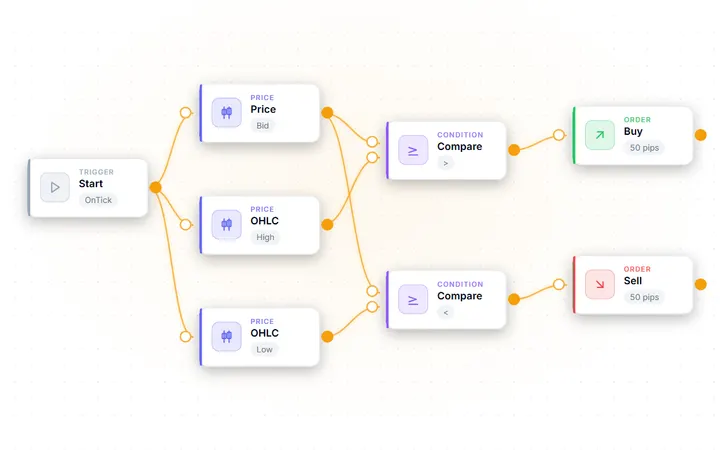
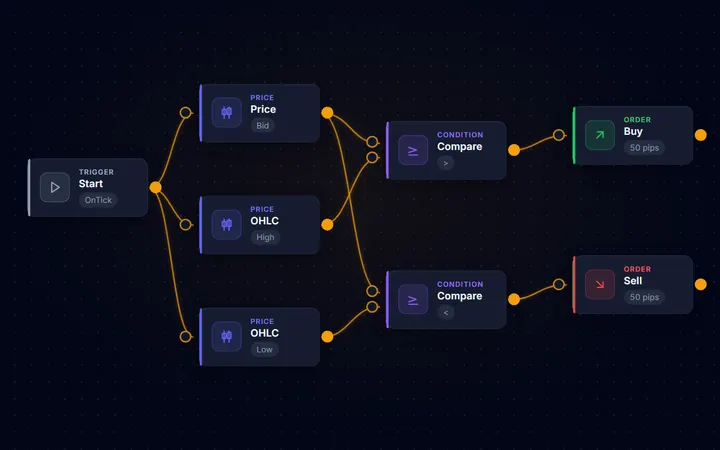
- CompareCompare two values (>, <, ==, !=, >=, <=)Conditions
- CrossCrossover / Crossunder detectionConditions
- MA Perfect OrderChecks whether multiple MAs are aligned in period order (perfect order). Composable with other conditions via AND/ORConditions
- Consecutive BarsChecks whether the last N closed bars moved in the same direction (up/down). Composable with other conditions via AND/ORConditions
- RSI DivergenceDetects regular divergence between RSI and price. Connect an RSI node (shift=1)Conditions
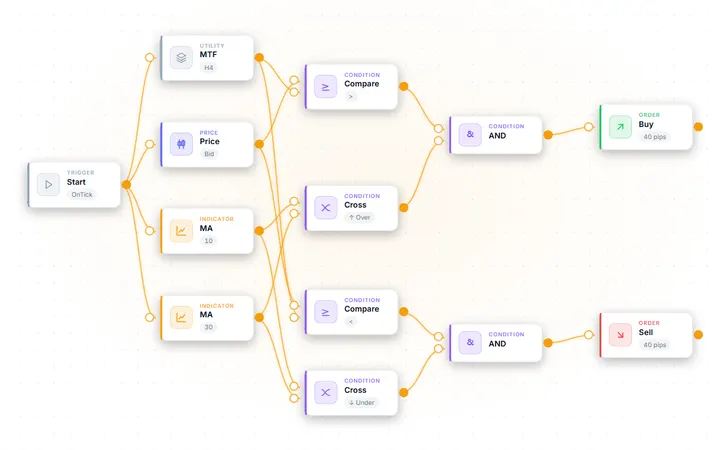
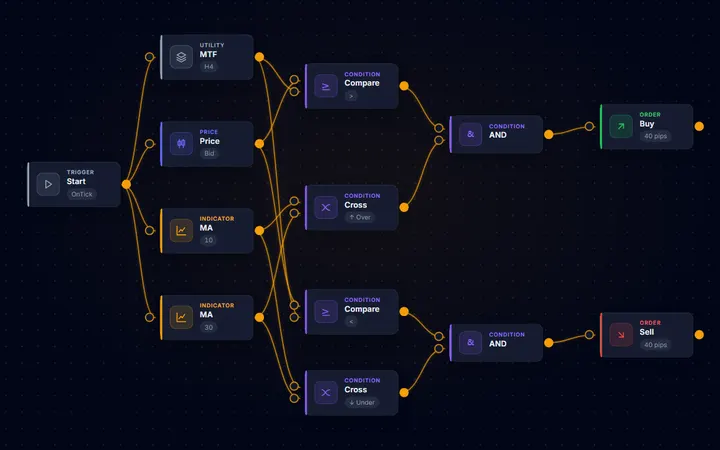
- AND GatePass only when all conditions are trueConditions
- OR GatePass when any condition is trueConditions
- NOT GateInvert condition (NOT)Conditions
- Signal LatchFires once, then stays silent until the reset condition occursConditions
- Math OperationsArithmetic on two inputsConditions
- Open BuyOpen a buy positionActions
- Open SellOpen a sell positionActions
- Close PositionClose position(s)Actions
- Time ExitClose by holding time / bars / time-of-day / FridayActions
- Profit Pips CloseClose the whole basket when aggregate floating pips reach the target (with time-decay)Actions
- Basket Money CloseClose the basket when its floating P/L in account currency reaches a thresholdActions
- Virtual/Hidden SL/TPClose at market on internal SL/TP levels (never sent to the broker)Actions
- Basket Average TPPlaces the weighted-average open +/- N pips as a hard TP on every position (disconnect-proof grid/nanpin take-profit)Actions
- Buy LimitBuy limit pending orderActions
- Sell LimitSell limit pending orderActions
- Buy StopBuy stop pending orderActions
- OCO BracketOCO straddle: places a Buy Stop above and a Sell Stop below; when one leg fills, the other is auto-cancelledActions
- Sell StopSell stop pending orderActions
- AlertAlert notificationActions
- Partial ClosePartial position closeActions
- Time FilterTrading time restrictionFilters
- Spread FilterMaximum spread filterFilters
- Position FilterMaximum position count limitFilters
- Session (auto DST)Gate by market session with automatic daylight-saving adjustmentFilters
- Holiday FilterHalt new orders on holidays and year-endFilters
- High-Low Range FilterSkip entry when the N-bar high-low range is out of range (filters volatile/quiet markets)Filters
- Range Size FilterBlocks entry unless the last closed bar's body is at least N times the recent average body (expansion-bar gate)Filters
- Days of Month FilterTrade only on the listed calendar days (comma-separated 1-31), e.g. 24,25,26,27,28,29 for the month-end weekFilters
- Candle Pattern FilterSkip entries unless the last closed bar is a pin bar / engulfing (price-action rejection reversal)Filters
- MA Distance FilterBlocks entry when the price-to-MA distance (pips) is out of range (pullback / over-extension filter)Filters
- Cooldown FilterWait N seconds/minutes after last entryFilters
- Daily Trade LimitStop opening new trades once the daily count is reachedFilters
- Gotobi FilterTrade only on Gotobi days (5th,10th,15th,20th,25th,month-end). Ideal for Nakane trade.Filters
- Weekday FilterAllow trading on specific weekdays onlyFilters
- Drawdown FilterStop trading when max drawdown exceededFilters
- Volatility FilterStop trading when volatility outside ATR rangeFilters
- Market Regime FilterCombines an ADX trend/range read with an ATR expansion/compression read, and trades only in the market regimes you allowFilters
- Equity TargetStop trading when profit target reachedFilters
- Session FilterTrading session filter with a selectable time basis (server time or UTC). Use Session (auto DST) for windows that follow daylight saving.Filters
- News FilterPause trading N minutes before/after news eventsFilters
- New Bar FilterPass only on new bar formationFilters
- Fixed LotFixed lot sizeMoney Mgmt
- Risk-Based LotCalculate lot from balance × risk %Money Mgmt
- Margin-Leverage LotAllocates a fixed % of balance as margin and sizes the lot at current leverageMoney Mgmt
- Martingale LotDouble lot on loss (Martingale)Money Mgmt
- PyramidingPyramiding — Add positions in profit directionMoney Mgmt
- Averaging DownAveraging Down — Add positions against loss to improve avg priceMoney Mgmt
- Reversal EntryReversal Entry — Enter opposite direction after closingMoney Mgmt
- Trailing StopTrailing stop lossExit Strategy
- Break EvenMove SL to entry when in profitExit Strategy
- Basket Break EvenMove every basket position SL to the weighted-average break-even once total floating profit hits the triggerExit Strategy
- Take ProfitTake profit level (Fixed pips / ATR multiple)Exit Strategy
- Stop LossStop loss level (Fixed pips / ATR multiple)Exit Strategy
- Close AllClose All — Close all positions when condition metExit Strategy
- Account GuardClose this EA's positions when the account's floating loss exceeds N% of balance, then pause new entriesExit Strategy
- Current PriceAsk/Bid/SpreadPrice / Info
- OHLCCandlestick Open/High/Low/ClosePrice / Info
- Time InfoTime information (Hour/Minute/DayOfWeek)Price / Info
- Account InfoAccount info (Balance/Equity/Profit)Price / Info
- ConstantOutput a fixed valuePrice / Info
- StartOnTick — Entry point executed every tickUtility
- Multi TimeframeReference indicator values from higher timeframesUtility
No block matches. Any other MT5 indicator can be read with the iCustom block.
Names and descriptions are shown exactly as they appear in the Builder.
How far each part goes
- Any timeframe, other symbols
- Every indicator block can read any timeframe from M1 to MN1, and most can read a different symbol from the chart.
- Your own indicators
- The iCustom block reads the values of any custom MT5 indicator you already use.
- Four ways to size a lot
- A fixed lot, a % of balance at risk, a % of balance as margin, or martingale with a level cap and a drawdown stop.
- When the rules are checked
- Once per closed bar, on every tick, or the moment price touches a level. One design can also run on several symbols at once.
- Exits in detail
- Trailing stops by pips, ATR, a moving average, swing highs and lows, Parabolic SAR and more — plus break-even, basket exits and an account-wide loss guard.
- Test and compile on our server
- Measure a design with the built-in strength test and a robustness check across four major pairs, then compile it to a .ex5 — no MetaEditor needed.
Templates
Start from a working design
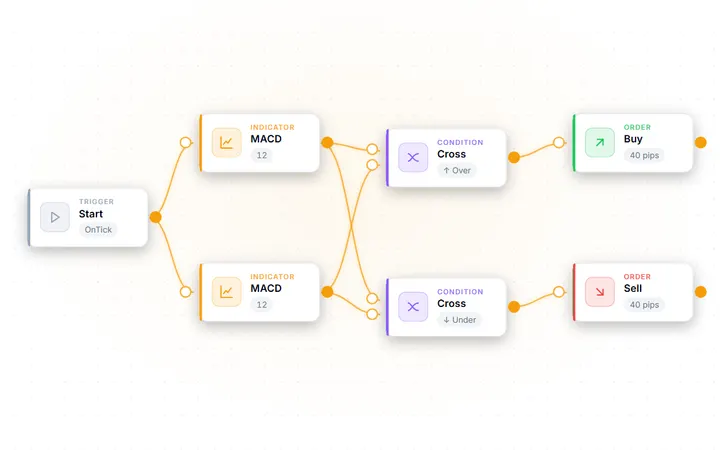
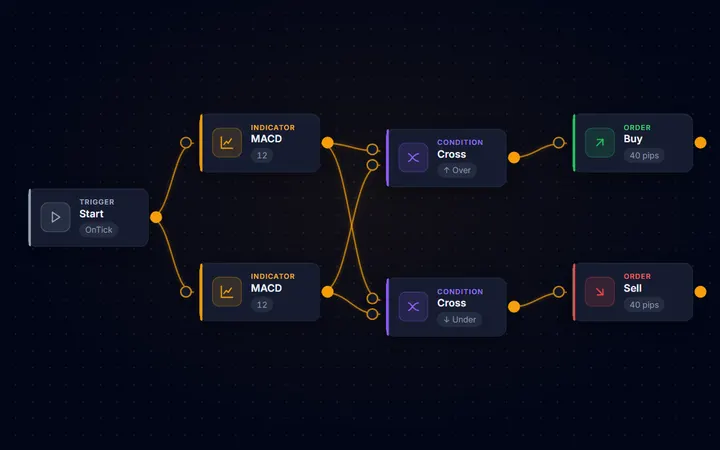
Every template opens as a complete block diagram — load one, run the strength test, then change the parts you want. A few of the 12 are shown here.
-
-
-
-
-
-
-
-
Plans
Build on the canvas for free; go Pro to compile and export
| Without Pro | Pro | |
|---|---|---|
| Visual editor + all 119 blocks | ✓ | ✓ |
| All 12 strategy templates | ✓ | ✓ |
| Strength test + robustness matrix | ✓ | ✓ |
| Strategy generator | Demo (counts and pass/fail only) | ✓ |
| Compiled .ex5 download | — | ✓ |
| Editable MQL5 (.mq5) source code | — | ✓ |
| Full generated source in the Code tab | Inputs preview | ✓ |
| Priority email support | — | ✓ |
Designing on the canvas is open to everyone; the strength test needs a signed-in account. The generator demo shows counts and stage pass/fail only. Pro is a one-time $399 licence that adds the full generator, the compiled .ex5 and the editable MQL5 source. See full pricing →
Who it's for
Made for people who want to build, not gamble
The Builder is for developers prototyping MQL5 logic quickly, traders who want to turn an idea into editable source code without starting from a blank file, and learners who want to see how strategy logic maps to clean MQL5. You keep full control of the output and remain responsible for testing, compiling, and any use of the code you generate.
Coming from a strategy generator? The Builder has its own Generate tool, and what sets it apart is that you can edit every candidate and compile it yourself. Read our honest comparison with EA Studio — we tell you plainly which fits which trader.
FAQ
Frequently asked questions
Can I try the AIStrategyMiner Builder for free?
Yes. Designing on the canvas — building with blocks and opening templates — is open to everyone, a free account unlocks the built-in strength test, and the Generate tool has a free demo that shows candidate counts and stage pass/fail. The full generator, compiling to .ex5, and the MQL5 source and export are Pro — a one-time $399 licence.
Do I need to install anything?
No. The Builder runs entirely in your browser — design, test, and compile without installing software. You only need MetaTrader 5 to run the .ex5 file you download.
Does the Builder trade for me?
No. The Builder is a software development tool: it generates an Expert Advisor from your design. It never executes trades, places orders, connects to a broker, or provides trading signals. You compile, test, and decide what to do with the code you create.
Can I test my EA before using it?
Yes — twice. Inside the Builder (free account required), the strength test backtests your design on historical data and the robustness matrix evaluates it across major pairs. After you download the EA, you should also forward-test it in the MetaTrader 5 Strategy Tester on your own broker's data before risking real money.
Do I own the code I generate?
Yes. Your designs and the generated output are yours to download and keep. Pro licence holders get the editable, commented MQL5 source, which you can modify, extend, and version-control like any other code.
Start building
Build on the canvas for free — no installation, no card required. Pro adds the generator, compile and MQL5 source.
Risk Warning: Trading CFDs and derivative instruments involves significant risk and is not suitable for all investors. Source code you generate with the Builder is provided as a development tool only; you are solely responsible for testing it and for any trading decisions. Backtest and robustness results describe past data and are not a reliable indicator of future results. The Service is not directed at residents of the United States or other Restricted Jurisdictions.