EA Builder tanpa kode
Rancang robot trading MetaTrader 5 — tanpa menulis MQL5 secara manual.
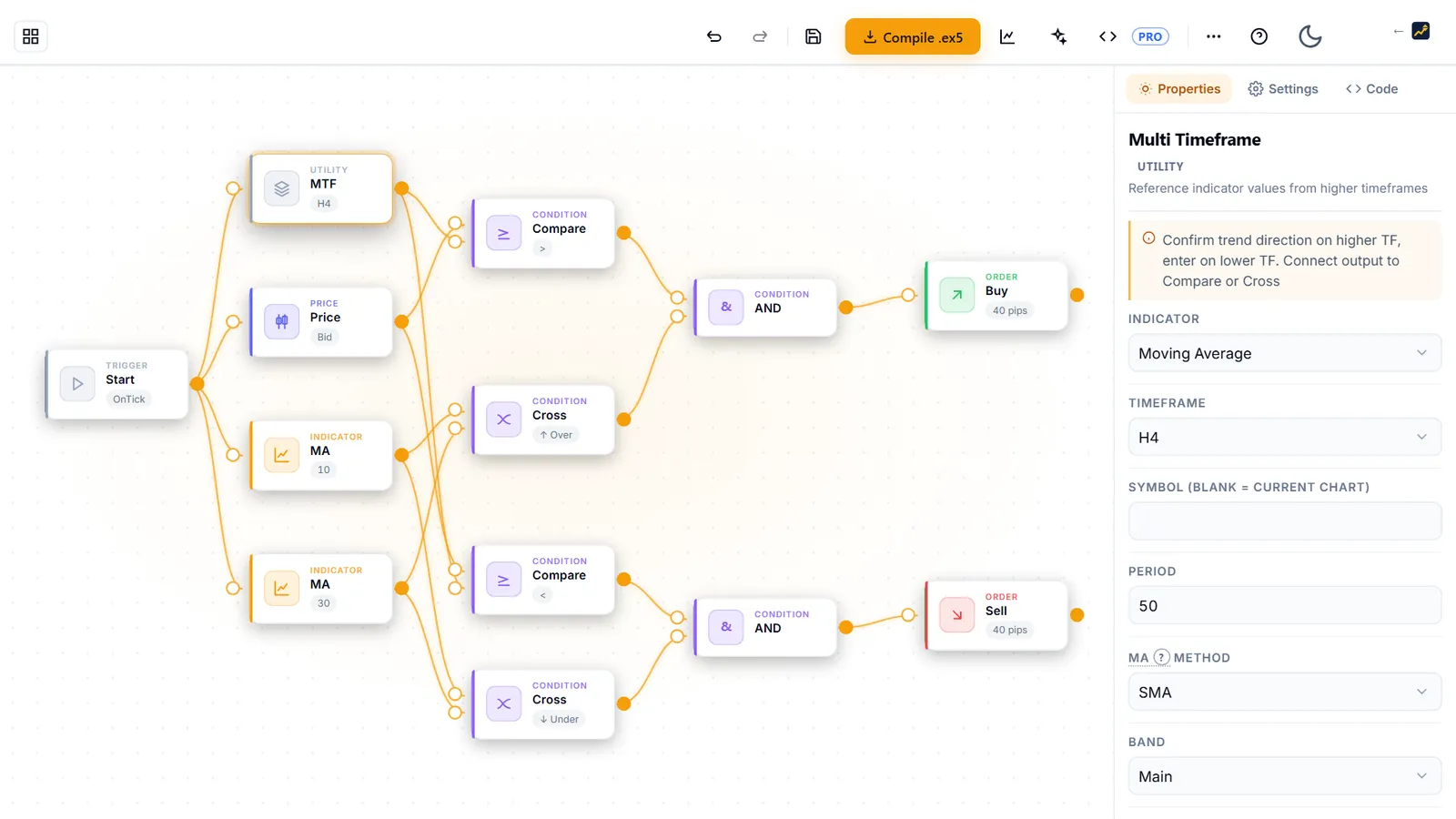
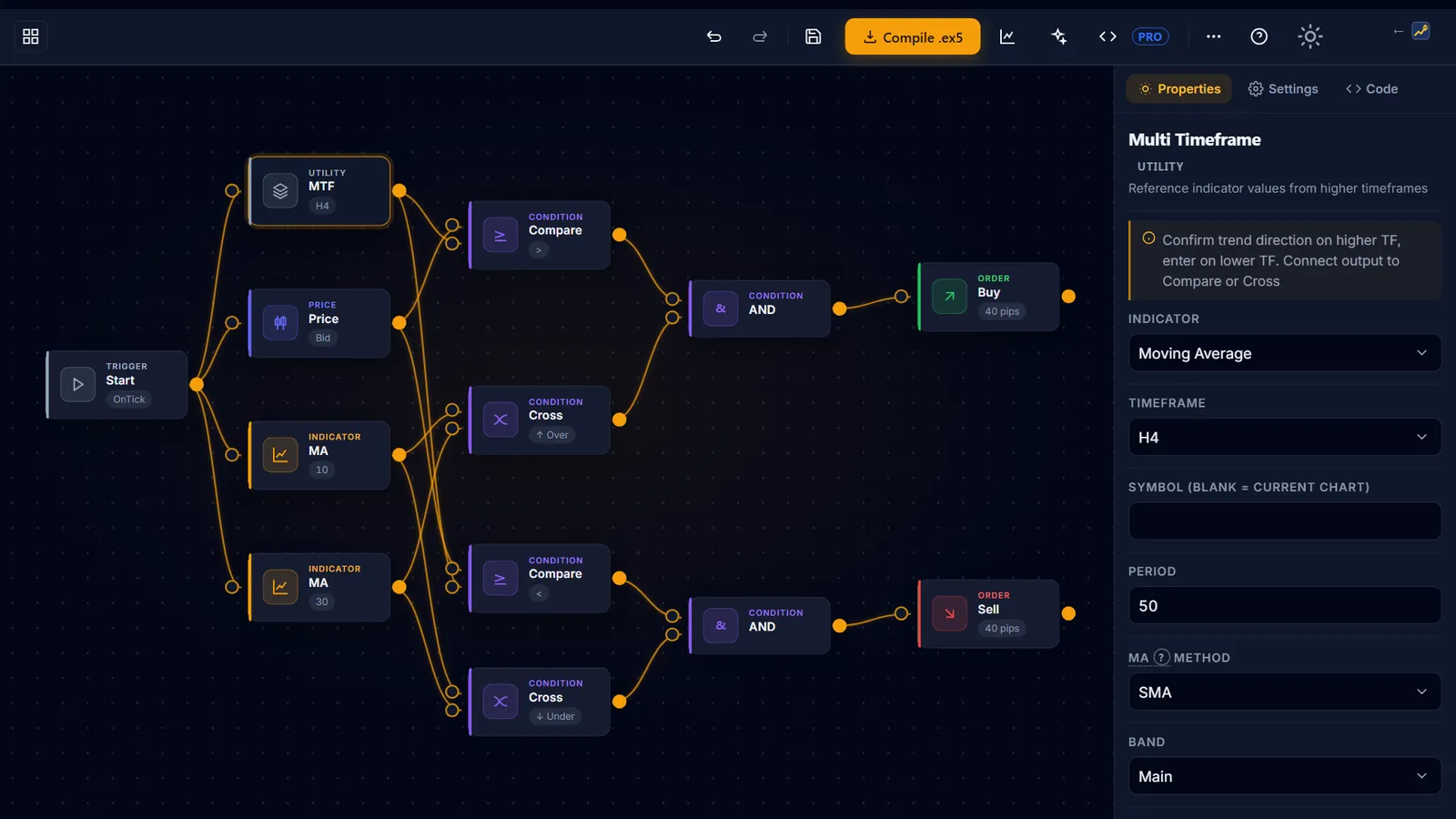
AIStrategyMiner Builder adalah alat pengembangan tanpa kode. Anda merancang logika trading di editor visual pada kanvas gratis, mengujinya dengan uji kekuatan bawaan, dan mencoba demo gratis alat Generate. Dengan Pro, Anda menjalankan generator penuh dan mengunduh EA MetaTrader 5 yang berfungsi — berkas terkompilasi, atau kode sumber MQL5 (.mq5) yang bisa diedit.
- 12
- template strategi
- 119
- blok logika dalam 8 kategori
- .ex5
- kompilasi & ekspor MQL5 di Pro
- 0
- instalasi — berjalan di browser Anda
Apa itu Builder — dan apa yang bukan
AIStrategyMiner Builder adalah alat pengembangan perangkat lunak yang menghasilkan kode sumber. Ini bukan robot trading, broker, layanan sinyal, atau saran investasi.
- Ia menghasilkan kode sumber MQL5 dari rancangan visual.
- Ia tidak mengeksekusi transaksi, menempatkan order, atau terhubung ke broker.
- Ia tidak memberikan sinyal trading, strategi untuk diikuti, atau saran investasi. Kandidat dari Generate cocok dengan data lampau dan bisa jadi hanya kecocokan kebetulan; itu titik awal untuk diuji, bukan rekomendasi.
- Anda yang mengompilasi dan memutuskan apa yang dilakukan dengan kode sumber yang Anda buat.
Cara kerjanya
Dari ide ke EA yang teruji dalam tiga langkah
-
 1
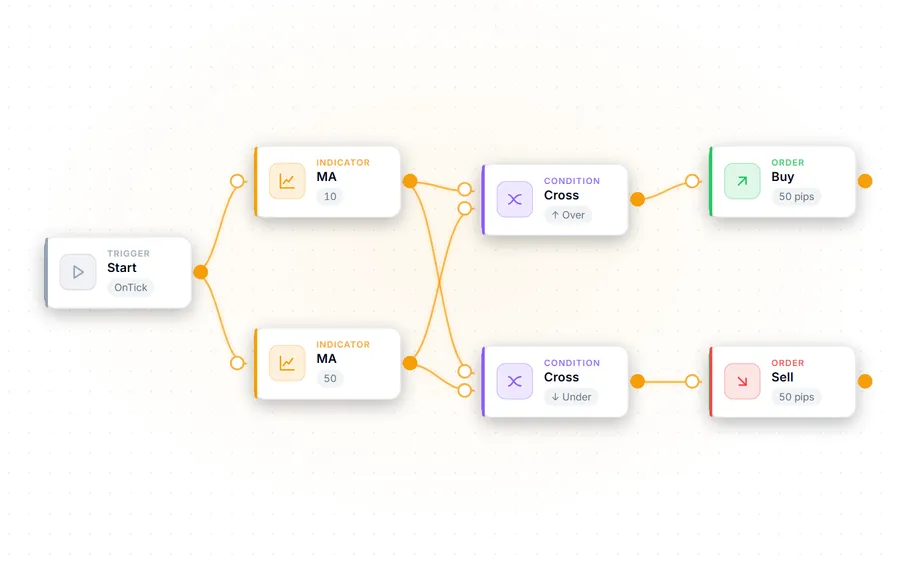
1Rancang logika Anda secara visual
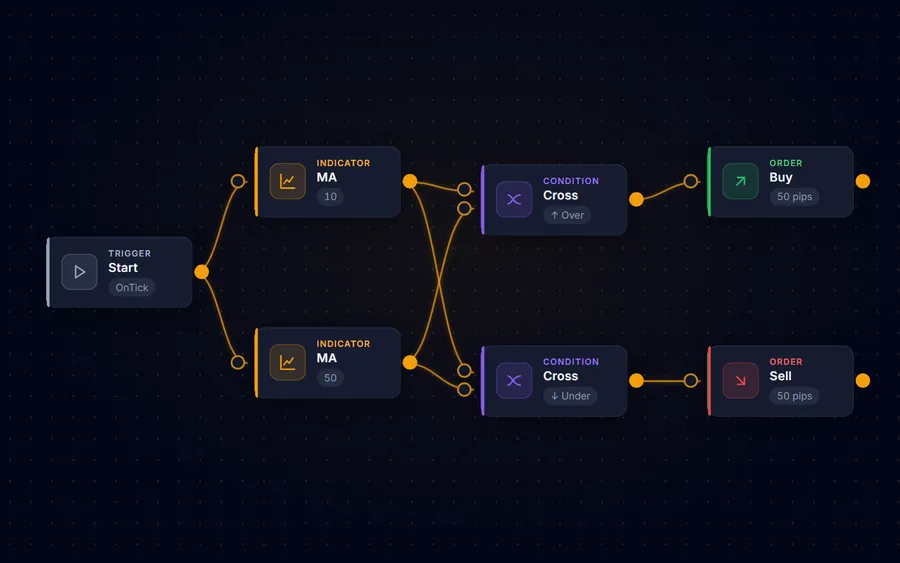
Seret dan lepas blok — indikator, kondisi masuk dan keluar, aturan risiko — ke kanvas, atau mulai dari salah satu dari 12 template strategi. Belum tahu harus mulai dari mana? Generate mencari kombinasi blok dan parameter di browser Anda (tidak ada yang dikirim ke server); buka kandidat mana pun di editor dan ubah sesuai keinginan. Tidak ada sintaks MQL5 yang perlu dihafal.
-
 2
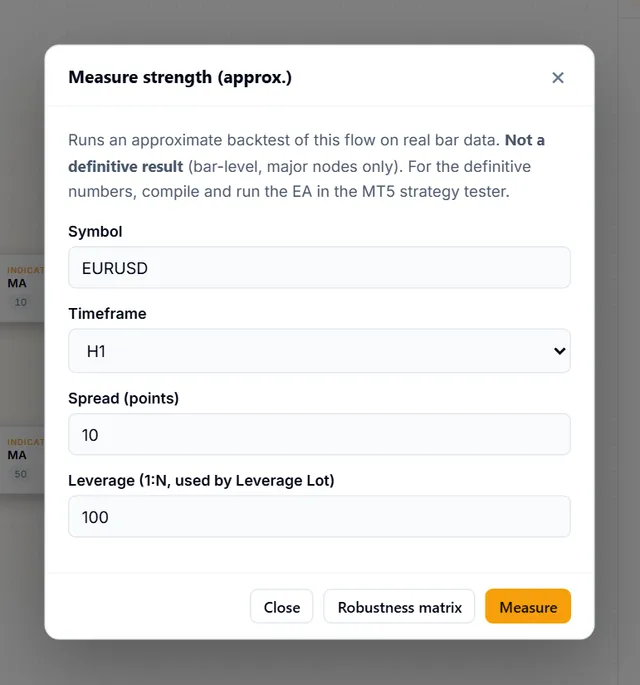
2Uji sebelum Anda mempercayainya
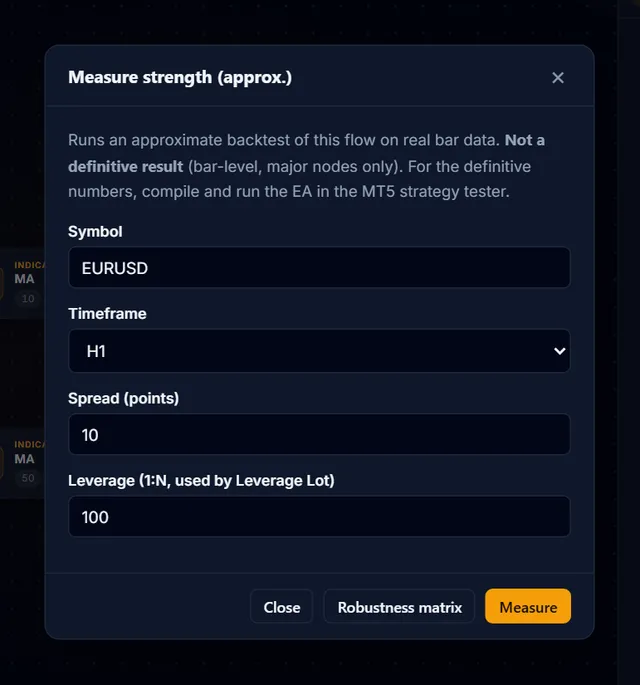
Jalankan uji kekuatan bawaan pada data historis dan matriks ketangguhan di seluruh pasangan mata uang utama — langsung di browser, sebelum apa pun menyentuh terminal Anda.
-
 3
3Kompilasi dan bawa ke mana pun
Kompilasi menjadi .ex5 siap pakai untuk MetaTrader 5, atau unduh kode sumber MQL5 (.mq5) yang bisa diedit — keduanya dengan Pro. Anda yang memutuskan apa yang dilakukan dengan hasilnya — Builder tidak pernah menjalankannya untuk Anda.
Fitur
Lingkungan pengembangan, bukan kotak hitam
Editor blok visual
Bangun aturan masuk/keluar, kondisi indikator, dan logika manajemen modal tanpa menulis kode. 119 blok di 8 kategori.
12 template strategi
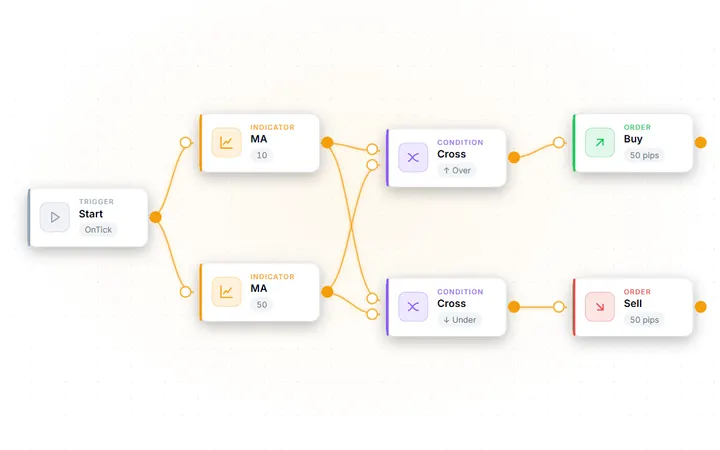
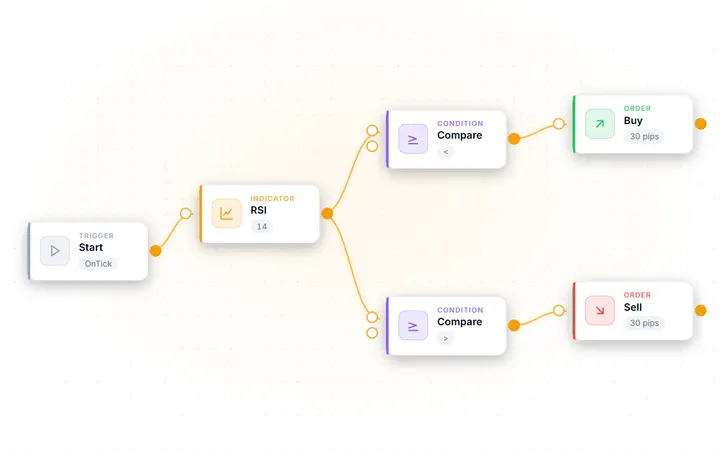
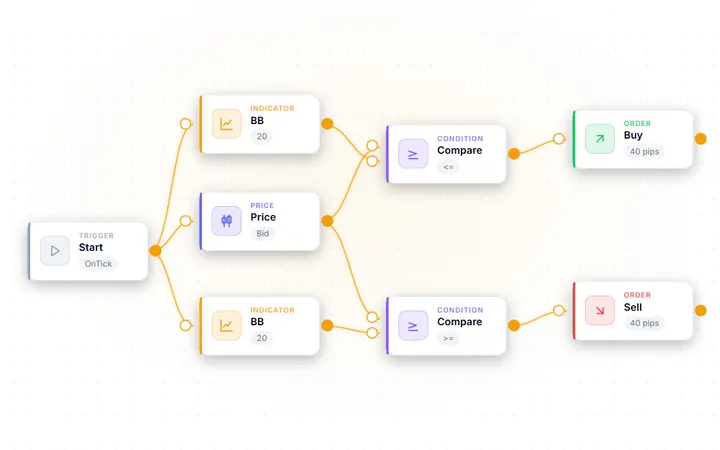
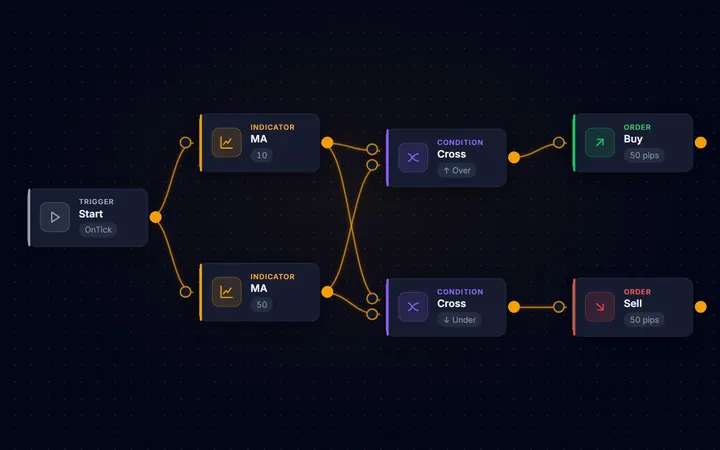
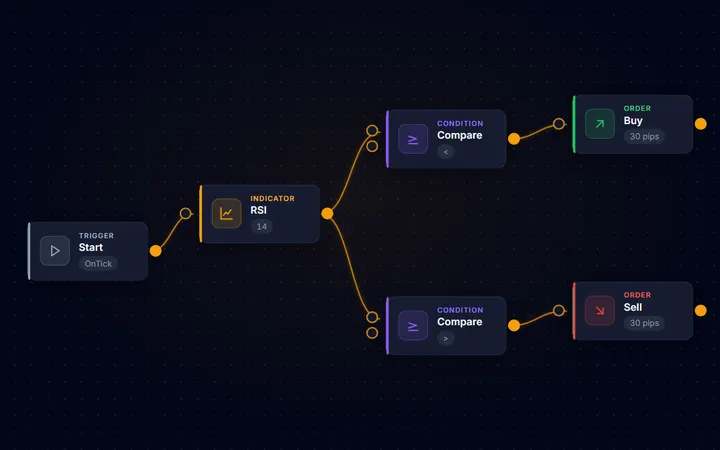
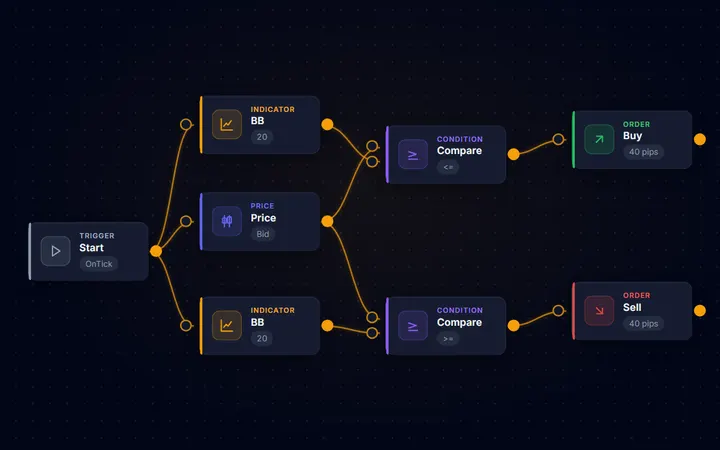
Mulai dari persilangan moving average, pembalikan RSI, breakout Bollinger Bands, dan lainnya, lalu sesuaikan bloknya dengan ide Anda sendiri.
Uji kekuatan bawaan
Backtest rancangan Anda pada data historis dan evaluasi ketangguhannya di seluruh pasangan mata uang utama — di browser, sebelum Anda mengekspor apa pun.
Blok manajemen risiko
Logika stop loss, take profit, break-even, dan trailing yang dinyatakan sebagai komponen yang bisa dipakai ulang, dengan peringatan konfigurasi berbahaya sebelum ekspor.
Proyek tersimpan di akun Anda
Masuk untuk menyimpan rancangan Anda sebagai proyek, membukanya kembali di perangkat mana pun, dan melanjutkan dari titik terakhir. Rancangan anonim tetap tersimpan di browser Anda.
Keluaran kode sumber yang mudah dibaca
Pro menghasilkan MQL5 yang terstruktur dan berkomentar, yang bisa Anda periksa, ubah, dan kelola versinya. Rancangan dan hasil Anda adalah milik Anda sepenuhnya.
Bahan untuk membangun
Semua blok di Builder, dalam satu daftar.
- Moving AverageMoving Average (SMA/EMA/SMMA/LWMA)Tren
- RSIRelative Strength IndexOsilator
- Bollinger BandsBollinger Bands (Upper/Main/Lower)Volatilitas
- MACDMACD (Main/Signal)Osilator
- ATRAverage True RangeVolatilitas
- IchimokuIchimoku Kinko Hyo (Tenkan/Kijun/Senkou A/B/Chikou)Tren
- Donchian ChannelHighest high / lowest low of the last N bars - for breakout and swing-level conditionsVolatilitas
- Opening Range BreakoutFreezes the high/low of the first N bars from a given time as a range, then reports a break of it as +1 (up) / -1 (down) / 0 (none)Level harga
- Heiken AshiHeiken Ashi candle close/open - detect trend by candle color flipTren
- ADXADX — Trend Strength (Main/+DI/-DI)Tren
- CCICommodity Channel IndexOsilator
- Parabolic SARParabolic SAR — Trend-following stopTren
- StochasticStochastic Oscillator (%K/%D)Osilator
- Williams %RWilliams %R — Overbought/oversold oscillator (-100~0)Osilator
- MomentumMomentum — Rate of price changeOsilator
- OBVOn Balance Volume — Cumulative volume indicatorVolume
- DeMarkerDeMarker — Trend exhaustion detection (0~1)Osilator
- AlligatorBill Williams Alligator — Jaw/Teeth/Lips 3 linesTren
- Bears PowerBears Power — Selling pressure strengthOsilator
- Bulls PowerBulls Power — Buying pressure strengthOsilator
- Force IndexForce Index — Price change x VolumeVolume
- EnvelopeMA Envelope — Upper/Lower bands around moving averageVolatilitas
- RVIRelative Vigor Index — Trend strength (Main/Signal)Osilator
- DEMADouble Exponential MA — a moving average with reduced lagTren
- TEMATriple Exponential MA — even less lag than DEMATren
- Adaptive MAKaufman Adaptive MA — smoothing adapts to volatilityTren
- FrAMAFractal Adaptive MA — smoothing driven by fractal dimensionTren
- VIDyAVariable Index Dynamic Average — a CMO-driven adaptive MATren
- Std DeviationStandard Deviation — how far price spreads from its averageVolatilitas
- Awesome OscAwesome Oscillator — momentum from the 5/34 SMA differenceOsilator
- Accelerator OscAccelerator Oscillator — the acceleration of AOOsilator
- SupertrendSupertrend — trend direction from an ATR-width trailing bandTren
- VLDMIVariable-period RSI — stretches the RSI period by the ATR ratio and fades sharp drops or spikesOsilator
- Persistence RatioDirection-agreement ratio — how often the last N bars moved the same way as the bar before themTren
- Hull MAHull MA — recombines two LWMAs so the line keeps up with price instead of trailing itTren
- QQEQQE — trails a one-way band around a smoothed RSI and reports which side it brokeOsilator
- VWAPVWAP — volume-weighted average price accumulated from an anchor (the day boundary by default). The bands are multiples of the weighted standard deviation.Volume
- ADX WilderADX Wilder — trend strength using Wilder’s original smoothing (Main / +DI / −DI)Tren
- Keltner ChannelKeltner Channel — a moving average with bands at a multiple of ATR (Upper / Main / Lower)Volatilitas
- ROCRate of Change — the percentage change from N bars agoOsilator
- Ultimate OscillatorUltimate Oscillator — buying pressure over three periods, blended 4:2:1Osilator
- DPODetrended Price Oscillator — strips the trend out and leaves the cycleOsilator
- OsMADifference between the MACD line and its signal (histogram)Osilator
- TRIXRate of change of a triple-smoothed EMA — momentum without the noiseOsilator
- Chaikin OscChaikin Oscillator — money flow that includes volumeVolume
- Money Flow IndexMoney Flow Index — an RSI that includes volume (0-100)Volume
- VolumesTick volume — how active the bar wasVolume
- Accum/DistribA/D line — cumulative buying and selling pressureVolume
- BW Market FacilBill Williams Market Facilitation Index — range per unit of volumeVolume
- Gator OscGator Oscillator — the spread between the three Alligator linesOsilator
- FractalsBill Williams Fractals — the most recent confirmed swing high/lowLevel harga
- iCustomGet custom indicator valuesKustom
- CompareCompare two values (>, <, ==, !=, >=, <=)Conditions
- CrossCrossover / Crossunder detectionConditions
- MA Perfect OrderChecks whether multiple MAs are aligned in period order (perfect order). Composable with other conditions via AND/ORConditions
- Consecutive BarsChecks whether the last N closed bars moved in the same direction (up/down). Composable with other conditions via AND/ORConditions
- RSI DivergenceDetects regular divergence between RSI and price. Connect an RSI node (shift=1)Conditions
- AND GatePass only when all conditions are trueConditions
- OR GatePass when any condition is trueConditions
- NOT GateInvert condition (NOT)Conditions
- Signal LatchFires once, then stays silent until the reset condition occursConditions
- Math OperationsArithmetic on two inputsConditions
- Open BuyOpen a buy positionActions
- Open SellOpen a sell positionActions
- Close PositionClose position(s)Actions
- Time ExitClose by holding time / bars / time-of-day / FridayActions
- Profit Pips CloseClose the whole basket when aggregate floating pips reach the target (with time-decay)Actions
- Basket Money CloseClose the basket when its floating P/L in account currency reaches a thresholdActions
- Virtual/Hidden SL/TPClose at market on internal SL/TP levels (never sent to the broker)Actions
- Basket Average TPPlaces the weighted-average open +/- N pips as a hard TP on every position (disconnect-proof grid/nanpin take-profit)Actions
- Buy LimitBuy limit pending orderActions
- Sell LimitSell limit pending orderActions
- Buy StopBuy stop pending orderActions
- OCO BracketOCO straddle: places a Buy Stop above and a Sell Stop below; when one leg fills, the other is auto-cancelledActions
- Sell StopSell stop pending orderActions
- AlertAlert notificationActions
- Partial ClosePartial position closeActions
- Time FilterTrading time restrictionFilters
- Spread FilterMaximum spread filterFilters
- Position FilterMaximum position count limitFilters
- Session (auto DST)Gate by market session with automatic daylight-saving adjustmentFilters
- Holiday FilterHalt new orders on holidays and year-endFilters
- High-Low Range FilterSkip entry when the N-bar high-low range is out of range (filters volatile/quiet markets)Filters
- Range Size FilterBlocks entry unless the last closed bar's body is at least N times the recent average body (expansion-bar gate)Filters
- Days of Month FilterTrade only on the listed calendar days (comma-separated 1-31), e.g. 24,25,26,27,28,29 for the month-end weekFilters
- Candle Pattern FilterSkip entries unless the last closed bar is a pin bar / engulfing (price-action rejection reversal)Filters
- MA Distance FilterBlocks entry when the price-to-MA distance (pips) is out of range (pullback / over-extension filter)Filters
- Cooldown FilterWait N seconds/minutes after last entryFilters
- Daily Trade LimitStop opening new trades once the daily count is reachedFilters
- Gotobi FilterTrade only on Gotobi days (5th,10th,15th,20th,25th,month-end). Ideal for Nakane trade.Filters
- Weekday FilterAllow trading on specific weekdays onlyFilters
- Drawdown FilterStop trading when max drawdown exceededFilters
- Volatility FilterStop trading when volatility outside ATR rangeFilters
- Market Regime FilterCombines an ADX trend/range read with an ATR expansion/compression read, and trades only in the market regimes you allowFilters
- Equity TargetStop trading when profit target reachedFilters
- Session FilterTrading session filter with a selectable time basis (server time or UTC). Use Session (auto DST) for windows that follow daylight saving.Filters
- News FilterPause trading N minutes before/after news eventsFilters
- New Bar FilterPass only on new bar formationFilters
- Fixed LotFixed lot sizeMoney Mgmt
- Risk-Based LotCalculate lot from balance × risk %Money Mgmt
- Margin-Leverage LotAllocates a fixed % of balance as margin and sizes the lot at current leverageMoney Mgmt
- Martingale LotDouble lot on loss (Martingale)Money Mgmt
- PyramidingPyramiding — Add positions in profit directionMoney Mgmt
- Averaging DownAveraging Down — Add positions against loss to improve avg priceMoney Mgmt
- Reversal EntryReversal Entry — Enter opposite direction after closingMoney Mgmt
- Trailing StopTrailing stop lossExit Strategy
- Break EvenMove SL to entry when in profitExit Strategy
- Basket Break EvenMove every basket position SL to the weighted-average break-even once total floating profit hits the triggerExit Strategy
- Take ProfitTake profit level (Fixed pips / ATR multiple)Exit Strategy
- Stop LossStop loss level (Fixed pips / ATR multiple)Exit Strategy
- Close AllClose All — Close all positions when condition metExit Strategy
- Account GuardClose this EA's positions when the account's floating loss exceeds N% of balance, then pause new entriesExit Strategy
- Current PriceAsk/Bid/SpreadPrice / Info
- OHLCCandlestick Open/High/Low/ClosePrice / Info
- Time InfoTime information (Hour/Minute/DayOfWeek)Price / Info
- Account InfoAccount info (Balance/Equity/Profit)Price / Info
- ConstantOutput a fixed valuePrice / Info
- StartOnTick — Entry point executed every tickUtility
- Multi TimeframeReference indicator values from higher timeframesUtility
Tidak ada blok yang cocok. Indikator MT5 lain bisa dibaca dengan blok iCustom.
Nama dan deskripsi ditampilkan persis seperti di Builder.
Sejauh mana tiap bagian
- Timeframe apa pun, simbol lain
- Setiap blok indikator bisa membaca timeframe mana pun dari M1 hingga MN1, dan sebagian besar bisa membaca simbol selain chart.
- Indikator Anda sendiri
- Blok iCustom membaca nilai indikator kustom MT5 apa pun yang sudah Anda pakai.
- Empat cara menentukan lot
- Lot tetap, % saldo sebagai risiko, % saldo sebagai margin, atau martingale dengan batas level dan penghenti drawdown.
- Kapan aturan diperiksa
- Sekali per bar yang ditutup, setiap tick, atau saat harga menyentuh level. Satu desain juga bisa berjalan di beberapa simbol sekaligus.
- Exit secara rinci
- Trailing stop berdasarkan pips, ATR, moving average, swing high/low, Parabolic SAR, dan lainnya — plus break-even, exit keranjang, dan pelindung kerugian akun.
- Uji dan kompilasi di server kami
- Ukur desain dengan uji kekuatan bawaan dan cek ketahanan di empat pasangan utama, lalu kompilasi ke .ex5 — tanpa MetaEditor.
Templat
Mulai dari desain yang sudah berfungsi
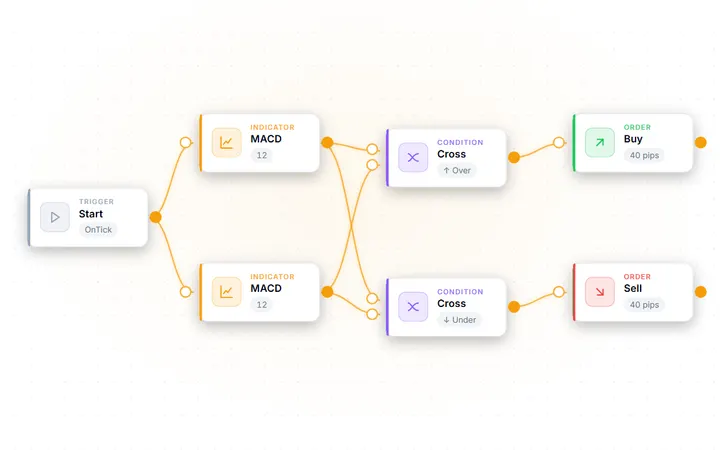
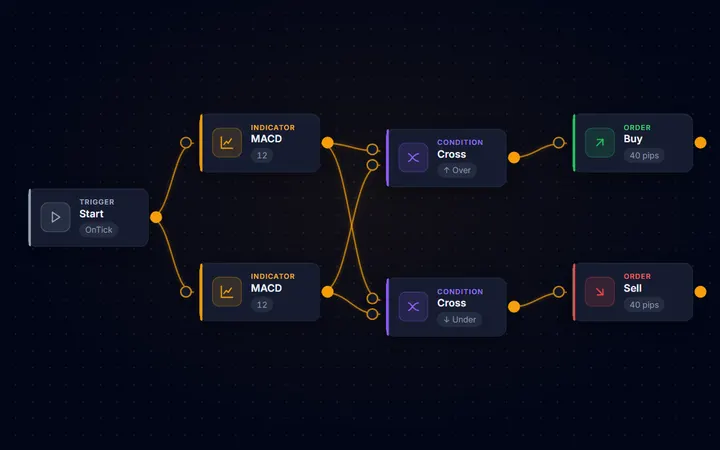
Setiap templat terbuka sebagai diagram blok yang lengkap — muat satu, jalankan uji kekuatan, lalu ubah bagian yang Anda mau. Sebagian dari 12 templat ditampilkan di sini.
-
-
-
-
-
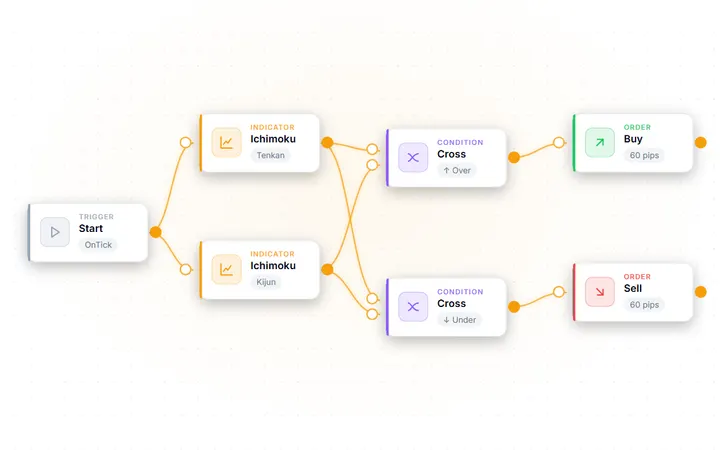
-
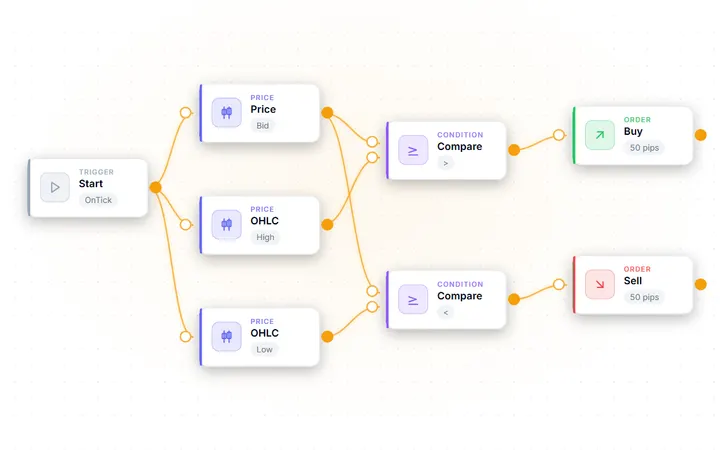
-
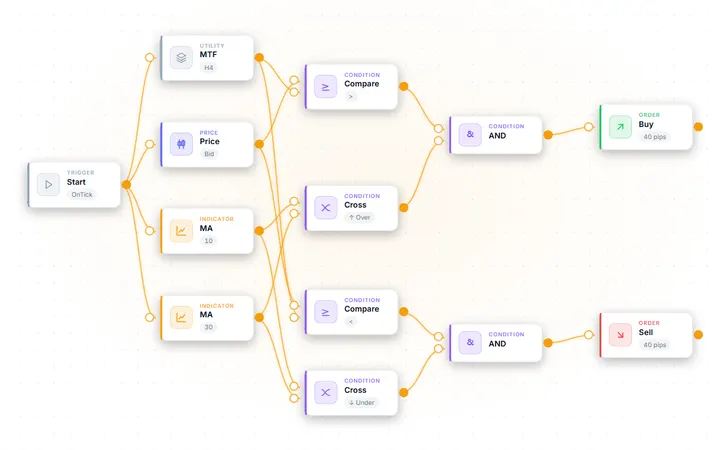
-
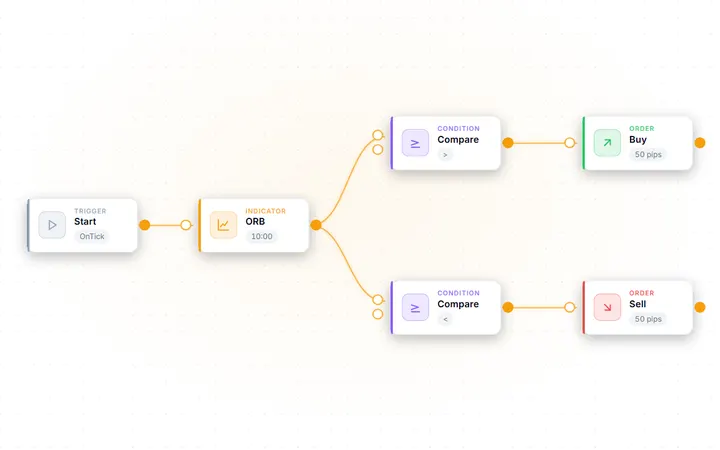
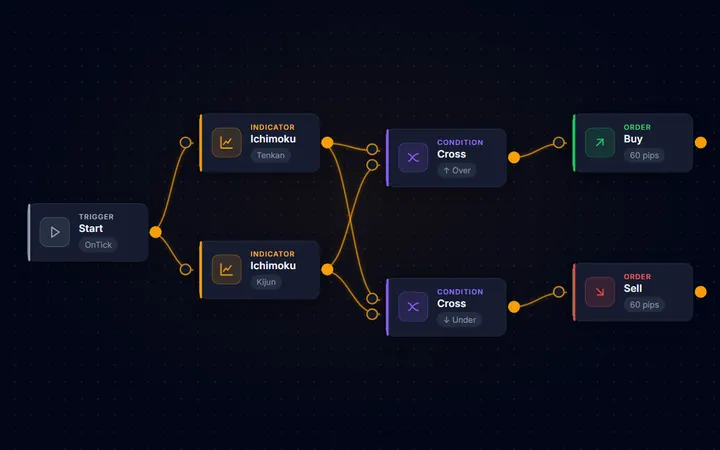
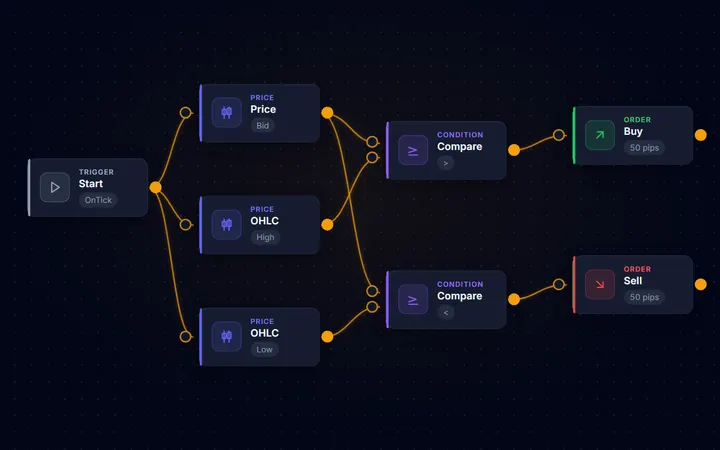
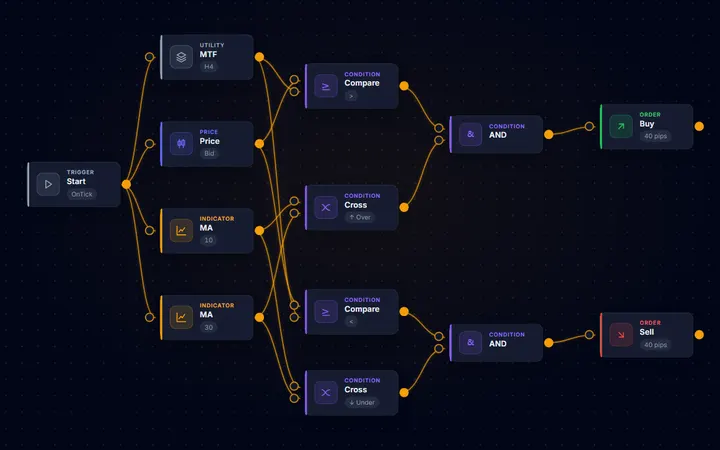
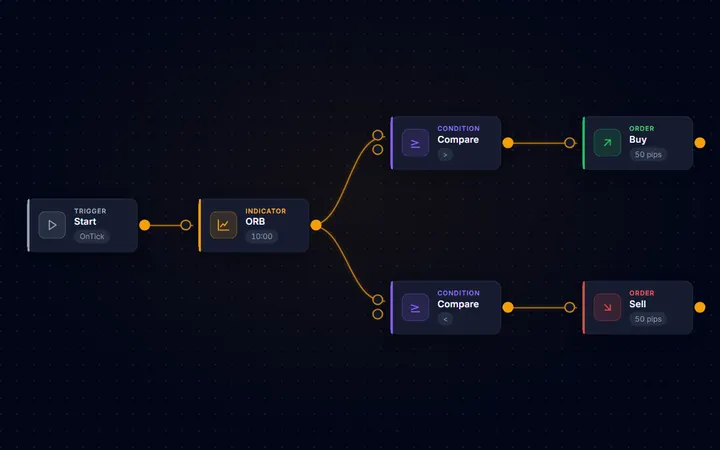
Paket
Bangun di kanvas secara gratis; pakai Pro untuk kompilasi dan ekspor
| Tanpa Pro | Pro | |
|---|---|---|
| Editor visual + semua 119 blok | ✓ | ✓ |
| Semua 12 template strategi | ✓ | ✓ |
| Uji kekuatan + matriks ketangguhan | ✓ | ✓ |
| Generator strategi | Demo (hanya jumlah dan lolos/gagal) | ✓ |
| Unduhan .ex5 terkompilasi | — | ✓ |
| Kode sumber MQL5 (.mq5) yang bisa diedit | — | ✓ |
| Kode sumber lengkap yang dihasilkan di tab Code | Pratinjau input | ✓ |
| Dukungan email prioritas | — | ✓ |
Merancang di kanvas terbuka untuk semua orang; uji kekuatan memerlukan akun yang sudah masuk. Demo generator hanya menampilkan jumlah dan lolos/gagalnya tiap tahap. Pro adalah lisensi sekali bayar $399 yang menambahkan generator penuh, .ex5 terkompilasi, dan kode sumber MQL5 yang bisa diedit. Lihat semua harga →
Untuk siapa
Dibuat untuk orang yang ingin membangun, bukan berjudi
Builder ditujukan untuk developer yang membuat prototipe logika MQL5 dengan cepat, trader yang ingin mengubah sebuah ide menjadi kode sumber yang bisa diedit tanpa mulai dari berkas kosong, dan pemula yang ingin melihat bagaimana logika strategi diterjemahkan menjadi MQL5 yang rapi. Anda tetap memegang kendali penuh atas hasilnya dan tetap bertanggung jawab atas pengujian, kompilasi, dan setiap penggunaan kode yang Anda hasilkan.
Datang dari generator strategi? Builder punya alat Generate sendiri, dan yang membedakannya adalah Anda bisa mengedit setiap kandidat dan mengompilasinya sendiri. Baca perbandingan jujur kami dengan EA Studio — kami memberi tahu dengan jelas mana yang cocok untuk trader yang mana.
FAQ
Pertanyaan yang sering diajukan
Bisakah saya mencoba AIStrategyMiner Builder secara gratis?
Ya. Merancang di kanvas — menyusun blok dan membuka templat — terbuka untuk semua orang, akun gratis membuka uji kekuatan bawaan, dan alat Generate punya demo gratis yang menampilkan jumlah kandidat serta lolos/gagalnya tiap tahap. Generator penuh, kompilasi ke .ex5, serta kode sumber dan ekspor MQL5 ada di Pro — lisensi sekali bayar $399.
Apakah saya perlu menginstal sesuatu?
Tidak. Builder berjalan sepenuhnya di browser Anda — rancang, uji, dan kompilasi tanpa menginstal perangkat lunak apa pun. Anda hanya butuh MetaTrader 5 untuk menjalankan berkas .ex5 yang Anda unduh.
Apakah Builder melakukan trading untuk saya?
Tidak. Builder adalah alat pengembangan perangkat lunak: ia menghasilkan Expert Advisor dari rancangan Anda. Ia tidak pernah mengeksekusi transaksi, menempatkan order, terhubung ke broker, atau memberikan sinyal trading. Anda yang mengompilasi, menguji, dan memutuskan apa yang dilakukan dengan kode yang Anda buat.
Bisakah saya menguji EA saya sebelum memakainya?
Bisa — dua kali. Di dalam Builder (butuh akun gratis), uji kekuatan mem-backtest rancangan Anda pada data historis dan matriks ketangguhan mengevaluasinya di seluruh pasangan mata uang utama. Setelah mengunduh EA-nya, Anda juga sebaiknya melakukan forward test di MetaTrader 5 Strategy Tester dengan data broker Anda sendiri sebelum mempertaruhkan uang sungguhan.
Apakah saya memiliki kode yang saya hasilkan?
Ya. Rancangan Anda dan hasil yang dihasilkan adalah milik Anda untuk diunduh dan disimpan. Pemegang lisensi Pro mendapatkan kode sumber MQL5 yang bisa diedit dan berkomentar, yang bisa Anda ubah, kembangkan, dan kelola versinya seperti kode lainnya.
Mulai membangun
Bangun di kanvas secara gratis — tanpa instalasi, tanpa kartu. Pro menambahkan generator, kompilasi, dan kode sumber MQL5.
Peringatan Risiko: Trading CFD dan instrumen derivatif melibatkan risiko signifikan dan tidak cocok untuk semua investor. Kode sumber yang Anda hasilkan dengan Builder disediakan hanya sebagai alat pengembangan; Anda sepenuhnya bertanggung jawab untuk mengujinya dan atas setiap keputusan trading. Hasil backtest dan matriks ketangguhan menggambarkan data masa lalu dan bukan indikator yang andal untuk hasil di masa depan. Layanan ini tidak ditujukan bagi penduduk Amerika Serikat atau Yurisdiksi Terbatas lainnya.