No-code EA builder
Design a trading robot for MT5 and more — without writing code by hand.
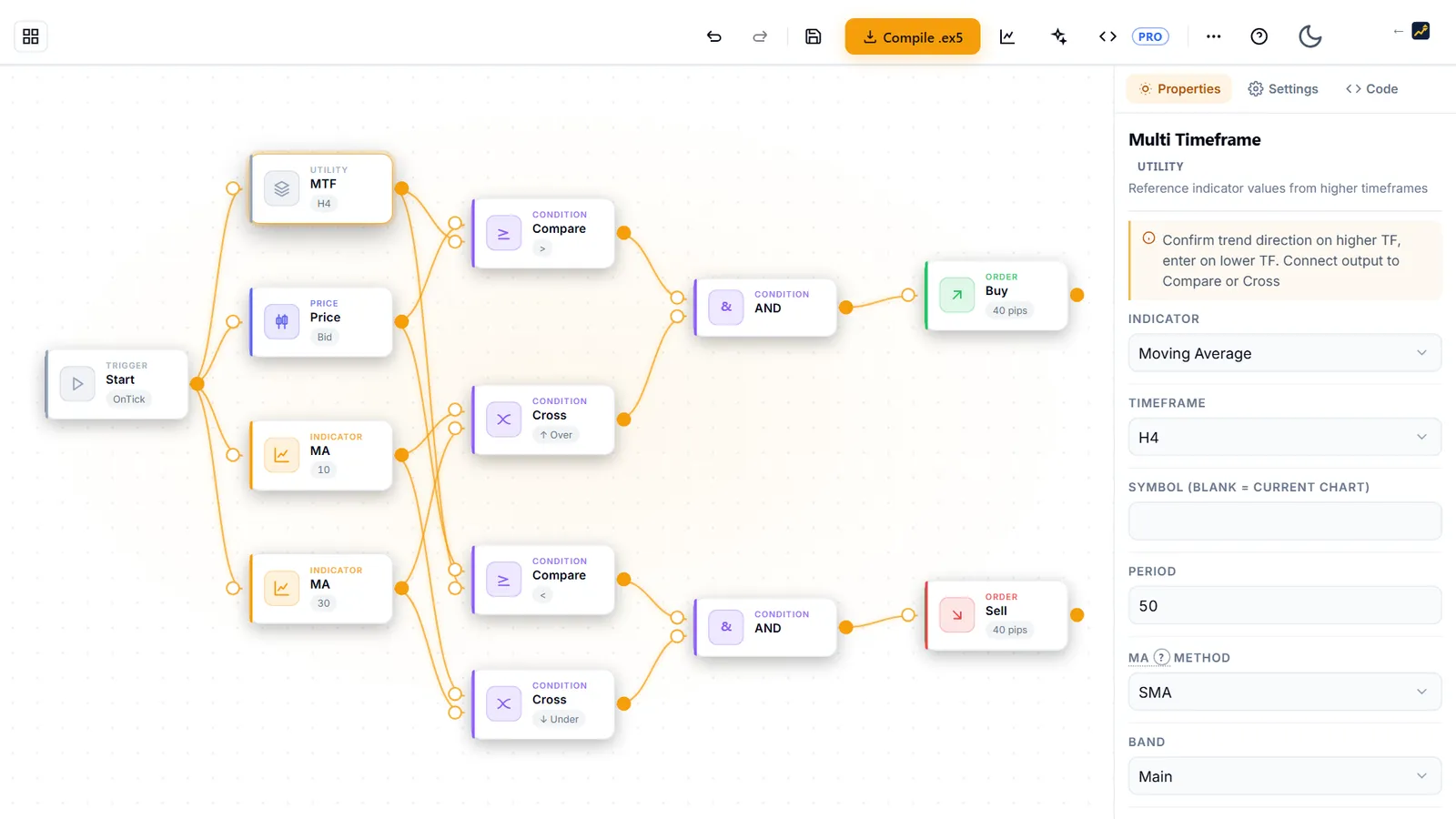
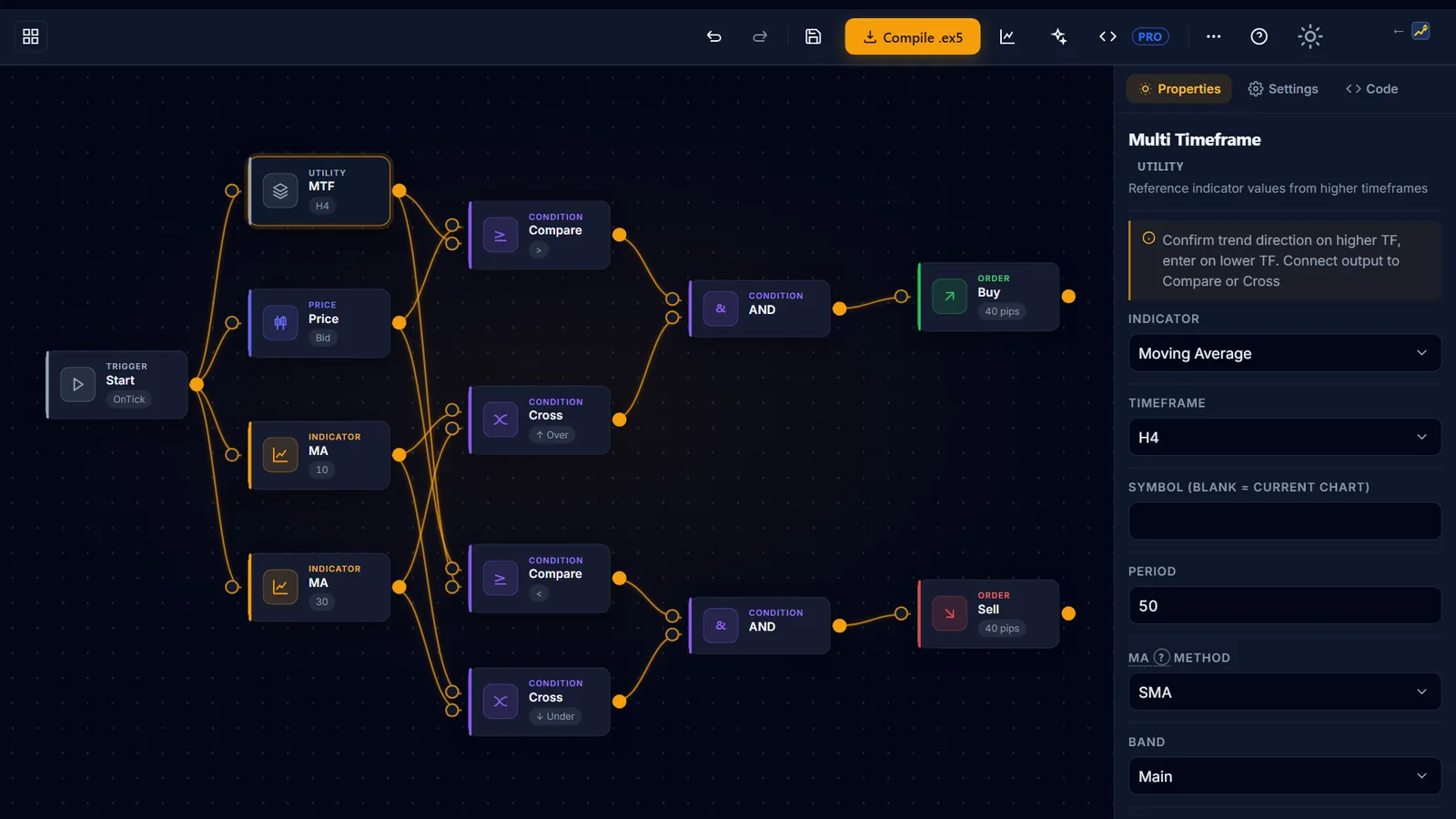
AIStrategyMiner Strategy Builder is a no-code development tool. You design trading logic in a visual editor on a free canvas, test it with the built-in strength test, and run the Generate tool's free trial search. With Pro you choose every generator setting, see the conditions of each candidate and download a working MetaTrader 5 EA as editable MQL5 (.mq5) source code, which you compile yourself in MetaEditor.
- 12
- strategy templates
- 129
- logic blocks in 8 categories
- .mq5
- MQL5 source & export on Pro
- 0
- installs — runs in your browser
What the Strategy Builder is — and is not
AIStrategyMiner Strategy Builder is a software development tool that outputs source code. It is not a trading robot, a brokerage, a signal service, or financial advice.
- It does generate MQL5 source code from a visual design.
- It does not execute trades, place orders, or connect to a broker.
- It does not provide trading signals, strategies to follow, or investment advice. Candidates from Generate fit past data and may be chance fits; they are starting points to test, not recommendations.
- You compile and decide what to do with the source code you create.
How it works
From idea to a tested EA in three steps
-
 1
Design your logic visually
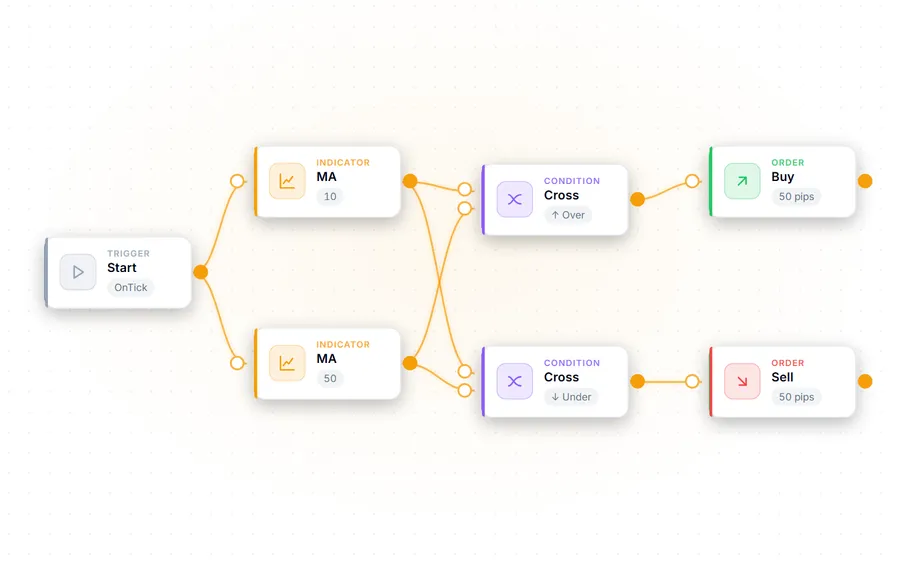
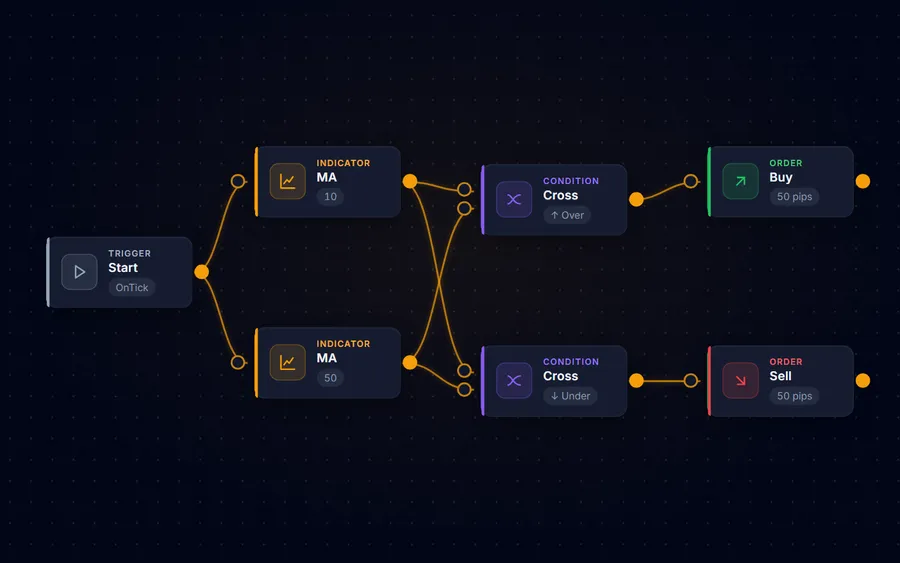
Drag and drop blocks — indicators, entry and exit conditions, risk rules — onto a canvas, or start from one of 12 strategy templates. Not sure where to start? Generate searches block combinations and parameters in your browser (the calculation runs on your PC; with Pro, the results you keep are saved to your vault); open any candidate in the editor and change it. No MQL5 syntax to memorise.
-
 2
Test it before you trust it
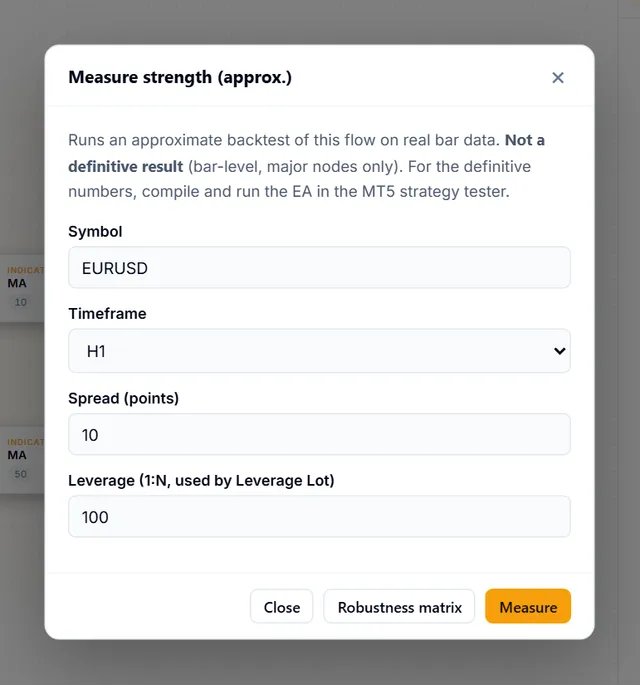
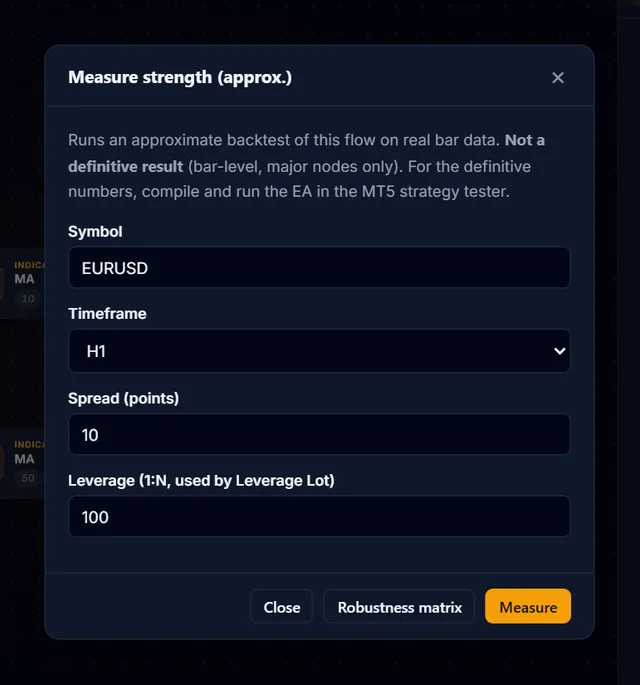
Run the built-in strength test on historical data and the robustness matrix across major pairs — directly in the browser, before anything touches your terminal.
-
 3
Download it and compile it yourself
Download the editable MQL5 (.mq5) source with Pro, open it in MetaEditor (press F4 in MetaTrader 5) and press F7 to compile it into an .ex5. You decide what to do with what you build — the Strategy Builder never runs it for you.
Features
A development environment, not a black box
Visual block editor
Build entry/exit rules, indicator conditions, and money-management logic without writing code. 129 blocks across 8 categories.
12 strategy templates
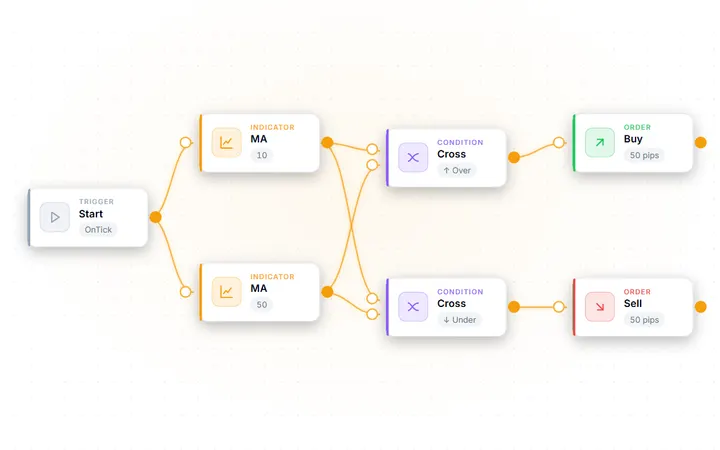
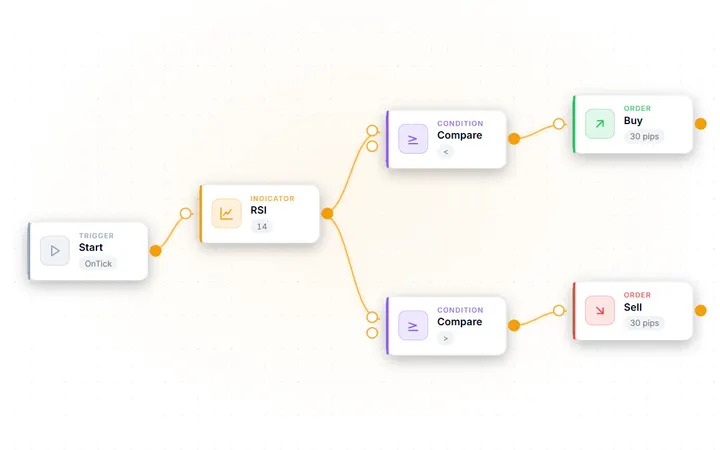
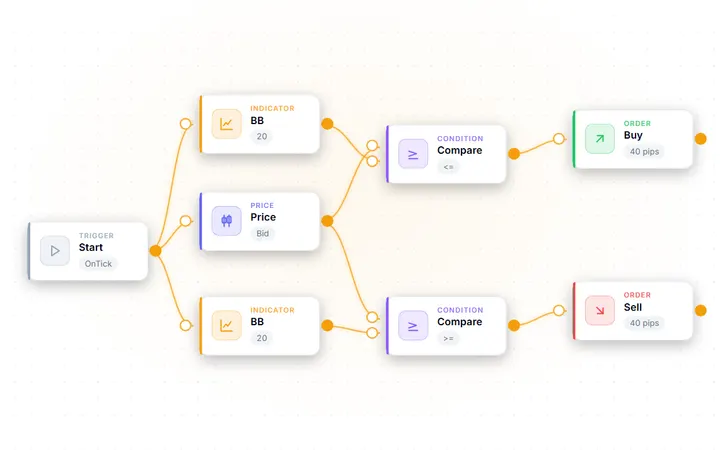
Start from moving-average crossovers, RSI reversion, Bollinger breakouts and more, then adapt the blocks to your own idea.
Built-in strength test
Backtest your design on historical data and evaluate robustness across major pairs — in the browser, before you export anything.
Risk-management blocks
Stop-loss, take-profit, break-even and trailing logic expressed as reusable components, with dangerous-configuration warnings before export.
Projects saved to your account
Sign in to keep your designs as projects, reopen them on any device, and pick up where you left off. Anonymous designs stay in your browser.
Readable source output
Pro generates structured, commented MQL5 you can inspect, modify, and version-control. Your designs and your output are yours to keep.
What you can build with
Every block in the Strategy Builder, in one list.
- Moving AverageMoving Average (SMA/EMA/SMMA/LWMA)Trend
- RSIRelative Strength IndexOscillator
- Bollinger BandsBollinger Bands (Upper/Main/Lower)Volatility
- MACDMACD (Main/Signal)Oscillator
- ATRAverage True RangeVolatility
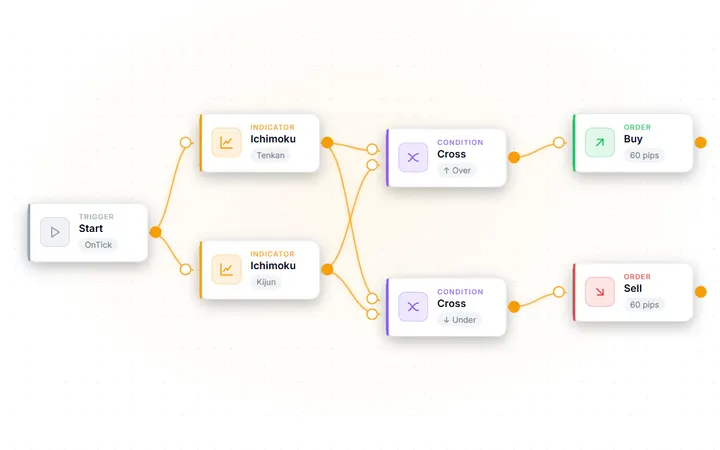
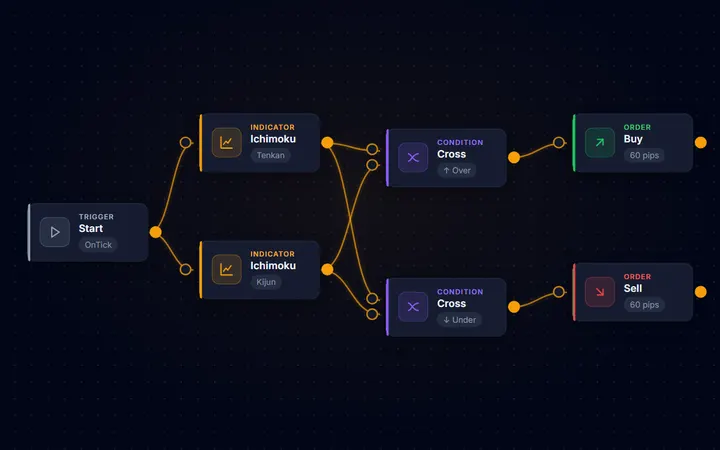
- IchimokuIchimoku Kinko Hyo (Tenkan/Kijun/Senkou A/B/Chikou)Trend
- Donchian ChannelHighest high / lowest low of the last N bars - for breakout and swing-level conditionsVolatility
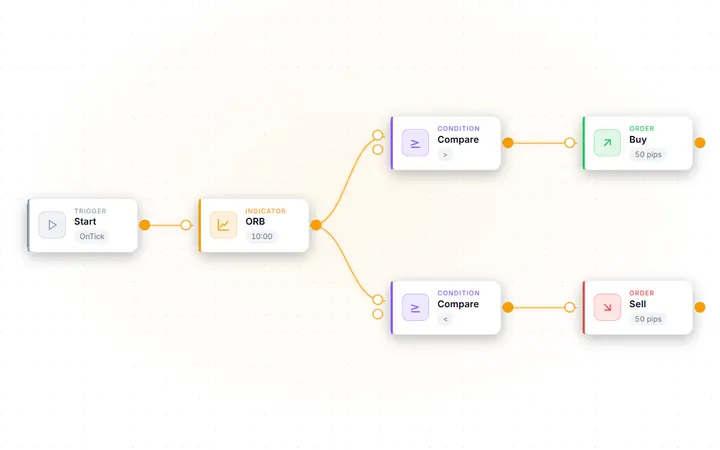
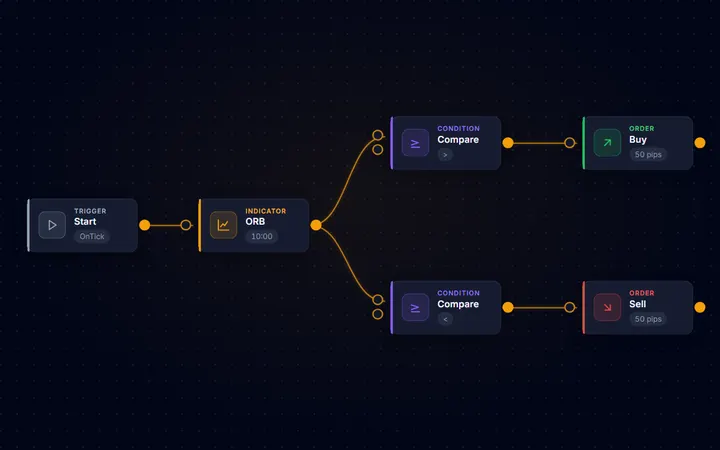
- Opening Range BreakoutFreezes the high/low of the first N bars from a given time as a range, then reports a break of it as +1 (up) / -1 (down) / 0 (none)Price levels
- Heiken AshiHeiken Ashi candle close/open - detect trend by candle color flipTrend
- ADXADX — Trend Strength (Main/+DI/-DI)Trend
- CCICommodity Channel IndexOscillator
- Parabolic SARParabolic SAR — Trend-following stopTrend
- StochasticStochastic Oscillator (%K/%D)Oscillator
- Williams %RWilliams %R — Overbought/oversold oscillator (-100~0)Oscillator
- MomentumMomentum — Rate of price changeOscillator
- OBVOn Balance Volume — Cumulative volume indicatorVolume
- DeMarkerDeMarker — Trend exhaustion detection (0~1)Oscillator
- AlligatorBill Williams Alligator — Jaw/Teeth/Lips 3 linesTrend
- Bears PowerBears Power — Selling pressure strengthOscillator
- Bulls PowerBulls Power — Buying pressure strengthOscillator
- Force IndexForce Index — Price change x VolumeVolume
- EnvelopeMA Envelope — Upper/Lower bands around moving averageVolatility
- RVIRelative Vigor Index — Trend strength (Main/Signal)Oscillator
- DEMADouble Exponential MA — a moving average with reduced lagTrend
- TEMATriple Exponential MA — even less lag than DEMATrend
- Adaptive MAKaufman Adaptive MA — smoothing adapts to volatilityTrend
- FrAMAFractal Adaptive MA — smoothing driven by fractal dimensionTrend
- VIDyAVariable Index Dynamic Average — a CMO-driven adaptive MATrend
- Std DeviationStandard Deviation — how far price spreads from its averageVolatility
- Awesome OscAwesome Oscillator — momentum from the 5/34 SMA differenceOscillator
- Accelerator OscAccelerator Oscillator — the acceleration of AOOscillator
- SupertrendSupertrend — trend direction from an ATR-width trailing bandTrend
- VLDMIVariable-period RSI — stretches the RSI period by the ATR ratio and fades sharp drops or spikesOscillator
- Persistence RatioDirection-agreement ratio — how often the last N bars moved the same way as the bar before themTrend
- Hull MAHull MA — recombines two LWMAs so the line keeps up with price instead of trailing itTrend
- QQEQQE — trails a one-way band around a smoothed RSI and reports which side it brokeOscillator
- VWAPVWAP — volume-weighted average price accumulated from an anchor (the day boundary by default). The bands are multiples of the weighted standard deviation.Volume
- ADX WilderADX Wilder — trend strength using Wilder’s original smoothing (Main / +DI / −DI)Trend
- Keltner ChannelKeltner Channel — a moving average with bands at a multiple of ATR (Upper / Main / Lower)Volatility
- ROCRate of Change — the percentage change from N bars agoOscillator
- Linear RegressionLinear Regression — the value, or the slope, of a straight line fitted to the last N pricesTrend
- Pivot PointsPivot Points - a base line and the resistance and support lines around it, from the last finished day's (or week's, month's) high, low and closePrice levels
- KST (Know Sure Thing)KST - four rates of change, each averaged, added with weights 1, 2, 3 and 4. The signal line can be chosen tooOscillator
- CorrelationCorrelation - how closely this symbol's closes move with another symbol's (-1 to +1)Oscillator
- Ultimate OscillatorUltimate Oscillator — buying pressure over three periods, blended 4:2:1Oscillator
- DPODetrended Price Oscillator — strips the trend out and leaves the cycleOscillator
- OsMADifference between the MACD line and its signal (histogram)Oscillator
- TRIXRate of change of a triple-smoothed EMA — momentum without the noiseOscillator
- Chaikin OscChaikin Oscillator — money flow that includes volumeVolume
- Money Flow IndexMoney Flow Index — an RSI that includes volume (0-100)Volume
- VolumesTick volume — how active the bar wasVolume
- Accum/DistribA/D line — cumulative buying and selling pressureVolume
- BW Market FacilBill Williams Market Facilitation Index — range per unit of volumeVolume
- Gator OscGator Oscillator — the spread between the three Alligator linesOscillator
- FractalsBill Williams Fractals — the most recent confirmed swing high/lowPrice levels
- Swing High / LowSwing High / Low - the price of the latest swing peak or troughPrice levels
- iCustomGet custom indicator valuesCustom
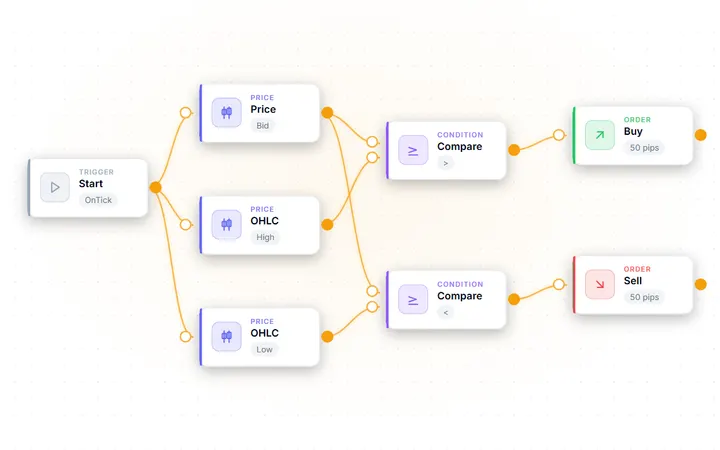
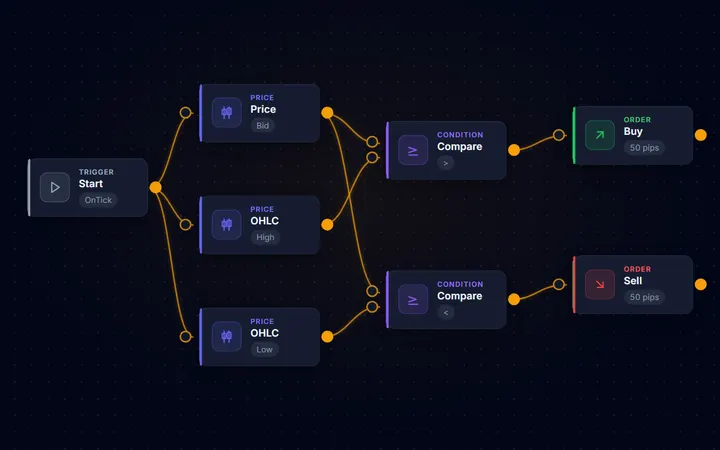
- CompareCompare two values (>, <, ==, !=, >=, <=)Conditions
- CrossCrossover / Crossunder detectionConditions
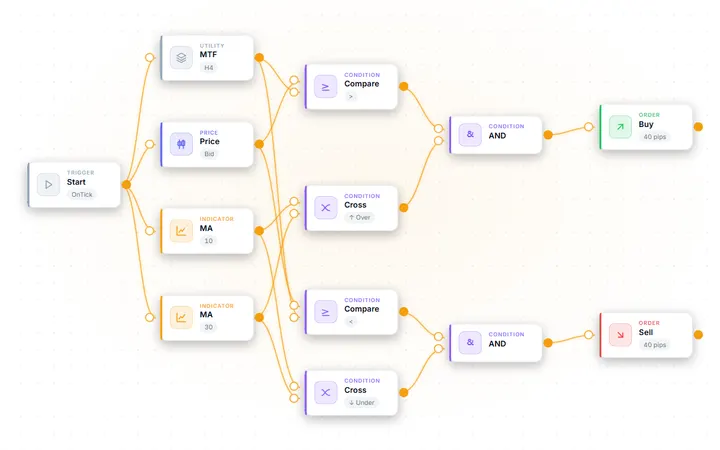
- MA Perfect OrderChecks whether multiple MAs are aligned in period order (perfect order). Composable with other conditions via AND/ORConditions
- Consecutive BarsChecks whether the last N closed bars moved in the same direction (up/down). Composable with other conditions via AND/ORConditions
- RSI DivergenceDetects regular divergence between RSI and price. Connect an RSI node (shift=1)Conditions
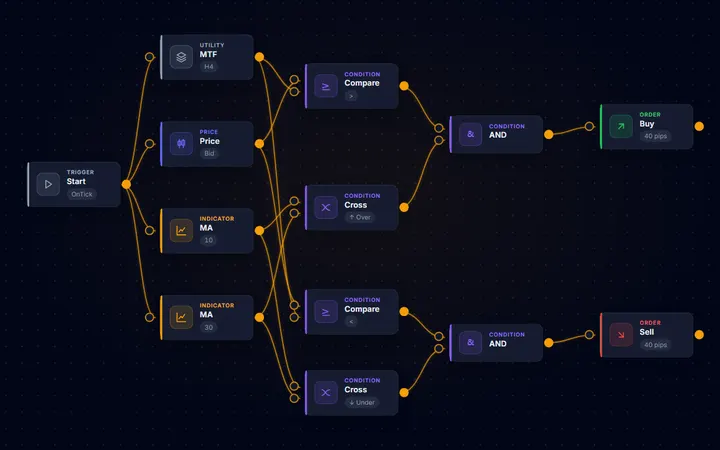
- AND GatePass only when all conditions are trueConditions
- OR GatePass when any condition is trueConditions
- Chart Pattern SignalChart pattern - true only on the bar that closes through the neckline of a double top/bottom, head and shoulders, or triangleConditions
- NOT GateInvert condition (NOT)Conditions
- Signal LatchFires once, then stays silent until the reset condition occursConditions
- Level LatchRemembers a value (e.g. the day high) at a set time and is true once, on the first tick that breaks itConditions
- Math OperationsArithmetic on two inputsConditions
- Open BuyOpen a buy positionActions
- Open SellOpen a sell positionActions
- Close PositionClose position(s)Actions
- Time ExitClose by holding time / bars / time-of-day / FridayActions
- Profit Pips CloseClose the whole basket when aggregate floating pips reach the target (with time-decay)Actions
- Basket Money CloseClose the basket when its floating P/L in account currency reaches a thresholdActions
- Virtual/Hidden SL/TPClose at market on internal SL/TP levels (never sent to the broker)Actions
- Basket Average TPPlaces the weighted-average open +/- N pips as a hard TP on every position (disconnect-proof grid/nanpin take-profit)Actions
- Buy LimitBuy limit pending orderActions
- Sell LimitSell limit pending orderActions
- Buy StopBuy stop pending orderActions
- OCO BracketOCO straddle: places a Buy Stop above and a Sell Stop below; when one leg fills, the other is auto-cancelledActions
- Sell StopSell stop pending orderActions
- AlertAlert notificationActions
- Partial ClosePartial position closeActions
- Pending Orders ManagerDeletes pending orders by weekday/hour or age, and remembers their prices to re-place them laterActions
- Time FilterTrading time restrictionFilters
- Spread FilterMaximum spread filterFilters
- Position FilterMaximum position count limitFilters
- Session (auto DST)Gate by market session with automatic daylight-saving adjustmentFilters
- Holiday FilterHalt new orders on holidays and year-endFilters
- High-Low Range FilterSkip entry when the N-bar high-low range is out of range (filters volatile/quiet markets)Filters
- Range Size FilterBlocks entry unless the last closed bar's body is at least N times the recent average body (expansion-bar gate)Filters
- Days of Month FilterTrade only on the listed calendar days (comma-separated 1-31), e.g. 24,25,26,27,28,29 for the month-end weekFilters
- Candle Pattern FilterSkip entries unless the last closed bars form the chosen candlestick pattern (pin bar, engulfing, harami, morning star, belt hold and more, 27 in all)Filters
- MA Distance FilterBlocks entry when the price-to-MA distance (pips) is out of range (pullback / over-extension filter)Filters
- Cooldown FilterWait N seconds/minutes after last entryFilters
- Daily Trade LimitStop opening new trades once the daily count is reachedFilters
- Gotobi FilterTrade only on Gotobi days (5th,10th,15th,20th,25th,month-end). Ideal for Nakane trade.Filters
- Weekday FilterAllow trading on specific weekdays onlyFilters
- Drawdown FilterStop trading when max drawdown exceededFilters
- Period Loss LimitStops new entries for the rest of the period (day / week / month / year / since start) once the period loss reaches the limit. The limit can be an amount, and a profit cap can be set too. Protects against prop-account daily-loss rulesFilters
- Volatility FilterStop trading when volatility outside ATR rangeFilters
- Market Regime FilterCombines an ADX trend/range read with an ATR expansion/compression read, and trades only in the market regimes you allowFilters
- Equity TargetStop trading when profit target reachedFilters
- Session FilterTrading session filter with a selectable time basis (server time or UTC). Use Session (auto DST) for windows that follow daylight saving.Filters
- News FilterPause trading N minutes before/after news eventsFilters
- New Bar FilterPass only on new bar formationFilters
- Fixed LotFixed lot sizeMoney Mgmt
- Risk-Based LotCalculate lot from balance × risk %Money Mgmt
- Margin-Leverage LotAllocates a fixed % of balance as margin and sizes the lot at current leverageMoney Mgmt
- Martingale LotDouble lot on loss (Martingale)Money Mgmt
- PyramidingPyramiding — Add positions in profit directionMoney Mgmt
- Averaging DownAveraging Down — Add positions against loss to improve avg priceMoney Mgmt
- Reversal EntryReversal Entry — Enter opposite direction after closingMoney Mgmt
- Trailing StopTrailing stop lossExit Strategy
- Break EvenMove SL to entry when in profitExit Strategy
- Basket Break EvenMove every basket position SL to the weighted-average break-even once total floating profit hits the triggerExit Strategy
- Staged Trailing TableStaged trailing table - switches the stop-loss rule by profit stageExit Strategy
- Take ProfitTake profit level (Fixed pips / ATR multiple / Risk-reward ratio)Exit Strategy
- Stop LossStop loss level (Fixed pips / ATR multiple / High-low of the last N bars)Exit Strategy
- Close AllClose All — Close all positions when condition metExit Strategy
- Account GuardClose this EA's positions when the account's floating loss exceeds N% of balance, then pause new entriesExit Strategy
- Current PriceAsk/Bid/SpreadPrice / Info
- OHLCCandlestick Open/High/Low/ClosePrice / Info
- Time InfoTime information (Hour/Minute/DayOfWeek)Price / Info
- Account InfoAccount info (Balance/Equity/Profit)Price / Info
- ConstantOutput a fixed valuePrice / Info
- StartOnTick — Entry point executed every tickUtility
- Multi TimeframeReference indicator values from higher timeframesUtility
No block matches. Any other MT5 indicator can be read with the iCustom block.
Names and descriptions are shown exactly as they appear in the Strategy Builder.
How far each part goes
- Any timeframe, other symbols
- Every indicator block can read any timeframe from M1 to MN1, and most can read a different symbol from the chart.
- Your own indicators
- The iCustom block reads the values of any custom MT5 indicator you already use.
- Four ways to size a lot
- A fixed lot, a % of balance at risk, a % of balance as margin, or martingale with a level cap and a drawdown stop.
- When the rules are checked
- Once per closed bar, on every tick, or the moment price touches a level. One design can also run on several symbols at once.
- Exits in detail
- Trailing stops by pips, ATR, a moving average, swing highs and lows, Parabolic SAR and more — plus break-even, basket exits and an account-wide loss guard.
- Test, then download the source
- Measure a design with the built-in strength test and a robustness check across four major pairs, then download it as editable MQL5 source (.mq5).
Templates
Start from a working design
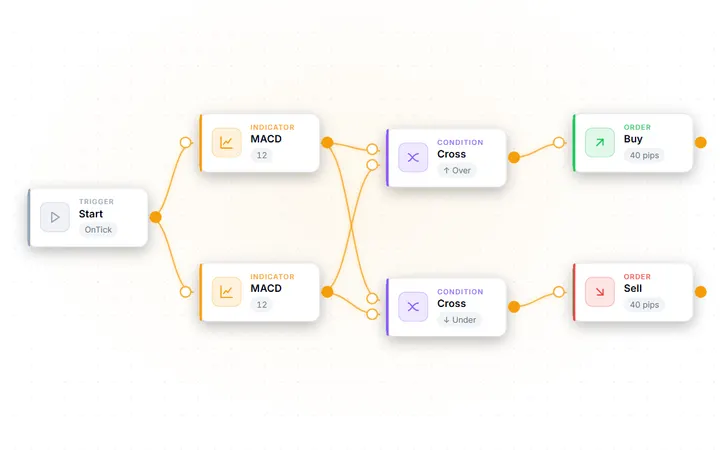
Every template opens as a complete block diagram — load one, run the strength test, then change the parts you want. A few of the 12 are shown here.
-
-
-
-
-
-
-
-
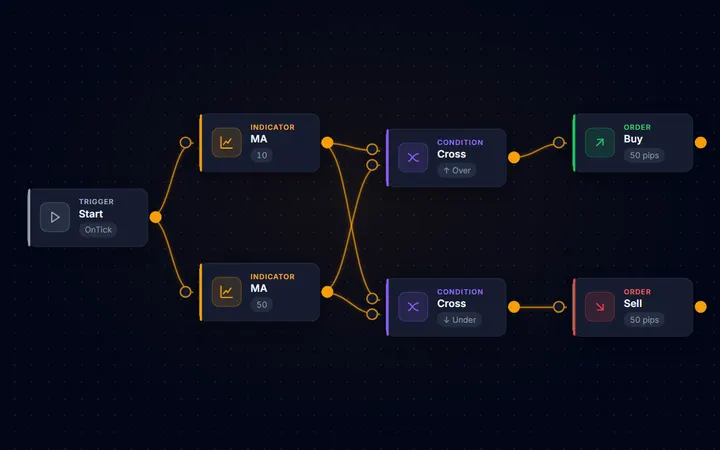
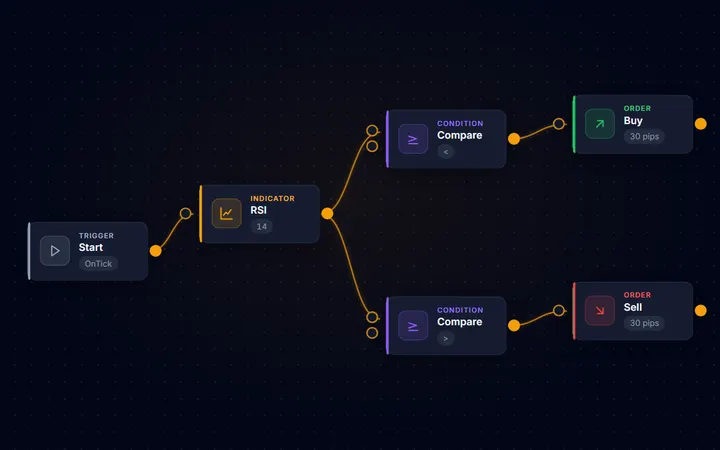
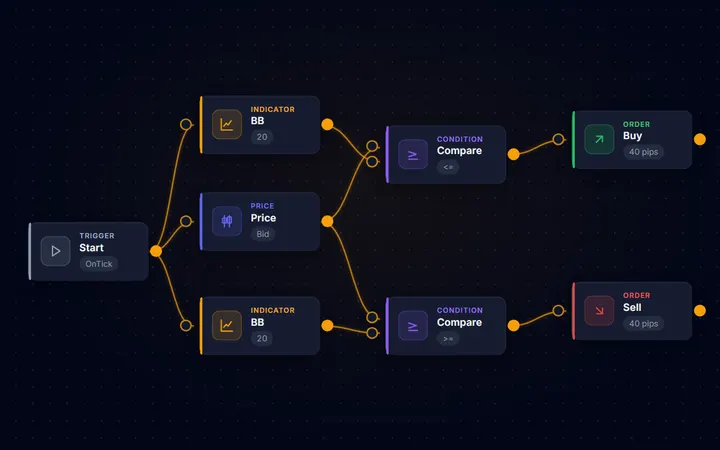
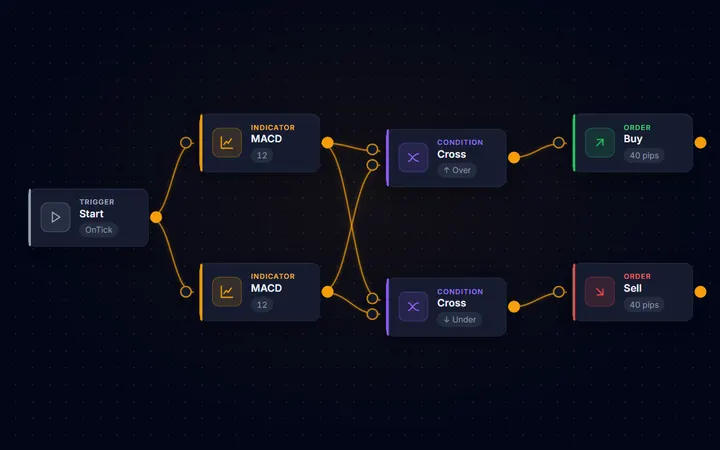
Plans
Build on the canvas for free; go Pro to download the source and export
| Without Pro | Pro | |
|---|---|---|
| Visual editor + all 129 blocks | ✓ | ✓ |
| All 12 strategy templates | ✓ | ✓ |
| Strength test + robustness matrix | ✓ | ✓ |
| Strategy generator | A real trial run at a smaller fixed size; performance numbers only, no conditions | ✓ |
| Realistic costs, advanced search settings, your own CSV data | — | ✓ |
| Vault for mined strategies (up to 10,000) | — | ✓ |
| Hand results to your AI | — | ✓ |
| Saved Builder projects | Up to 20 | Up to 500 |
| Prop-firm check | Rule check in the Builder; first section of the Prop Report tool | Also the pass-rate estimate in the Miner and the full Prop Report |
| Source export to 5 targets (MT5 (MQL5), MT4 (MQL4), TradingView (Pine), cTrader (C#), Python) | — | ✓ |
| Full generated source in the Code tab | Locked — no code is shown | ✓ |
| All 9 strategy recipes | Results visible; blocks and settings with Pro | ✓ |
Designing on the canvas is open to everyone; the strength test needs a signed-in account. In the Strategy Miner, anyone can run a trial search without signing up, at a smaller fixed size, and sees performance numbers only. Pro is a one-time $899 licence that adds every generator setting, the conditions of each candidate, the vault, the exports and the editable MQL5 source. See full pricing →
Who it's for
Made for people who want to build, not gamble
The Strategy Builder is for developers prototyping MQL5 logic quickly, traders who want to turn an idea into editable source code without starting from a blank file, and learners who want to see how strategy logic maps to clean MQL5. You keep full control of the output and remain responsible for testing, compiling, and any use of the code you generate.
FAQ
Frequently asked questions
Can I try the AIStrategyMiner Strategy Builder for free?
Yes. Designing on the canvas — building with blocks and opening templates — is open to everyone, a free account unlocks the built-in strength test, and the Strategy Miner lets anyone run a trial search without signing up, at a smaller fixed size, with performance numbers only. The full generator settings, the conditions of each candidate, the vault, the source code and the exports are Pro — a one-time $899 licence.
Do I need to install anything?
No. The Strategy Builder runs entirely in your browser — design and test without installing software. You only need MetaTrader 5, with its built-in MetaEditor, to compile the .mq5 source you download and run the result.
Does the Strategy Builder trade for me?
No. The Strategy Builder is a software development tool: it generates an Expert Advisor from your design. It never executes trades, places orders, connects to a broker, or provides trading signals. You compile, test, and decide what to do with the code you create.
Can I test my EA before using it?
Yes — twice. Inside the Strategy Builder (free account required), the strength test backtests your design on historical data and the robustness matrix evaluates it across major pairs. After you download the EA, you should also forward-test it in the MetaTrader 5 Strategy Tester on your own broker's data before risking real money.
Do I own the code I generate?
Yes. Your designs and the generated output are yours to download and keep. Pro licence holders get the editable, commented MQL5 source, which you can modify, extend, and version-control like any other code.
Start building
Build on the canvas for free — no installation, no card required. Pro adds the generator and the MQL5 source.
Risk Warning: Trading CFDs and derivative instruments involves significant risk and is not suitable for all investors. Source code you generate with the Strategy Builder is provided as a development tool only; you are solely responsible for testing it and for any trading decisions. Backtest and robustness results describe past data and are not a reliable indicator of future results. The Service is not directed at residents of the United States or other Restricted Jurisdictions.